- [Case Studies](https://www.mergado.com/category/case-studies)
- [eCommerce tips](https://www.mergado.com/category/ecommerce-tips)
- [Online Store Solutions and Platforms](https://www.mergado.com/category/online-store-solutions-and-platforms)
- [Mergado Pack](https://www.mergado.com/category/mergado-pack)
- [Mergado tips](https://www.mergado.com/category/mergado-tips)
- [Mergado News](https://www.mergado.com/category/mergado-news)
- [eCommerce News](https://www.mergado.com/category/ecommerce-news)
- [How to use Mergado](https://www.mergado.com/category/how-to-use-mergado)
- [Interviews with e‑commerce gurus](https://www.mergado.com/category/interviews-e-commerce-gurus)
- [Extensions](https://www.mergado.com/category/apps-bidding-image-marketing-and-more)
- [Expansion with Mergado](https://www.mergado.com/category/expansion-with-mergado)
- [Mergado Lifestyle](https://www.mergado.com/category/mergado-lifestyle)
1. [ Home ](https://www.mergado.com/)
2. [ Mergado Blog ](https://www.mergado.com/blog)
3. [ Extensions ](https://www.mergado.com/category/apps-bidding-image-marketing-and-more)
4. **Merging XML feeds is easy with the new Blending Bull app**
# **Merging XML feeds is easy with the new Blending Bull app**
[  Lukáš Horák ](https://www.mergado.com/blog/lukas-horak) [Extensions](https://www.mergado.com/category/apps-bidding-image-marketing-and-more)
24. 3. 2021
3 minutes read

Do you import data from multiple vendors, but your shop system can **import it from only one feed**? Do you need to **process data** in Mergado before importing it into the shop system? Combining input XML feeds into one output used to be challenging. But that’s no longer the case — the [Blending Bull](https://store.mergado.com/detail/blendingbull/#about) app will speed up your work.
function tableOfContents() {
return {
headings_menu: [],
heading_active: '', // Added to track the active section
shouldBeSticky: false,
generateToC() {
const headings = document.querySelectorAll('.js-article-full-headings h2, .js-article-full-headings h3');
let headingMap = {};
headings.forEach((heading) => { // Use an arrow function to maintain `this` context
// Normalize heading text to remove diacritics, then replace non-alphanumeric characters with dashes
var normalizedText = heading.textContent.normalize("NFD").replace(/[\u0300-\u036f]/g, ""); // Remove diacritics
var id = heading.id ? heading.id : normalizedText.trim().toLowerCase()
.split(' ').join('-').replace(/[^a-z0-9\-]/ig, ''); // Updated regex to replace non-alphanumeric characters
headingMap[id] = headingMap[id] !== undefined ? ++headingMap[id] : 0;
// Use the updated `id` with diacritics removed for the heading id and the TOC
const finalId = headingMap[id] ? `${id}-${headingMap[id]}` : id;
this.headings_menu.push({
id: finalId,
title: heading.textContent,
level: heading.tagName.toLowerCase(), // Track heading level
active: false, // Initially set active to false
});
heading.id = finalId;
});
},
checkStickyNeeded() {
const ul = this.$el.querySelector('ul');
if (ul) {
this.shouldBeSticky = ul.scrollHeight < window.innerHeight;
}
},
setActiveHeading() {
// disabled not working with active state on click
// add @scroll.window="setActiveHeading()" to the parent div
// const headings = document.querySelectorAll('.js-article-full-headings h2');
// let activeHeading = '';
// let closestHeadingDistance = Infinity;
// headings.forEach((heading) => {
// const rect = heading.getBoundingClientRect();
// const offset = rect.top - window.innerHeight / 2; // Consider heading in the middle of the screen as active
// if (offset < 0 && Math.abs(offset) < closestHeadingDistance) {
// activeHeading = heading.id;
// closestHeadingDistance = Math.abs(offset);
// }
// });
// // Update the active state in headings_menu
// if (activeHeading !== this.heading_active) {
// this.headings_menu = this.headings_menu.map(item => ({
// ...item,
// active: item.id === activeHeading,
// }));
// this.heading_active = activeHeading;
// }
},
setActiveItem(clickedId) {
this.headings_menu.forEach(item => {
item.active = (item.id === clickedId);
});
this.heading_active = clickedId; // Optionally update the heading_active property if used
},
};
}
1. —
Do you import data from multiple vendors, but your shop system can **import it from only one feed**? Do you need to **process data** in Mergado before importing it into the shop system? Combining input XML feeds into one output used to be challenging. But that’s no longer the case — the [Blending Bull](https://store.mergado.com/detail/blendingbull/#about) app will speed up your work.
## Blending Bull merges data feeds into one
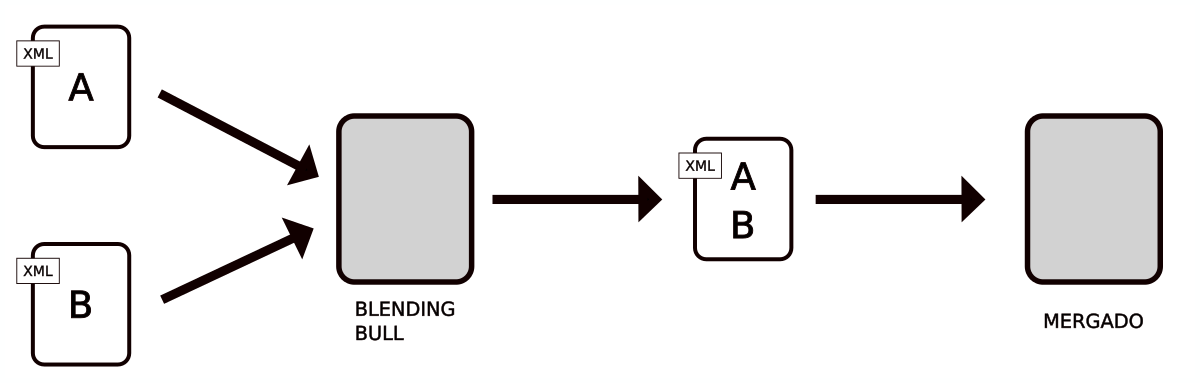
Blending Bull can download **multiple input** XML data feeds and merge them **into a single output** XML. It downloads files automatically and regularly. It creates one output file from them, which can be **further processed**. Its setup is simple. In the administration, you can process everything yourself without the need to cooperate with the administrator.
[  ](https://www.mergado.com/sites/default/files/perm/paragraph-image/schema-bull.png)
In [Mergado](https://www.mergado.com/get-started), you can effectively use Blending Bull **in combination with other apps** from the Mergado Store:
- [Pricing Fox](http://store.mergado.com/detail/pricingfox/#about)
- [Feed Image Editor](http://store.mergado.com/detail/feedimageeditor/#about)
[](http://store.mergado.com/detail/blendingbull/#about)
### How the Blending Bull app works
- The application is linked to the online store and works at the file level. It **does not import products** into the database. The user enters which part of the XML file to “delete” at the beginning and end and inserts the remaining data into the output XML feed.
- It **automatically downloads** input XML feeds. If the inputs change, it regenerates the output XML feed. If the input data does not change, it leaves the output XML feed as it is.
- It **optimizes access to servers** with input feeds. For example, if one wholesaler provides an XML feed to ten retailers and they use Blending Bull, the application downloads the input XML feed only once and then provides it for processing to all of them.
**How to work with Blending Bull:**
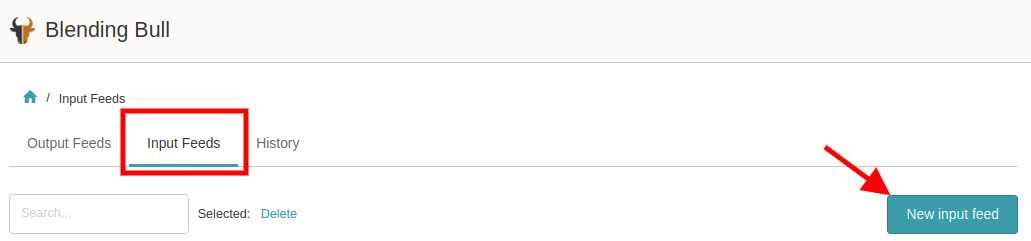
**1.** **Add the feeds** you want to combine to the “stack” → go to the (middle) tab *“Input feeds”* → click the button *“New input feed”*.
[  ](https://www.mergado.com/sites/default/files/perm/paragraph-image/screenshot-appmergadocom-20210331-113834_0.png)
**2. Enter the feed URL** and click *“Create feed”*.
**2a. Repeat steps 1 and 2** until you add all the feeds you want to combine to the “stack”.
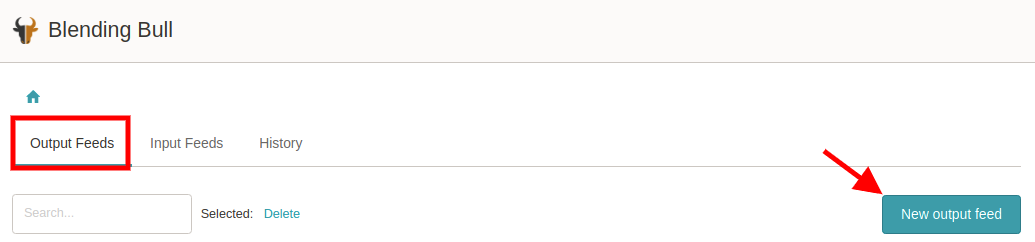
**3.** Go to the (first) *“Output feeds”* tab and **click** the *“New output feed”* button.
[  ](https://www.mergado.com/sites/default/files/perm/paragraph-image/screenshot-appmergadocom-20210331-113931_0.png)
**4. Enter** the *“Output feed name”* and **click** the “*New output feed”* button. This will **add the first feed** that will be part of the output feed.
**5.** You can **name** the input feed in the *“Name”* field and **select** the one you want to use first in the *“XML feed”* drop-down menu.
- Let’s say you work with three feeds. You use the field *“Remove text from the end of the feed”*. Then you **copy** the end of the feed you want to delete. It often ends on the line containing the </CHANNEL> element.
- You remove this text because the next feed will form a continuation of the individual <ITEM>, and the **terminating element must not remain** **here** for the feed to be valid.
- Click “*Save”* — we have **merged** the first part of the feed.
**5a.** R**epeat steps 3 and 4** for all feeds that you want to merge.
If we combine three (or more) feeds:
- remove the **\_footer\_** first (see element </CHANNEL> above)
- in the middle, remove the **\_header\_** and **\_footer\_**
- delete the **\_header\_** at the end (i. e. all content before the individual <ITEM>)
**6.** After adding all input feeds that are to be merged into one output feed, **finish** its creation by saving it → with the *“Save”* button.
**Note:** After saving, it may take a while (approx. 1 minute) for the output URL address to be displayed in the table with the overview of output feeds.
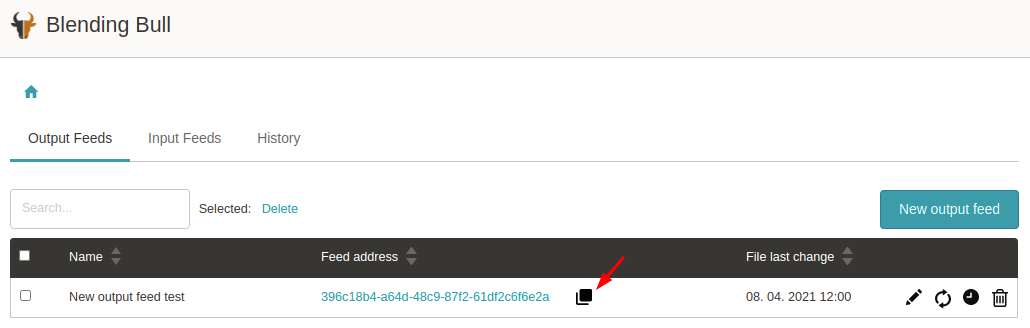
**7.** Click the appropriate **icon** to copy the address of the output feed.
[  ](https://www.mergado.com/sites/default/files/perm/paragraph-image/screen1_2.png)
**8.** And that’s all. You can edit the created output feed at any time via the **pencil icon.**
[  ](https://www.mergado.com/sites/default/files/perm/paragraph-image/screen2_0.png)
Import quality data straight into the online store. Combining feeds with the Blending Bull app will never be time-consuming again. Other apps will also help you **streamline advertising**. With [Bidding Fox](https://store.mergado.com/detail/biddingfox/#about) , you automatically set cost per click. With [Feed Image Editor](https://store.mergado.com/detail/feedimageeditor/#about), you control product image management.
### **Read more:**
[ 
### What should a proper client context look like for performance specialists?
](https://www.mergado.com/blog/master-prompt-eshopy-b2c)
[ 
### How Feed Optimization Unlocked Meta Ads Performance without Increasing Ad Spend
](https://www.mergado.com/blog/feed-optimization-for-meta-ads)
[ 
### How to Sell Successfully on idealo
](https://www.mergado.com/blog/successful-sale-on-idealo)
[  ](https://www.mergado.com/blog/lukas-horak)### [ Lukáš Horák ](https://www.mergado.com/blog/lukas-horak)
Lukáš takes care of most of the Czech and English communication in Mergado. Through blogs, e‑mail, and social networks, he regularly supplies readers with e‑commerce news and news and tips from Mergado. In his time off, he enjoys simple things like badminton, digging the hidden gems of the 80’s, and seafood served with red wine.
## What you *might be interested in next*
[ 
### GPSR on Allegro and Kaufland
](https://www.mergado.com/blog/gpsr-allegro-kaufland)
[ 
### Show the most suitable alternative products. More customers will buy from you
](https://www.mergado.com/blog/alternative-products)
[ 
### How to optimise product images
](https://www.mergado.com/blog/how-optimise-product-images)
## Don’t miss *anything*
Sign up for our newsletter
By logging in, you agree that we will process your data by the [terms of personal data protection](https://www.mergado.com/cookies).
Thank you, you have successfully joined our subscriber's list.
function ml_webform_success_5807248() {
var r = ml_jQuery || jQuery
r('.ml-subscribe-form-5807248 .row-success').show(), r('.ml-subscribe-form-5807248 .row-form').hide()
}