- [Case Studies](https://www.mergado.com/category/case-studies)
- [eCommerce tips](https://www.mergado.com/category/ecommerce-tips)
- [Online Store Solutions and Platforms](https://www.mergado.com/category/online-store-solutions-and-platforms)
- [Mergado Pack](https://www.mergado.com/category/mergado-pack)
- [Mergado tips](https://www.mergado.com/category/mergado-tips)
- [Mergado News](https://www.mergado.com/category/mergado-news)
- [eCommerce News](https://www.mergado.com/category/ecommerce-news)
- [How to use Mergado](https://www.mergado.com/category/how-to-use-mergado)
- [Interviews with e‑commerce gurus](https://www.mergado.com/category/interviews-e-commerce-gurus)
- [Extensions](https://www.mergado.com/category/apps-bidding-image-marketing-and-more)
- [Expansion with Mergado](https://www.mergado.com/category/expansion-with-mergado)
- [Mergado Lifestyle](https://www.mergado.com/category/mergado-lifestyle)
1. [ Home ](https://www.mergado.com/)
2. [ Mergado Blog ](https://www.mergado.com/blog)
3. **Comparison Engines: How to avoid the most common mistakes when setting up campaigns**
# **Comparison Engines: How to avoid the most common mistakes when setting up campaigns**
[  Petra Marková ](https://www.mergado.com/blog/petra-markova)
20. 10. 2021
4 minutes read

Advertising on [comparison engines](https://www.mergado.com/category/comparison-engine-news) is pivotal for online stores, both rookies and those looking for new customers. When setting up advertising, you have to **avoid** **frequently recurring errors**. We have prepared several tips tailored for *Google Shopping*, *GLAMI*, or *Heureka*.
function tableOfContents() {
return {
headings_menu: [],
heading_active: '', // Added to track the active section
shouldBeSticky: false,
generateToC() {
const headings = document.querySelectorAll('.js-article-full-headings h2, .js-article-full-headings h3');
let headingMap = {};
headings.forEach((heading) => { // Use an arrow function to maintain `this` context
// Normalize heading text to remove diacritics, then replace non-alphanumeric characters with dashes
var normalizedText = heading.textContent.normalize("NFD").replace(/[\u0300-\u036f]/g, ""); // Remove diacritics
var id = heading.id ? heading.id : normalizedText.trim().toLowerCase()
.split(' ').join('-').replace(/[^a-z0-9\-]/ig, ''); // Updated regex to replace non-alphanumeric characters
headingMap[id] = headingMap[id] !== undefined ? ++headingMap[id] : 0;
// Use the updated `id` with diacritics removed for the heading id and the TOC
const finalId = headingMap[id] ? `${id}-${headingMap[id]}` : id;
this.headings_menu.push({
id: finalId,
title: heading.textContent,
level: heading.tagName.toLowerCase(), // Track heading level
active: false, // Initially set active to false
});
heading.id = finalId;
});
},
checkStickyNeeded() {
const ul = this.$el.querySelector('ul');
if (ul) {
this.shouldBeSticky = ul.scrollHeight < window.innerHeight;
}
},
setActiveHeading() {
// disabled not working with active state on click
// add @scroll.window="setActiveHeading()" to the parent div
// const headings = document.querySelectorAll('.js-article-full-headings h2');
// let activeHeading = '';
// let closestHeadingDistance = Infinity;
// headings.forEach((heading) => {
// const rect = heading.getBoundingClientRect();
// const offset = rect.top - window.innerHeight / 2; // Consider heading in the middle of the screen as active
// if (offset < 0 && Math.abs(offset) < closestHeadingDistance) {
// activeHeading = heading.id;
// closestHeadingDistance = Math.abs(offset);
// }
// });
// // Update the active state in headings_menu
// if (activeHeading !== this.heading_active) {
// this.headings_menu = this.headings_menu.map(item => ({
// ...item,
// active: item.id === activeHeading,
// }));
// this.heading_active = activeHeading;
// }
},
setActiveItem(clickedId) {
this.headings_menu.forEach(item => {
item.active = (item.id === clickedId);
});
this.heading_active = clickedId; // Optionally update the heading_active property if used
},
};
}
1. —
Advertising on [comparison engines](https://www.mergado.com/category/comparison-engine-news) is pivotal for online stores, both rookies and those looking for new customers. When setting up advertising, you have to **avoid** **frequently recurring errors**. We have prepared several tips tailored for *Google Shopping*, *GLAMI*, or *Heureka*.
## Get items higher in Google search
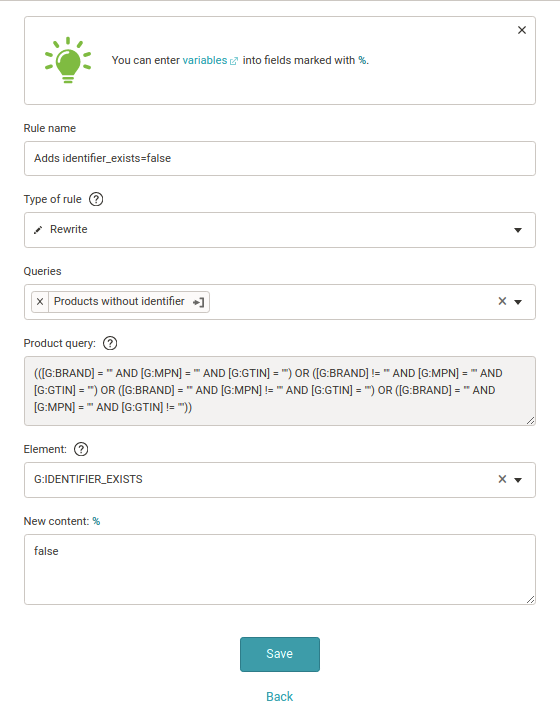
Have you targeted your advertising to the [Google](https://www.mergado.com/tag/google-shopping) platform? One of its criteria is the **correct identification of products**. In the Google Merchant feed, you can use the *BRAND*, *GTIN*, and *MPN* identifiers for this purpose. Google requires using **at least two** of these three identifiers for each product. If your products have only one or no identifier, you must add the *g:identifier\_exists* element to each product and **fill it with a false value**.
In Mergado, you may use the handy *Rewrite* rule for this type of feed editing, which you will apply to the selected query. For a simple step-by-step guide, see article [7 common Google Shopping feed flaws and how to fix them in Mergado](https://www.mergado.com/blog/main-google-shopping-feed-issues).
[  ](https://www.mergado.com/sites/default/files/perm/paragraph-image/identifier-false.png)
### How **Pavel Novák**, [Besteto](https://www.besteto.cz/sluzby/) PPC specialist, perceives the Google Shopping channel
> “I would recommend advertising on Google to every online store, **especially now in the upcoming Christmas season**. Google is the most used search engine in Europe. The Google Ads advertising system allows precise targeting of the right users, whether remarketing or targeting by interest. I would **recommend the Google Shopping campaigns**. They work well and bring a lot of new orders.”
## Improve advertising on GLAMI
Do you sell **fashion products**? Use the potential of the [GLAMI](https://www.glami.eco/) engine to reach customers who buy clothes, shoes, and accessories. You will be ahead of the competition by running your ads efficiently. The most common problems are actions that you can manage in **Mergado with a few clicks** — for example, removing the size from the name and hiding products that are not in stock.
### Remove size from the product name
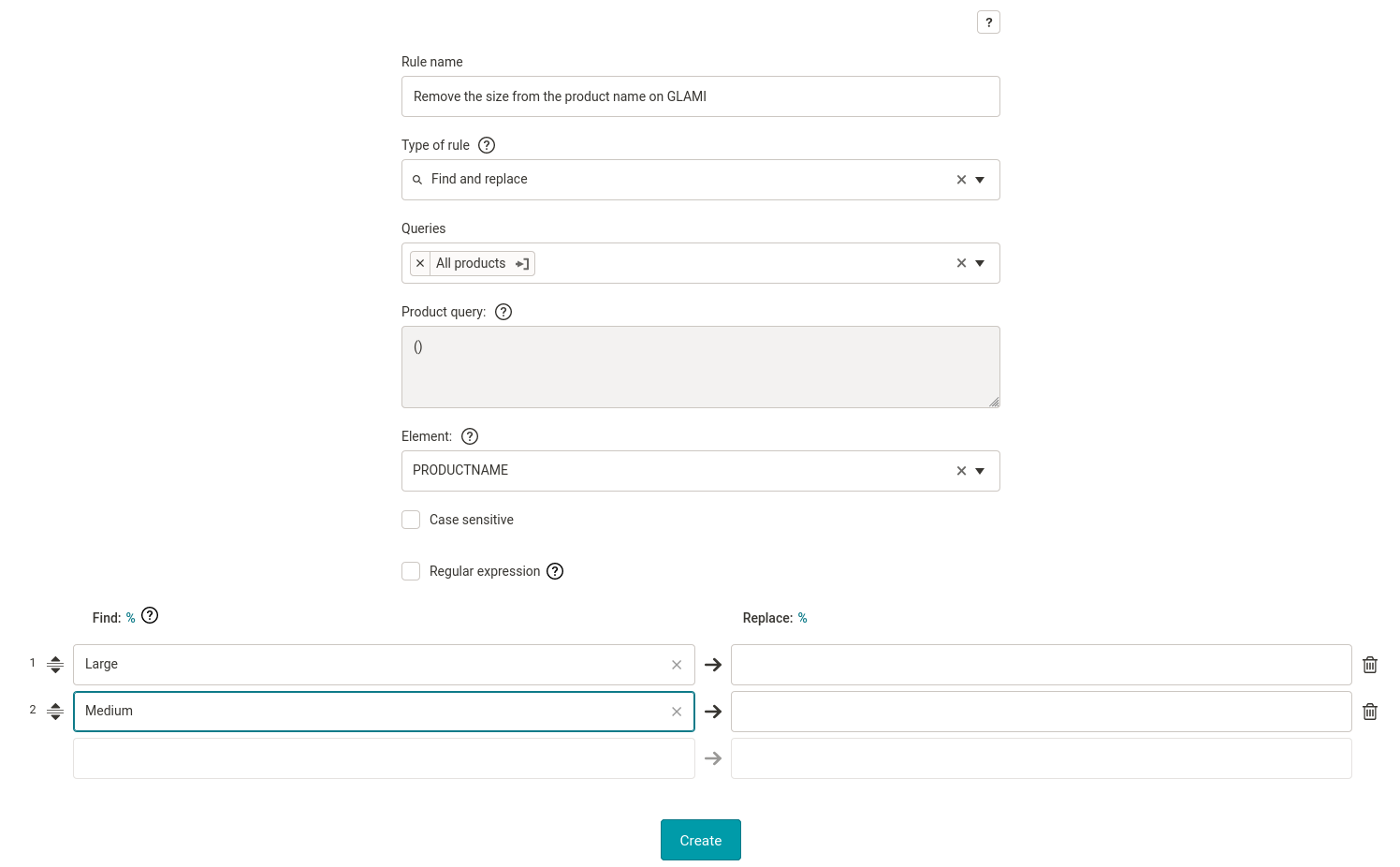
When advertising on GLAMI, pay attention to the **product name**. According to their requirements, it **cannot contain the size of the goods**. You must specify this information only in the parameters. If you have such products in your feed, we recommend using Mergado.
The solution is simple — you create a [Find and replace](https://www.mergado.com/blog/find-and-replace-rule-guide) rule to remove sizes and other parametric data from PRODUCTNAME. Find the desired expression in the element and **replace it with an empty field** (do not write anything in the Replace field).
[  ](https://www.mergado.com/sites/default/files/perm/paragraph-image/removing-size-glami.png)
Among other things, GLAMI has several rules for product images (without additional texts, logos, etc.). You can get your **image ad to a flawless** state with the *Feed Image Editor* app, in which you can bulk edit everything you need.
### Tips for GLAMI by **Marek Daňko**, a specialist from [Feed Image Editor](http://www.feed-image-editor.cz/)
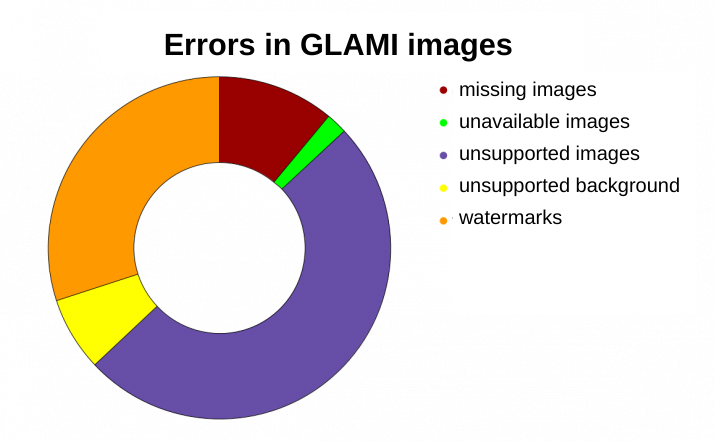
> “GLAMI is the ideal comparison engine for a range of fashion and accessories. It accents high-quality images, so be careful to meet all conditions. Due to image errors, **18 % of products on average** do not get to GLAMI. The problem is watermarks, insufficient minimum dimensions, unsupported backgrounds, and missing images. However, you can check their quality in the free [Image Validator](https://image-validator.com/).”
[  ](https://www.mergado.com/sites/default/files/perm/paragraph-image/glami-image-errors.png)
## Pair products on Heureka like a pro
The key to efficient advertising, not only on [Heureka](https://www.heureka.cz/), is the flawless pairing of products. To classify the goods into the appropriate categories, you have to **assign the online store to the created product card**.
It often happens that the product name or category is not in the required form. You edit it with the **CATEGORYTEXT and PRODUCTNAME** elements. Using the [Rename categories in bulk](https://info.mergado.com/mergado-guide/rules#rename-categories-in-bulk) rule, you can correct them according to Heureka requirements. Mergado streamlines setting the categories via the implemented insinuator.
### What [Mergado](https://www.mergado.com/mergado-smart-product-feed-manager) consultant **Luděk Volejník** recommends for advertising on Heureka
> *“***Most Czech and Slovak** online stores use advertising on Heureka, and I would recommend it to all new brands. Perhaps only to those who sell a unique assortment, it may not bring desired results. I describe it as the **first step** to start advertising on comparison engines. In Mergado, we have several functions and additional apps that can be used to manage Heureka advertising. That technically means it is possible to **fine-tune a perfect feed** for Heureka in Mergado.*”*
Learn how to pair products with [apps from the Mergado Store](https://store.mergado.com). They will improve the quality of advertising on Heureka and **make your assortment more visible**.
For a flawless start on each comparison engine, you need **a data file in the required format**. Not sure if it meets the requirements of the chosen platform? **Check** its status with the free [Feed audit](https://audit.mergado.com). You will get a technical analysis and recommendations on how to fix it with Mergado.
[](http://app.mergado.com)
### **Read more:**
[ 
### What should a proper client context look like for performance specialists?
](https://www.mergado.com/blog/master-prompt-eshopy-b2c)
[ 
### How Feed Optimization Unlocked Meta Ads Performance without Increasing Ad Spend
](https://www.mergado.com/blog/feed-optimization-for-meta-ads)
[ 
### How to Sell Successfully on idealo
](https://www.mergado.com/blog/successful-sale-on-idealo)
[  ](https://www.mergado.com/blog/petra-markova)### [ Petra Marková ](https://www.mergado.com/blog/petra-markova)
With her melodious Slovak language skills, copywriter Petra takes care of the Slovak market. She texts, blogs, translates and passionately creates content on social networks. And when she’s not looking for the right words, she dedicates time to her residential jungle, baking, cafes, or traveling.
## What you *might be interested in next*
[ 
### What should a proper client context look like for performance specialists?
](https://www.mergado.com/blog/master-prompt-eshopy-b2c)
[ 
### How Feed Optimization Unlocked Meta Ads Performance without Increasing Ad Spend
](https://www.mergado.com/blog/feed-optimization-for-meta-ads)
[ 
### How to Sell Successfully on idealo
](https://www.mergado.com/blog/successful-sale-on-idealo)
## Don’t miss *anything*
Sign up for our newsletter
By logging in, you agree that we will process your data by the [terms of personal data protection](https://www.mergado.com/cookies).
Thank you, you have successfully joined our subscriber's list.
function ml_webform_success_5807248() {
var r = ml_jQuery || jQuery
r('.ml-subscribe-form-5807248 .row-success').show(), r('.ml-subscribe-form-5807248 .row-form').hide()
}