- [Case Studies](/category/case-studies)
- [eCommerce tips](/category/ecommerce-tips)
- [Online Store Solutions and Platforms](/category/online-store-solutions-and-platforms)
- [Mergado Pack](/category/mergado-pack)
- [Mergado tips](/category/mergado-tips)
- [Mergado News](/category/mergado-news)
- [eCommerce News](/category/ecommerce-news)
- [How to use Mergado](/category/how-to-use-mergado)
- [Interviews with e‑commerce gurus](/category/interviews-e-commerce-gurus)
- [Extensions](/category/apps-bidding-image-marketing-and-more)
- [Expansion with Mergado](/category/expansion-with-mergado)
- [Mergado Lifestyle](/category/mergado-lifestyle)
1. [ Home ](/)
2. [ Mergado Blog ](/blog)
3. [ eCommerce tips ](/category/ecommerce-tips)
4. **Conversational Attributes in Google Shopping Feeds: Making Sure AI Actually Sees Your Products**
# **Conversational Attributes in Google Shopping Feeds: Making Sure AI Actually Sees Your Products**
[ Michaela Vaňková ](https://www.mergado.cz/blog/michaela-vankova) [eCommerce tips](/category/ecommerce-tips)
10. 9. 2026
8 minutes read
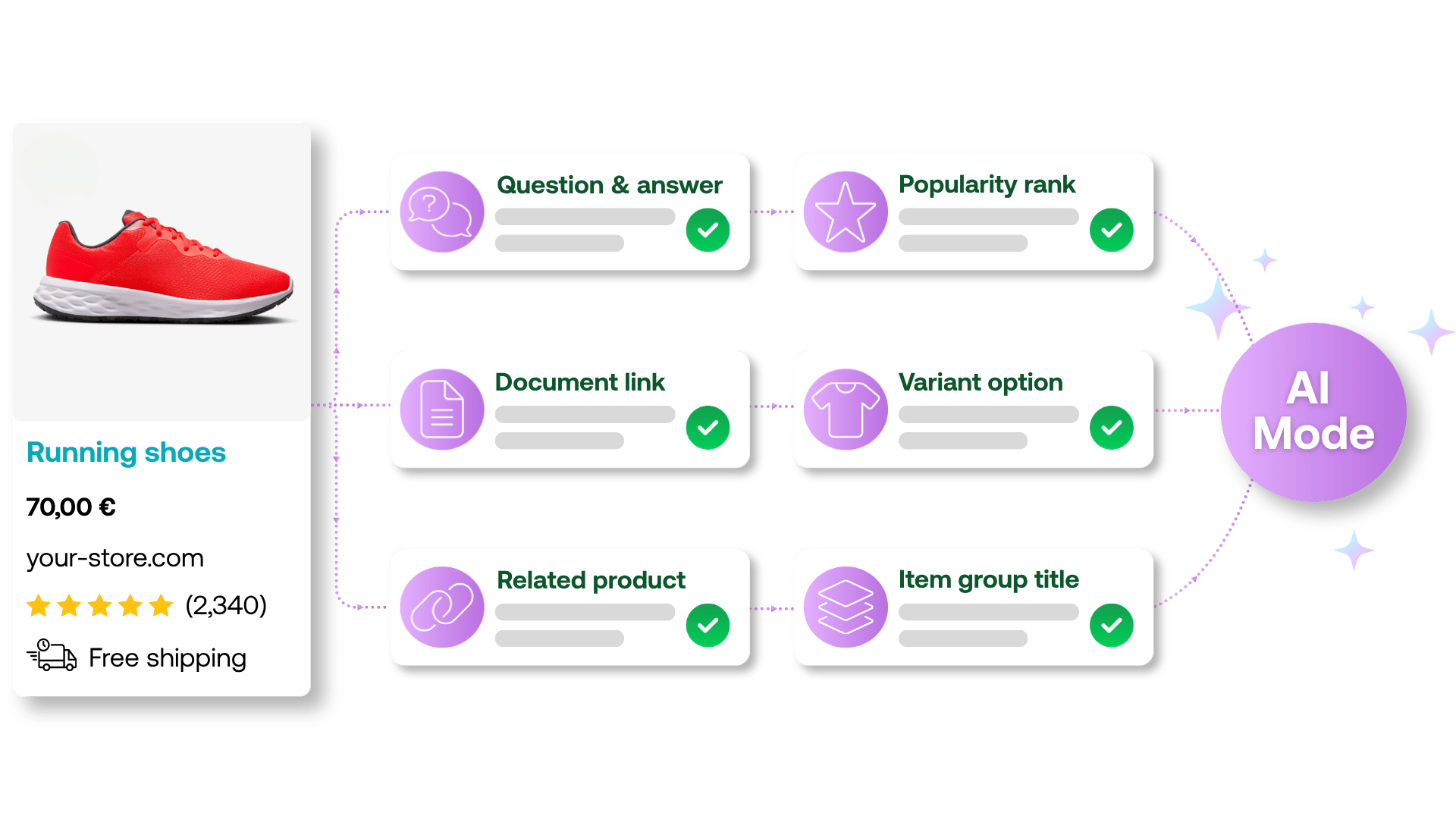
This spring, Google expanded its Shopping feed specification with a new group of attributes known as **conversational attributes**. These are six optional elements with one shared goal: **helping Google’s AI Mode in Search better understand what your product actually offers**, and match it to increasingly detailed, conversational customer queries. And if you’re on the fence about whether it’s even worth bothering with these attributes, consider this: according to Google, **AI Mode passed the 1‑billion-monthly-user mark within a year of launch, and query volume is more than doubling every quarter**.
function tableOfContents() {
return {
headings_menu: [],
heading_active: '', // Added to track the active section
shouldBeSticky: false,
generateToC() {
const headings = document.querySelectorAll('.js-article-full-headings h2, .js-article-full-headings h3');
let headingMap = {};
headings.forEach((heading) => { // Use an arrow function to maintain `this` context
// Normalize heading text to remove diacritics, then replace non-alphanumeric characters with dashes
var normalizedText = heading.textContent.normalize("NFD").replace(/[\u0300-\u036f]/g, ""); // Remove diacritics
var id = heading.id ? heading.id : normalizedText.trim().toLowerCase()
.split(' ').join('-').replace(/[^a-z0-9\-]/ig, ''); // Updated regex to replace non-alphanumeric characters
headingMap[id] = headingMap[id] !== undefined ? ++headingMap[id] : 0;
// Use the updated `id` with diacritics removed for the heading id and the TOC
const finalId = headingMap[id] ? `${id}-${headingMap[id]}` : id;
this.headings_menu.push({
id: finalId,
title: heading.textContent,
level: heading.tagName.toLowerCase(), // Track heading level
active: false, // Initially set active to false
});
heading.id = finalId;
});
},
checkStickyNeeded() {
const ul = this.$el.querySelector('ul');
if (ul) {
this.shouldBeSticky = ul.scrollHeight < window.innerHeight;
}
},
setActiveHeading() {
// disabled not working with active state on click
// add @scroll.window="setActiveHeading()" to the parent div
// const headings = document.querySelectorAll('.js-article-full-headings h2');
// let activeHeading = '';
// let closestHeadingDistance = Infinity;
// headings.forEach((heading) => {
// const rect = heading.getBoundingClientRect();
// const offset = rect.top - window.innerHeight / 2; // Consider heading in the middle of the screen as active
// if (offset < 0 && Math.abs(offset) < closestHeadingDistance) {
// activeHeading = heading.id;
// closestHeadingDistance = Math.abs(offset);
// }
// });
// // Update the active state in headings_menu
// if (activeHeading !== this.heading_active) {
// this.headings_menu = this.headings_menu.map(item => ({
// ...item,
// active: item.id === activeHeading,
// }));
// this.heading_active = activeHeading;
// }
},
setActiveItem(clickedId) {
this.headings_menu.forEach(item => {
item.active = (item.id === clickedId);
});
this.heading_active = clickedId; // Optionally update the heading_active property if used
},
};
}
1. —
## **Keywords Aren’t Enough Anymore**
The classic product feed was built for a world where people searched using short keywords, like “men’s running shoes” or “24-inch dishwasher.” Search today looks different. In AI Mode, people ask **much longer, more specific questions**, like “running shoes for flat feet under $100 that won’t slip on wet surfaces.” A **well-filled-out title and category simply won’t cut it** for a query like that. Google needs far richer product context than standard feed elements can provide.
💡 Imagine you’re **selling a gaming monitor, and your feed lists “Resolution: 2560×1440 px, Refresh rate: 165 Hz, Response time: 1 ms.”** Precise specs that describe the product’s features. The trouble is, a **customer isn’t going to ask AI about refresh rates**. They’ll ask: **“What’s a good monitor for playing action games?”** For Google’s AI Mode to match that question with the right product, it needs something telling it **what situation or purpose the monitor is actually suited for**, not just its technical parameters. A feed packed with numbers and specs but no context can look perfectly fine in Merchant Center and still never surface in AI Mode search results.
Conversational attributes are Google’s answer to that gap. They’re not meant to replace the classic elements (title, description, product\_highlight, and so on), but to complement them. Google stresses that they’re entirely **optional**, and whether or not you fill them in has **no bearing on whether your product gets approved in Merchant Center**.
## **Six New Ways to Tell Google More**
Here’s an overview of what the new elements include and what they’re for:
1️⃣ [**question\_and\_answer**](https://support.google.com/merchants/answer/17085211) – a question/answer pair about the product. Google allows up to 30 pairs per product, with each question and answer allowed up to 1,000 characters. This is a good place for answers to questions like “Is this dishwasher-safe?” or “Does the package include a charger?”
2️⃣ [**document\_link**](https://support.google.com/merchants/answer/17084656) – a link to a supporting PDF document, such as a user manual or assembly instructions. You can include multiple links separated by commas.
**3️⃣** [**related\_product**](https://support.google.com/merchants/answer/17085213) – defines a relationship between products. It consists of three parts:
- **relationship type** (relationship\_type) – Google supports six values here:
- **substitute** – a comparable product that serves the same function
- **accessory** – an add-on for the product
- **required\_part** – an essential component of the product
- **often\_bought\_with** – a product customers frequently buy alongside this one
- **different\_brand** – the same or a similar product under a different brand
- **part\_of\_set** – a product from the same line or set that makes sense to offer together
- **identification method** (identifier\_type) – id or gtin
- **the identifier itself** (identifier) – the identifier value
4️⃣ [**item\_group\_title**](https://support.google.com/merchants/answer/17085146) – a shared name for a product with multiple variants, used together with item\_group\_id.
5️⃣ [**variant\_option**](https://support.google.com/merchants/answer/17085214) – describes what sets a specific variant apart from the others.
6️⃣ [**popularity\_rank**](https://support.google.com/merchants/answer/17085297) – expresses a product’s relative popularity as a percentage, where a higher number means a stronger position within your assortment.
**Tip!** If you’re already including this information in **description**, **product\_highlight**, or **product\_detail**, there’s no need to duplicate it. Google can work with what’s already there.
[  ](https://www.mergado.com/sites/default/files/perm/image/ai_atributy_grafika_en.png)
## **Tell Google What the Product Is For, Not Just What Color It Is**
You don’t need to fill in all six attributes across your entire catalog right away, and with a larger assortment that’s often not realistic anyway. The best place to start is with three of them, since **there simply hasn’t been room in the feed for this kind of information until now**.
### 💬 Question and answer (question\_and\_answer)
A specific answer to a specific **question that customers genuinely have**, but that a standard product description doesn’t cover. For example: “Will this jacket hold up in heavy rain all day, or is it more for light drizzle?” An answer like “Yes, the jacket is waterproof” won’t do AI much good. What’s actually useful is a concrete answer – for example, that the material holds up through a full day of steady rain, not just passing showers – something specific enough for AI to match the product correctly. Try thinking about **what your customers ask most often.**
### 🛍️ Related product (related\_product)
This tells Google **what goes with a product, what can replace it, or what else customers will need alongside it**. When a customer asks “What do I need for cooking on a backcountry hike?”, AI needs to know how the items in your catalog relate to each other – for example, a camping stove, the matching gas canister, and a nesting cookware set. Without that link, AI can offer little more than the stove on its own, even though the customer is really after the whole setup.
### 📄 Document link (document\_link)
This gives AI access to **entire documents**, not just a few sentences from a description. At first glance it might look like the least exciting of the bunch, but it’s actually one of the most valuable, and **filling it in takes almost no effort**. All you need is a URL pointing to the document; no rewriting or reformatting the content required. This covers material almost nobody actually reads: assembly instructions, lab test results, or manufacturer documents. That lets Google **answer even a detailed question** like “What tools will I need to assemble this bookshelf?” without having to guess from a short description. And since suppliers and online stores typically don’t publish this kind of content anywhere else, there’s a good chance you’ll be among the first to make information this specific available to AI at all.
## **How to Send Attributes to Merchant Center**
Google offers two ways to do this:
1. **Supplemental feed – the recommended option.** You upload a separate TSV, XML, or Google Sheet file, which links to your primary feed via a matching product ID (offer\_id). The advantage is that you **don’t have to touch the structure of your main feed**, and you can start small, for example, just with your bestsellers.
2. **Adding attributes directly to the primary feed** (or via the **Merchant API**). Mergado supports this method too. The elements for conversational attributes are already available in the Mergado Editor, and you can fill them in the standard way, using rules.
Since these are optional fields, a badly formatted value won’t cost you product approval, Google simply ignores it. That makes conversational attributes a **safe space for gradual testing**.
## **What to Watch Out for When Filling These In**
Before diving into a blanket rollout, it’s worth thinking through a few things:
**⚠️ Don’t start from scratch.** You probably already have an FAQ section, technical specs, or manuals and assembly instructions somewhere on your online store. **Reusing data that already exists is the cheapest way to enrich your product data**, you just need to get it into the right format, not invent it from scratch.
**⚠️ Quality over quantity.** A field that just repeats what’s already in the description won’t tell Google anything new. What matters is genuinely **additional information**.
**⚠️ popularity\_rank needs upkeep.** It’s a relative ranking across your catalog. Set it once and forget about it, and as your assortment and sales shift, it’ll **stop reflecting reality**, potentially feeding Google misleading information.
**⚠️ With dozens or hundreds of products, filling this in by hand isn’t realistic.** That’s where automation comes in, and Mergado can help.
## **How Mergado Can Help with Conversational Attributes**
Rolling out six new fields across an entire catalog by hand would mean weeks of work for larger online stores. Mergado offers several ways to make that job dramatically easier, from populating the attributes to auto-generating content with AI.
### Filling in Attributes in the Mergado Editor
The Mergado Editor supports conversational attributes as standard Google feed elements. You’ll find them **already set up, no special configuration needed**. Since these are entirely new types of data that you likely don’t already have in your source feed, we don’t recommend trying to piece them together from existing fields using rules. Instead, we recommend this approach: **prepare the content outside of Mergado in a CSV file, then use that file to import it directly into the ready-made elements in Mergado**. You can build that file from contextual product data, and your favorite AI tool can, of course, help you put it together.
**Tip!** An even faster way is to connect an AI agent to the Mergado Editor via [**Mergado MCP**](https://www.mergado.com/mergado-mcp). Just **hand the AI agent your contextual product data, and it’ll fill in the conversational attributes for you directly**, no exports, CSV files, or manual imports required.
### Automatically Finding Substitute Products (related\_product) in Feed Image Editor
One of the most interesting, but also most time-consuming, attributes to fill in is **related\_product** with the value **substitute**, that is, identifying which of your products can stand in for one another. Manually matching up dozens or hundreds of items would be endless.
The [Feed Image Editor](https://store.mergado.com/detail/feedimageeditor/?lang=en#about) (Mergado Editor extension) solves this with its **visual similarity** feature. AI compares product images across your entire feed and finds the most visually similar items in your assortment for each listing. The identifiers of similar products are then written into a new feed element, which you can map into the related\_product structure (with relationship\_type set to substitute) using the **Bulk Copy Values** rule in the Mergado Editor.
⚠️ This method judges products by appearance, not by functional specs, so it **works great for things like fashion, furniture, or home decor**. For electronics or cosmetics, where two visually similar products can have completely different properties, it’s worth **reviewing the generated pairs before putting them into use**.
### Auto-Generating Q&A and Product Highlights with Mergado Pilot
The **question\_and\_answer** attribute is, without a doubt, the most labor-intensive attribute to fill in. Manually writing out dozens of question/answer pairs for every product takes time most online store owners simply don’t have. That’s exactly what **Mergado Pilot** is for, a set of AI rules available in the canvas (the new Mergado Editor interface), where you’ll find it alongside the regular rules.
Mergado Pilot currently offers three types of rules, of which the following are especially relevant for conversational attributes:
- **Q&A (question and answer)** – automatically generates **question/answer pairs** directly into the **question\_and\_answer** element, for both Google Shopping and ChatGPT Shopping. The primary data source is the product description in your feed.
- **Product highlight** – generates **key product features** into the **product\_highlight** element. While this isn’t technically one of the six conversational attributes in the strict sense, it belongs to the same family of “AI-ready” data. As with the other attributes, if you already have the same information elsewhere in your feed, there’s no need to duplicate it in product\_highlight.
You’ll find details on these rules and how to configure them in the article [Rule: Mergado Pilot](https://help.mergado.com/en/mergado-editor/rules/rule-library/rule-mergado-pilot/) in our help center.
## **Conversational Attributes Won’t Fix a Weak Feed**
**Don’t expect overnight results** after adding these attributes, give it at least 3 to 4 weeks before it shows up in the data. Then check **performance** in Merchant Center for the products you’ve updated: what matters most is **impression counts** and **which search queries the products are showing up for**. If they start appearing for new types of queries you haven’t seen before, the attributes are working.
If nothing changes for your best-selling products even after a month, the problem is probably not the conversational attributes themselves, but **a level below**, how well you’ve handled the **basic elements in your main product feed**. Conversational attributes are an add-on, not a fix. If core elements like title or description are weak, that’s what’s worth checking first.
## **A Feed That Can Answer Back**
More and more, people ask Google the way they’d **ask a salesperson in a brick-and-mortar store**, in full sentences, with context, with a specific need in mind. If your **feed can’t answer that kind of question, AI simply won’t show your products**. And this isn’t some distant future scenario. As AI search becomes more and more common, the **cost of missing product context in your data keeps rising** too. Conversational attributes may be optional, but empty fields still mean a missed chance to show AI systems exactly what your products offer, and why a customer should choose them.
- [ Google Ads and MERGADO ](/tema/google-ads)
### [ Michaela Vaňková ](https://www.mergado.cz/blog/michaela-vankova)
## What you *might be interested in next*
[ 
### Don’t Be Afraid of Ugly Ads: 8 Tips for Creatives That Sell
](/blog/8-tips-for-creatives-that-sell)
[ 
### OpenAI Ads Is Heading to Europe: Be Among the First to Try It
](/blog/openai-ads-is-heading-to-europe)
[ 
### What should a proper client context look like for performance specialists?
](/blog/master-prompt-eshopy-b2c)
## Don’t miss *anything*
Sign up for our newsletter
By logging in, you agree that we will process your data by the [terms of personal data protection](/cookies).
Thank you, you have successfully joined our subscriber's list.
function ml_webform_success_5807248() {
var r = ml_jQuery || jQuery
r('.ml-subscribe-form-5807248 .row-success').show(), r('.ml-subscribe-form-5807248 .row-form').hide()
}