- [Case Studies](https://www.mergado.com/category/case-studies)
- [eCommerce tips](https://www.mergado.com/category/ecommerce-tips)
- [Online Store Solutions and Platforms](https://www.mergado.com/category/online-store-solutions-and-platforms)
- [Mergado Pack](https://www.mergado.com/category/mergado-pack)
- [Mergado tips](https://www.mergado.com/category/mergado-tips)
- [Mergado News](https://www.mergado.com/category/mergado-news)
- [eCommerce News](https://www.mergado.com/category/ecommerce-news)
- [How to use Mergado](https://www.mergado.com/category/how-to-use-mergado)
- [Interviews with e‑commerce gurus](https://www.mergado.com/category/interviews-e-commerce-gurus)
- [Extensions](https://www.mergado.com/category/apps-bidding-image-marketing-and-more)
- [Expansion with Mergado](https://www.mergado.com/category/expansion-with-mergado)
- [Mergado Lifestyle](https://www.mergado.com/category/mergado-lifestyle)
1. [ Home ](https://www.mergado.com/)
2. [ Mergado Blog ](https://www.mergado.com/blog)
3. [ Extensions ](https://www.mergado.com/category/apps-bidding-image-marketing-and-more)
4. **Download the entire site into one CSV with Scraping Camel**
# **Download the entire site into one CSV with Scraping Camel**
[  Lukáš Horák ](https://www.mergado.com/blog/lukas-horak) [Extensions](https://www.mergado.com/category/apps-bidding-image-marketing-and-more)
14. 4. 2021
4 minutes read

Do you want to **get data** from web pages or online stores that are not contained in the XML feed? You can easily access valuable information with the new [Scraping Camel](https://store.mergado.com/detail/scrapingcamel/#about) app. Use its functions for **more efficient creation of PPC ads or SEO**. We’ll show you how.
function tableOfContents() {
return {
headings_menu: [],
heading_active: '', // Added to track the active section
shouldBeSticky: false,
generateToC() {
const headings = document.querySelectorAll('.js-article-full-headings h2, .js-article-full-headings h3');
let headingMap = {};
headings.forEach((heading) => { // Use an arrow function to maintain `this` context
// Normalize heading text to remove diacritics, then replace non-alphanumeric characters with dashes
var normalizedText = heading.textContent.normalize("NFD").replace(/[\u0300-\u036f]/g, ""); // Remove diacritics
var id = heading.id ? heading.id : normalizedText.trim().toLowerCase()
.split(' ').join('-').replace(/[^a-z0-9\-]/ig, ''); // Updated regex to replace non-alphanumeric characters
headingMap[id] = headingMap[id] !== undefined ? ++headingMap[id] : 0;
// Use the updated `id` with diacritics removed for the heading id and the TOC
const finalId = headingMap[id] ? `${id}-${headingMap[id]}` : id;
this.headings_menu.push({
id: finalId,
title: heading.textContent,
level: heading.tagName.toLowerCase(), // Track heading level
active: false, // Initially set active to false
});
heading.id = finalId;
});
},
checkStickyNeeded() {
const ul = this.$el.querySelector('ul');
if (ul) {
this.shouldBeSticky = ul.scrollHeight < window.innerHeight;
}
},
setActiveHeading() {
// disabled not working with active state on click
// add @scroll.window="setActiveHeading()" to the parent div
// const headings = document.querySelectorAll('.js-article-full-headings h2');
// let activeHeading = '';
// let closestHeadingDistance = Infinity;
// headings.forEach((heading) => {
// const rect = heading.getBoundingClientRect();
// const offset = rect.top - window.innerHeight / 2; // Consider heading in the middle of the screen as active
// if (offset < 0 && Math.abs(offset) < closestHeadingDistance) {
// activeHeading = heading.id;
// closestHeadingDistance = Math.abs(offset);
// }
// });
// // Update the active state in headings_menu
// if (activeHeading !== this.heading_active) {
// this.headings_menu = this.headings_menu.map(item => ({
// ...item,
// active: item.id === activeHeading,
// }));
// this.heading_active = activeHeading;
// }
},
setActiveItem(clickedId) {
this.headings_menu.forEach(item => {
item.active = (item.id === clickedId);
});
this.heading_active = clickedId; // Optionally update the heading_active property if used
},
};
}
1. —
## Keep all the necessary information in one file
[Scraping Camel](https://www.mergado.com/tag/scraping-camel) is developed by Shopitak, which focuses on developing applications for the Mergado ecosystem. The app goes through the HTML pages of the website and obtains any information from them. The app saves it and **generates one output CSV file**. Thanks to this, the app is suitable for high-quality data analysis of products and categories.
[](https://store.mergado.com/detail/scrapingcamel/#about)
What data can you get from the site? Using the app, you will **receive any information from the website**, such as Title, Meta Description, headings H1 and H2, Google Analytics tag ID, or Google Tag Manager.
The application can also **process websites that are not online stores**. These are, for example, various catalogs (fashion, travel tickets, etc.) or web presentations. It can edit the data in Mergado for PPC advertising on Google Ads, and it can further process the usual store procedures. If the user’s shop system does not generate XML (or other) feeds, it can obtain the necessary information and further work with them in [Mergado](https://www.mergado.com/get-started).
With Scraping Camel, you apply feed marketing workflows from online stores with an XML feed to websites without a cart. Data is continuously automated. Outputs are **available online** for other applications or data connections.
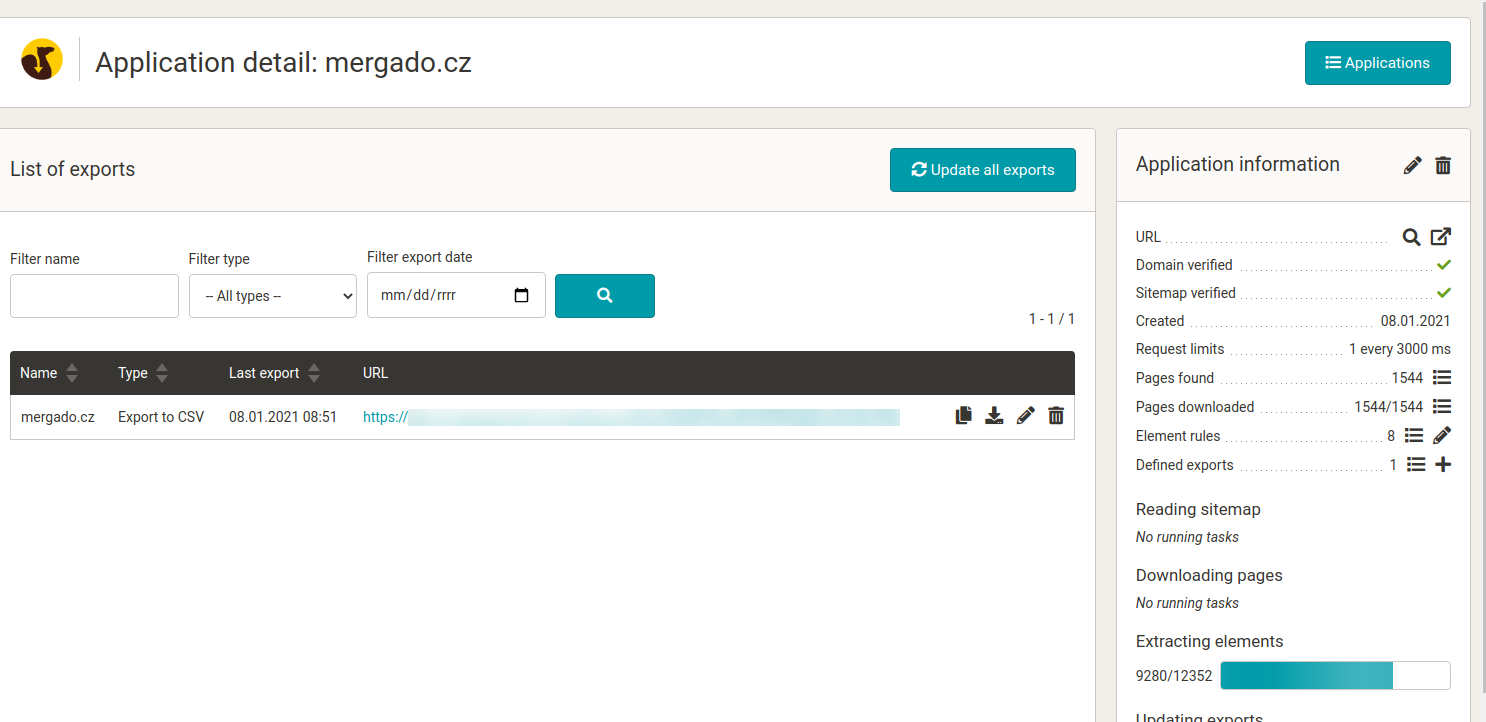
 Download the entire site into one CSV
Download the ENTIRE WEB to one CSV. Scraping Camel will do it for you and will keep the CSV content updated with new information as you change the site.
[Try it out](https://store.mergado.com/detail/scrapingcamel/)

[  ](https://www.mergado.com/sites/default/files/perm/paragraph-image/3f86499373c2936f9a74f32b78bd9fc8.png)
### How Scraping Camel works
1. **Define** **the domain** that the app should crawl.
2. **Verify** it. It is similar to Google. You can choose from embedding the file on the web, META tags in pages, or a DNS record. The goal is to prove that this is not a third-party website.
3. **Insert** **sitemap.xml**, which is a condition for the app to work. Scraping Camel takes the URL of the website from here.
4. Then **set the frequency** of web crawling. Too many queries can overload the web and slow down the processing of the whole web.
5. Next, **choose which elements you want to retrieve** from the target HTML pages. The defaults are title, meta description, or define own elements (via a regular expression or by placing text before and after the information you are looking for).
6. **Set how the elements** with the obtained information **should be named** in the output CSV.
7. Finally, the app starts crawling the destination site. When it is processed in its entirety, the app will **generate an output CSV** and state its address in the administration.
How to **set up** Scraping Camel step by step? You will find a **detailed method** in this documentation.
### How to use Scraping Camel?
At the testing store, we will show you how easy it is to **get SEO data and a product description**.
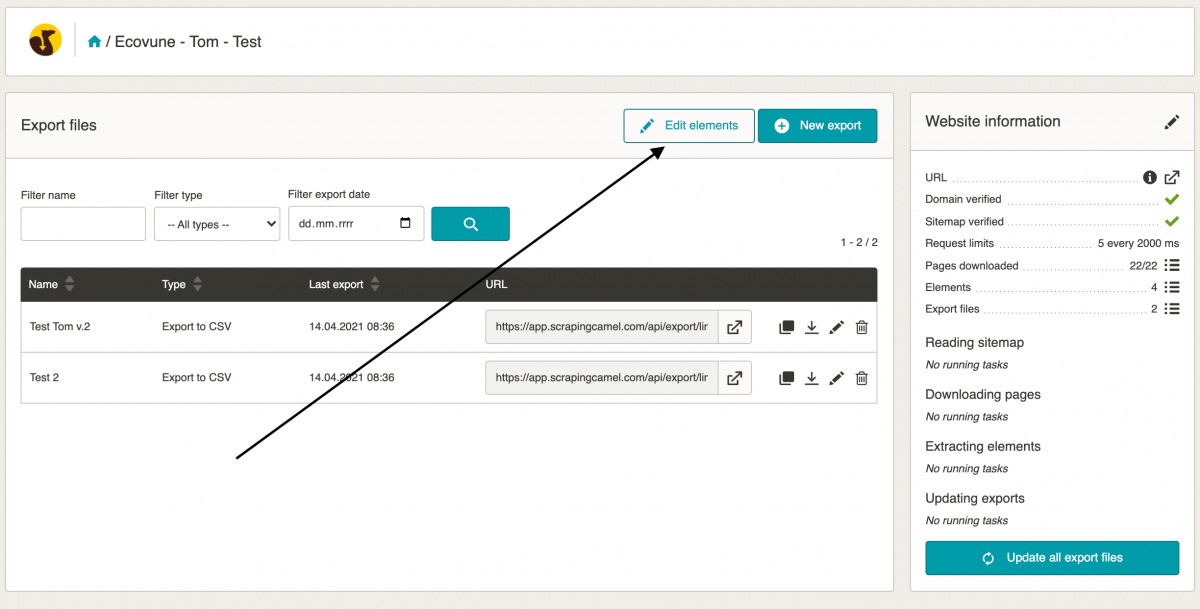
- ### 1. Click the “Edit elements” tab
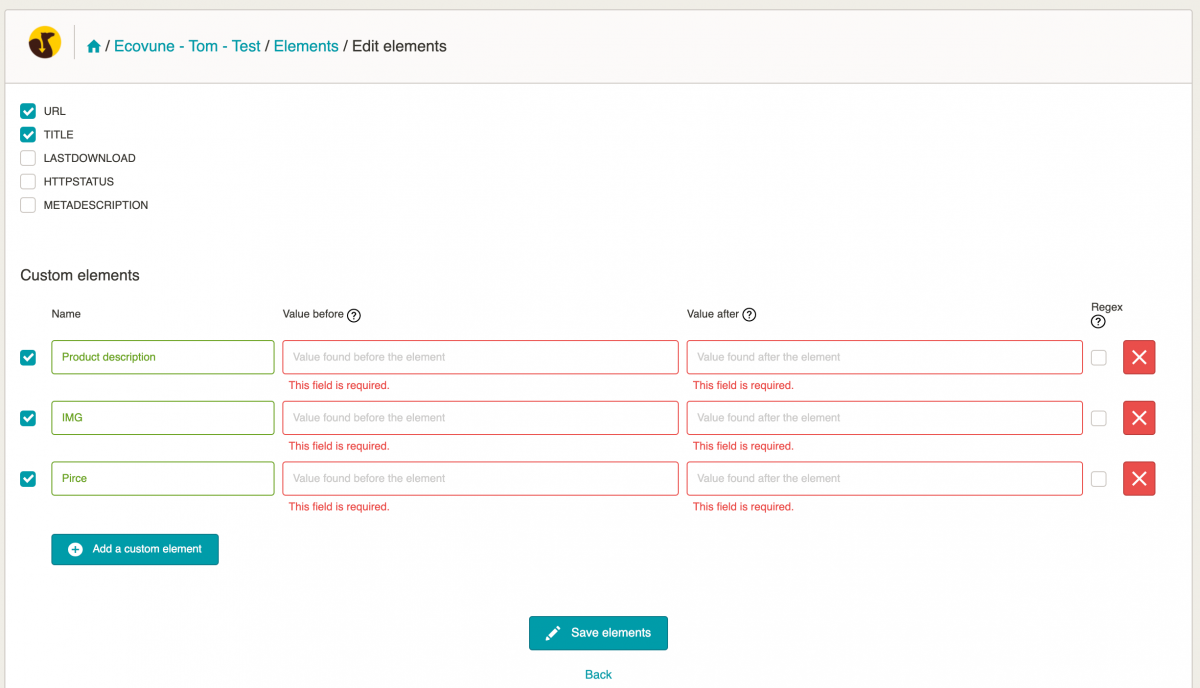
- ### 2. Click “Add your element” and name the elements according to your preferences
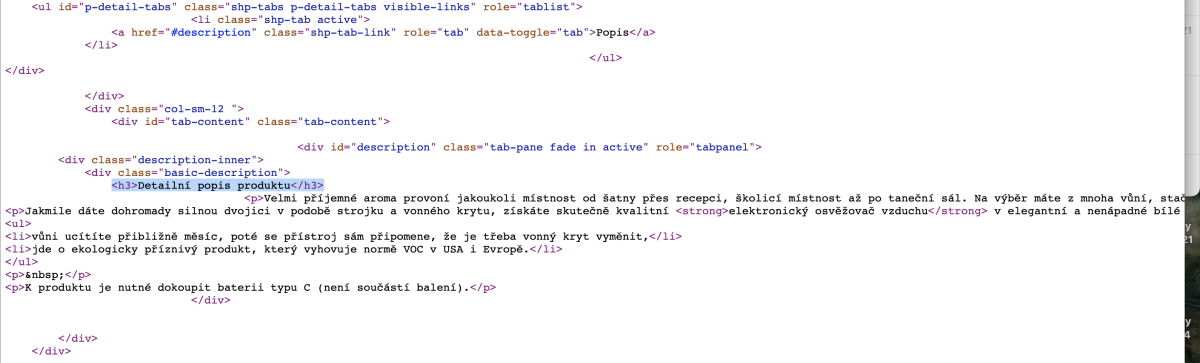
- ### 3. Navigate to the web site from which you want to retrieve data and press CTRL + U
- This keyboard shortcut allows you to see the source code of the site you need to define the elements from. Or you can right-click to view the source code of the page.
- Use the CTRL + F keyboard shortcut (to search for content on the page) to enter the element you want to get. In this case, we want to find the product description, i. e.: <h3> Detailed description of the product </h3>.
- ### 4. Return to Scraping Camel
In “Values before” enter: <h3> Detailed product description </h3> and in “Values below” enter </div>. It will look like this:

- ### 5. Result
The application is not **primarily used to view data**. We recommend doing it in another program, such as Mergado or Google Sheets. Apply the same procedure to other elements that you want to get from the site.
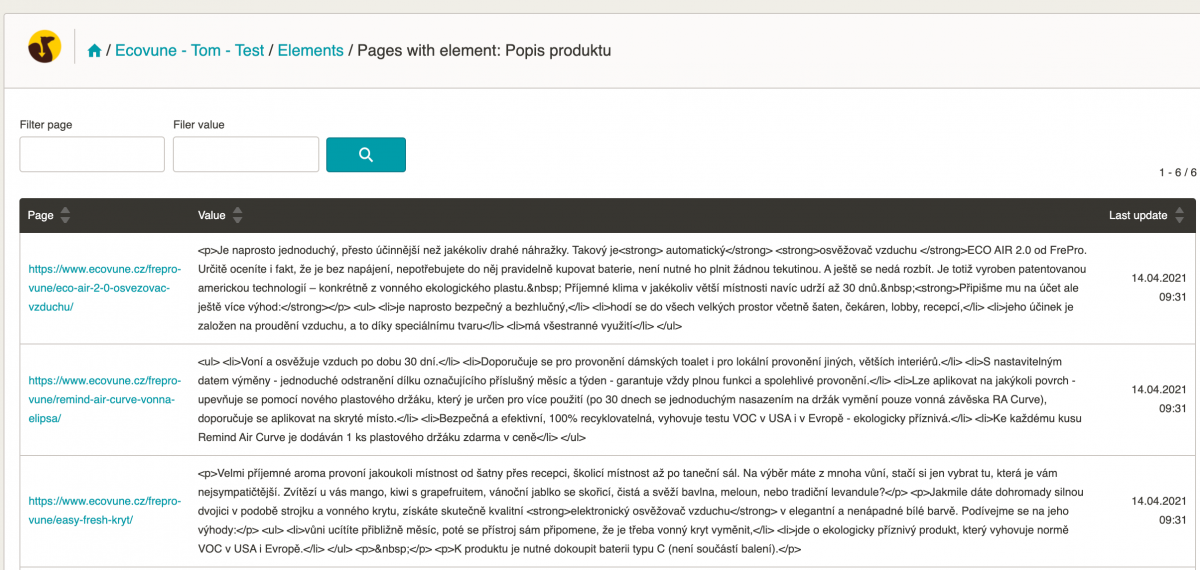
Scraping Camel **regularly and automatically checks the destination site**. If it finds a new page, it will process it immediately and project any changes in the output CSV file.
The app can be used **not only by online store operators**. Marketers, specialists in SEO or PPC advertising can also load product data or services from a page without a feed into the CSV file.
What are the differences between the application and other tools? Programs such as Screaming Frog or Xenu work on a one-time basis and run on a local device. Scraping Camel works the opposite — **it runs on a non-stop server**. It provides outputs in machine-readable form, which you can further process. You may use it for one-time analyzes, where the data is automatically processed by other software.
### Summary
**Benefits of Scraping Camel:**
- continuous monitoring of changes
- works on the server (non-stop)
- possibility to upload to Mergado as an input file for export and work with it in the usual way
- unlimited number of sites per account
**What you should know:**
- the app does not render JavaScript, it only works on HTML
- the principle of data extraction is based on characters, not on elements
- the condition for using Scraping Camel is a functional sitemap file and a verified domain
Try the Scraping Camel features for **30 free days** and gain the benefits of quality data.
[  ](https://www.mergado.com/blog/lukas-horak)### [ Lukáš Horák ](https://www.mergado.com/blog/lukas-horak)
Lukáš takes care of most of the Czech and English communication in Mergado. Through blogs, e‑mail, and social networks, he regularly supplies readers with e‑commerce news and news and tips from Mergado. In his time off, he enjoys simple things like badminton, digging the hidden gems of the 80’s, and seafood served with red wine.
## What you *might be interested in next*
[ 
### GPSR on Allegro and Kaufland
](https://www.mergado.com/blog/gpsr-allegro-kaufland)
[ 
### Show the most suitable alternative products. More customers will buy from you
](https://www.mergado.com/blog/alternative-products)
[ 
### How to optimise product images
](https://www.mergado.com/blog/how-optimise-product-images)
## Don’t miss *anything*
Sign up for our newsletter
By logging in, you agree that we will process your data by the [terms of personal data protection](https://www.mergado.com/cookies).
Thank you, you have successfully joined our subscriber's list.
function ml_webform_success_5807248() {
var r = ml_jQuery || jQuery
r('.ml-subscribe-form-5807248 .row-success').show(), r('.ml-subscribe-form-5807248 .row-form').hide()
}