- [Case Studies](https://www.mergado.com/category/case-studies)
- [eCommerce tips](https://www.mergado.com/category/ecommerce-tips)
- [Online Store Solutions and Platforms](https://www.mergado.com/category/online-store-solutions-and-platforms)
- [Mergado Pack](https://www.mergado.com/category/mergado-pack)
- [Mergado tips](https://www.mergado.com/category/mergado-tips)
- [Mergado News](https://www.mergado.com/category/mergado-news)
- [eCommerce News](https://www.mergado.com/category/ecommerce-news)
- [How to use Mergado](https://www.mergado.com/category/how-to-use-mergado)
- [Interviews with e‑commerce gurus](https://www.mergado.com/category/interviews-e-commerce-gurus)
- [Extensions](https://www.mergado.com/category/apps-bidding-image-marketing-and-more)
- [Expansion with Mergado](https://www.mergado.com/category/expansion-with-mergado)
- [Mergado Lifestyle](https://www.mergado.com/category/mergado-lifestyle)
1. [ Home ](https://www.mergado.com/)
2. [ Mergado Blog ](https://www.mergado.com/blog)
3. [ eCommerce tips ](https://www.mergado.com/category/ecommerce-tips)
4. **8 tips for Google Shopping feed optimization**
# **8 tips for Google Shopping feed optimization**
[  Veronika Kusalíková ](https://www.mergado.com/blog/veronika-kusalikova) [eCommerce tips](https://www.mergado.com/category/ecommerce-tips)
15. 8. 2023
6 minutes read

How to guarantee the success of your [Google Shopping ](https://www.mergado.com/topic/google-shopping)campaigns? The first step is good data. A bad product feed costs money and time. We’ve got 8 tips to optimize your data and improve your conversions right away.
function tableOfContents() {
return {
headings_menu: [],
heading_active: '', // Added to track the active section
shouldBeSticky: false,
generateToC() {
const headings = document.querySelectorAll('.js-article-full-headings h2, .js-article-full-headings h3');
let headingMap = {};
headings.forEach((heading) => { // Use an arrow function to maintain `this` context
// Normalize heading text to remove diacritics, then replace non-alphanumeric characters with dashes
var normalizedText = heading.textContent.normalize("NFD").replace(/[\u0300-\u036f]/g, ""); // Remove diacritics
var id = heading.id ? heading.id : normalizedText.trim().toLowerCase()
.split(' ').join('-').replace(/[^a-z0-9\-]/ig, ''); // Updated regex to replace non-alphanumeric characters
headingMap[id] = headingMap[id] !== undefined ? ++headingMap[id] : 0;
// Use the updated `id` with diacritics removed for the heading id and the TOC
const finalId = headingMap[id] ? `${id}-${headingMap[id]}` : id;
this.headings_menu.push({
id: finalId,
title: heading.textContent,
level: heading.tagName.toLowerCase(), // Track heading level
active: false, // Initially set active to false
});
heading.id = finalId;
});
},
checkStickyNeeded() {
const ul = this.$el.querySelector('ul');
if (ul) {
this.shouldBeSticky = ul.scrollHeight < window.innerHeight;
}
},
setActiveHeading() {
// disabled not working with active state on click
// add @scroll.window="setActiveHeading()" to the parent div
// const headings = document.querySelectorAll('.js-article-full-headings h2');
// let activeHeading = '';
// let closestHeadingDistance = Infinity;
// headings.forEach((heading) => {
// const rect = heading.getBoundingClientRect();
// const offset = rect.top - window.innerHeight / 2; // Consider heading in the middle of the screen as active
// if (offset < 0 && Math.abs(offset) < closestHeadingDistance) {
// activeHeading = heading.id;
// closestHeadingDistance = Math.abs(offset);
// }
// });
// // Update the active state in headings_menu
// if (activeHeading !== this.heading_active) {
// this.headings_menu = this.headings_menu.map(item => ({
// ...item,
// active: item.id === activeHeading,
// }));
// this.heading_active = activeHeading;
// }
},
setActiveItem(clickedId) {
this.headings_menu.forEach(item => {
item.active = (item.id === clickedId);
});
this.heading_active = clickedId; // Optionally update the heading_active property if used
},
};
}
1. —
How to guarantee the success of your [Google Shopping ](https://www.mergado.com/topic/google-shopping)campaigns? The first step is good data. A bad product feed costs money and time. We’ve got **8 tips to optimize your data and improve your conversions** right away.
### Content:
1. [**Product name update**](#aktualizace-nazvu)
2. [**GTIN (UPC) and product identification**](#gtin)
3. [**State actual colors**](#barvy)
4. [**Don’t mess up conversions with bad image**](#obrazky)
5. [**Use custom labels**](#custom-labels)
6. [**No more manual PPC ads**](#ppc)
7. [**Magic with regular expressions**](#regulary)
8. [**How to clean your data**](#data)
## 1. Product name update
If there’s one thing to look out for in your product feed, it’s the **product name**. Why? The answer is simple. Because the proper title is important to both Google and your customers. *Titles* play a key role in determining what search queries your products or services will be associated with. In other words, if you don’t list the essential keywords that your target audience is actively searching for, your listings won’t show up in search results. For customers, on the other hand, the title along with the image is the first thing they will notice in your ad.
### What to remember when writing a product name
The product name should reflect the product itself as closely as possible. Make sure it is **accurate**, **relevant** and **matches** what you are offering. Don’t mislead users with false claims or too persuasive language.
If you offer products from well-known **brands**, be sure to **mention them in the title**. As you probably know, brands often have a big influence on consumer decision-making, and mentioning them can increase the credibility of your ads. Similarly, don’t be afraid to **highlight unique features** of your product, such as the fact that the item is “**eco-friendly**,” “**100% natural**,” “**gluten-free**,” etc. Of course, only if your product actually has those features.
Also keep in mind that space for product names is limited, especially in mobile ads. So try to express key information **as briefly as possible** and make sure to place the most important words at the beginning of the title.
[ 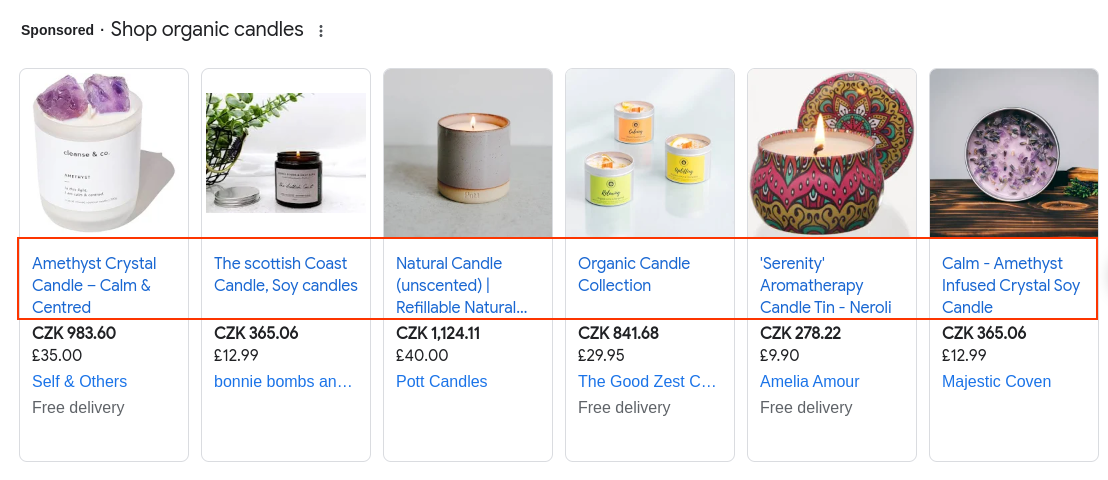 ](https://www.mergado.com/sites/default/files/perm/paragraph-image/title-google-feed-mergado-en-.png) If the product has unique features, highlight them in the headline.
Don’t be afraid to **test different variations** of product names and see which ones work best. Google Ads offers split testing so you can compare the performance of different versions of the names.
### What to avoid
**Advertising language does not belong in the title**. Choosing the right keywords that customers are searching for should be enough on its own to ensure that your products show up in relevant results.
## 2. GTIN (UPC) and product identification
The GTIN (formerly EAN) or UPC is probably **the most common product identifier** used in [Google Shopping](https://shopping.google.com/). In Europe, it is a 13-digit code, in North America it is known as UPC and has a 12-digit number. GTINs are usually supplied by the manufacturer. Although the GTIN is no longer a mandatory attribute for all categories, it is worth the time and effort. It plays an important role in optimising your ads.
### What you should know about GTINs (UPC):
- Including a GTIN in your ads can help you **improve the quality and relevance** of your **ad** **campaigns**. Google uses GTIN information to better rank your product ads in relevant user searches, which can **improve the effectiveness** of your campaigns.
- **Every new product should have a unique GTIN identifier**. Duplicate or invalid GTINs can lead to problems with search and ad serving.
- It is important to ensure that the GTINs listed are correct and up to date. If the GTIN identifier for your products changes, you should **update it in your data as soon as possible**.
### What to do if I have no GTIN (UPC)
Some products (e.g. second-hand, handmade or custom-made items) **do not have a GTIN** and therefore do not need to be listed. However, if a product has a GTIN and you do not enter it, you may be rejected.
Google requires you to provide **at least 2 of the 3 identifiers** for each product. If you do not have a GTIN, you must add the [\[brand\]](https://support.google.com/merchants/answer/6324351) and [\[mpn\]](https://support.google.com/merchants/answer/6324482) attributes. If your products have **only one or no identifier**, you must add the **g:identifier\_exists** element to each product and **populate it with the value false** (alternatively, the value *no* works as well). In MERGADO, you can use the [*Rewrite*](https://forum.mergado.com/t/rewrite/491) rule for this kind of feed editing. We describe how to do this in the article about [missing identifiers](https://www.mergado.com/blog/missing-identifiers-in-the-google-feed) and in the article about [7 common Google Shopping feed flaws](https://www.mergado.com/blog/main-google-shopping-feed-issues).
## 3. State actual colours
Do you also have a friend who wears only black T‑shirts? Comply with your customers’ wishes (and their favorite colors).
Until recently, it was **good old-fashioned marketers’ practice to “flatten” colours in campaigns**. Instead of olive, marketers opted for green, salmon became pink and brick was simply orange. Today, it’s **best to avoid that**. Google **crawls the product landing page** and **compares it to the product feed information**. If the colors don’t match, it may not approve your ad.
[ 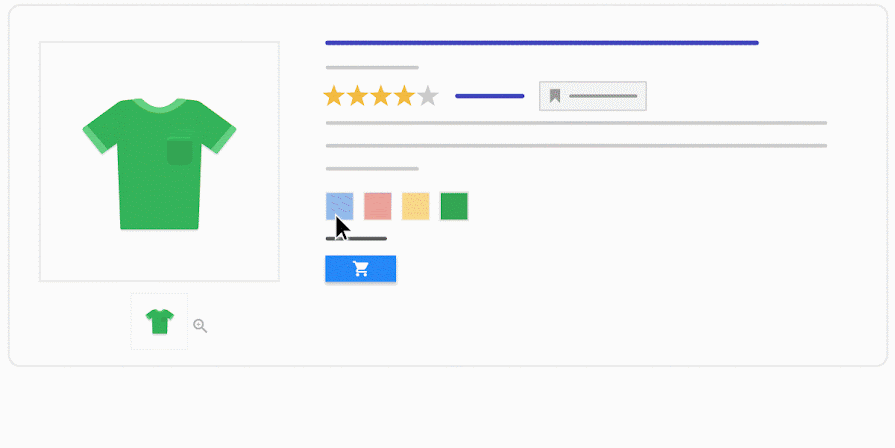 ](https://www.mergado.com/sites/default/files/perm/paragraph-image/google-optimalizace.png) Use the same colours as you have on the website. Source: Google
## 4. Don’t mess up your conversions with bad image
Did you know that [75 % of online shoppers](https://blog.wishpond.com/post/115675437985/retailers-marketing-strategy#:~:text=Did%20you%20know%20that%2075,professional%20images%20of%20your%20products.) base their purchasing decisions on product images? That’s enough to make product images your priority, don’t you think?
### How to images that make a profit
- Use only high-quality images that are also responsive for mobile devices.
- Make sure that the different product variants match the images (colour, size, material, etc.).
- Remove excess text (watermarks, sales, part numbers).
If you are still editing product images manually, we recommend that you leave this to the AI. Try the[ Feed Image Editor](https://www.feed-image-editor.com/). It can edit thousands of images in seconds. This smart tool **removes watermarks, backgrounds or adds graphic elements in bulk**. It’s **free to try for the first 30 days**.
 Run a free Image Audit
- automatic product image check
- avoid rejecting your advertisement on comparison engines
[Try Image Audit](https://audit-obrazku.cz/)

## 5. Use custom labels
Google allows you to create up to **5 custom labels** for each product. How does it work? In [Google feed](https://shopping.google.com/?nord=1), you use labels to add unique information to a product that customers won’t see anywhere else. **This sorts your goods by specific attributes,** such as PNO, seasonality, margin or best-selling products. You then set up campaigns with the added labels in mind.
[  ](https://www.mergado.com/sites/default/files/perm/paragraph-image/custom-labels.png) An example of what custom labels can look like.
Forget about manual labelling of products in spreadsheet editors. Go **automated** and edit your product information **in bulk** in [MERGADO](https://app.mergado.com/). It will make many common and specific tasks easier for you when advertising online. Get inspired by the article [How to streamline Google Shopping campaigns using custom\_label](https://www.mergado.com/blog/google-campaigns-custom-label).
## 6. No more manual PPC ads
The days of manually setting up PPC campaigns are over. **Save yourself time** when **creating ads in Google Ads**. We have a tip for you on an application that can create classic product and category campaigns for online stores, as well as “no cart” pages, i.e. magazine articles, product catalogue pages, holiday pages, etc. This is the [PPC Wolf](https://www.mergado.com/blog/ppc-wolf-app-introduction) app, which you can also[ **try for 30 days for free**](https://store.mergado.com/detail/ppcwolf/#about).
[  ](https://www.mergado.com/sites/default/files/perm/paragraph-image/ppc_wolf_app.png) The PPC Wolf app saves time when creating PPC ads.
A detailed introduction to the application and an explanation of its principles is given in the article [No more manual PPC ads for Google Ads and Sklik. Save time with PPC Wolf](https://www.mergado.com/blog/ppc-wolf-app-introduction)
## 7. Magic with regular expressions
Want to make your job easier when searching for product groups and editing them? Learn how to work with **regular expressions**. It won’t take you long to understand their rules, and you’ll get a **handy text-based helper** that works based on certain syntactic rules. In general, you can use it when working with Excel, programming on different platforms, applications or even in Google Sheets.
The regular expressions will **save you a lot of time when editing data in bulk**. They are used when searching for text that consists of simple tags such as a period, asterisk, question mark or plus symbol.
[ 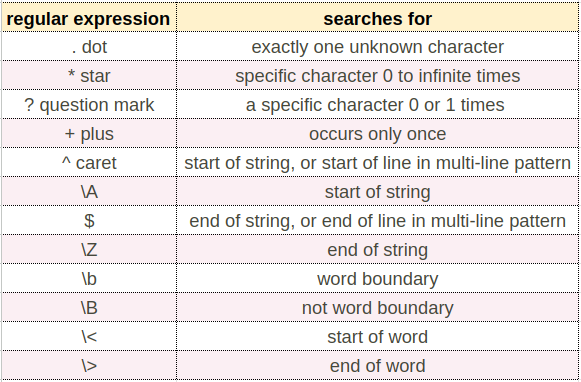 ](https://www.mergado.com/sites/default/files/perm/paragraph-image/regular-expressions.png) At first glance a complex combination of characters, at second glance an invaluable helper. These are the regulators.
Don’t be afraid to use the regex to edit your **Google product feeds**. You’ll appreciate their handiness when **searching for and replacing duplicate words, fixing multiple sizes at once, or even just removing too many spaces between words**. We regularly provide free [training](https://www.mergado.com/webinars) on how to use regulars when working with product feeds.
## 8. How to clean your data
**Feed cleaning and auditing** are key to achieving high quality and efficiency in your product feeds and advertising campaigns. By keeping your data feed clean and up-to-date, you i**mprove ad performance, reduce costs and increase your chances of success** in an increasingly competitive online marketing environment.
If you want to make checking your feed easier and faster, we recommend using our **free tool** to audit your product data.
### Check the status of your feed as follows:
1. Check out our [Audit feed](https://audit.mergado.com/).
2. Enter the **feed URL** in the form and **select the format** you want to check the feed against.
3. Enter the **email address** where the MERGADO app will send the results, agree to the terms and start the audit.
4. MERGADO Audit will **process your feed, find errors in it and recommend improvements**.
5. It will send an **email** to the address you provide with a **link to the audit results**.
 Run a free Feed Audit
- improve the condition of your feed and get recommendations for its adjustment
- fast and free technical analysis
[Try Feed Audit](https://audit.mergado.com/)

There’s not just one way to make your [Google Merchant Centre](https://www.google.com/retail/solutions/merchant-center/) sales successful. What you can’t do without in any case, though, is a well-set up product feed. Try our 8 tips for optimizing your data and move towards a more converting future.
## Read more:
[ 
### Do you want successful PMax campaigns? The key lies in data and proper preparation
](https://www.mergado.com/blog/pmax-campaigns-guide)
[ 
### Beyond average: Ultimate guide on how to tune your Google Shopping feed
](https://www.mergado.com/blog/quality-feed-google-shopping)
[ 
### 21 best platforms for expansion in CEE countries
](https://www.mergado.com/blog/comparison-engines-marketplaces-2025)
- [ Google Shopping ](https://www.mergado.com/topic/google-shopping)
- [ Google Ads and MERGADO ](https://www.mergado.com/tema/google-ads)
[  ](https://www.mergado.com/blog/veronika-kusalikova)### [ Veronika Kusalíková ](https://www.mergado.com/blog/veronika-kusalikova)
A copywriter and content specialist Veronika is in charge of the English content and communication. She spreads the word about Mergado and e‑commerce on our blog and social media. After she shuts her computer down, you can catch her knitting a sweater, strolling around second-hand shops or traveling.
## What you *might be interested in next*
[ 
### What should a proper client context look like for performance specialists?
](https://www.mergado.com/blog/master-prompt-eshopy-b2c)
[ 
### How to Sell Successfully on idealo
](https://www.mergado.com/blog/successful-sale-on-idealo)
[ 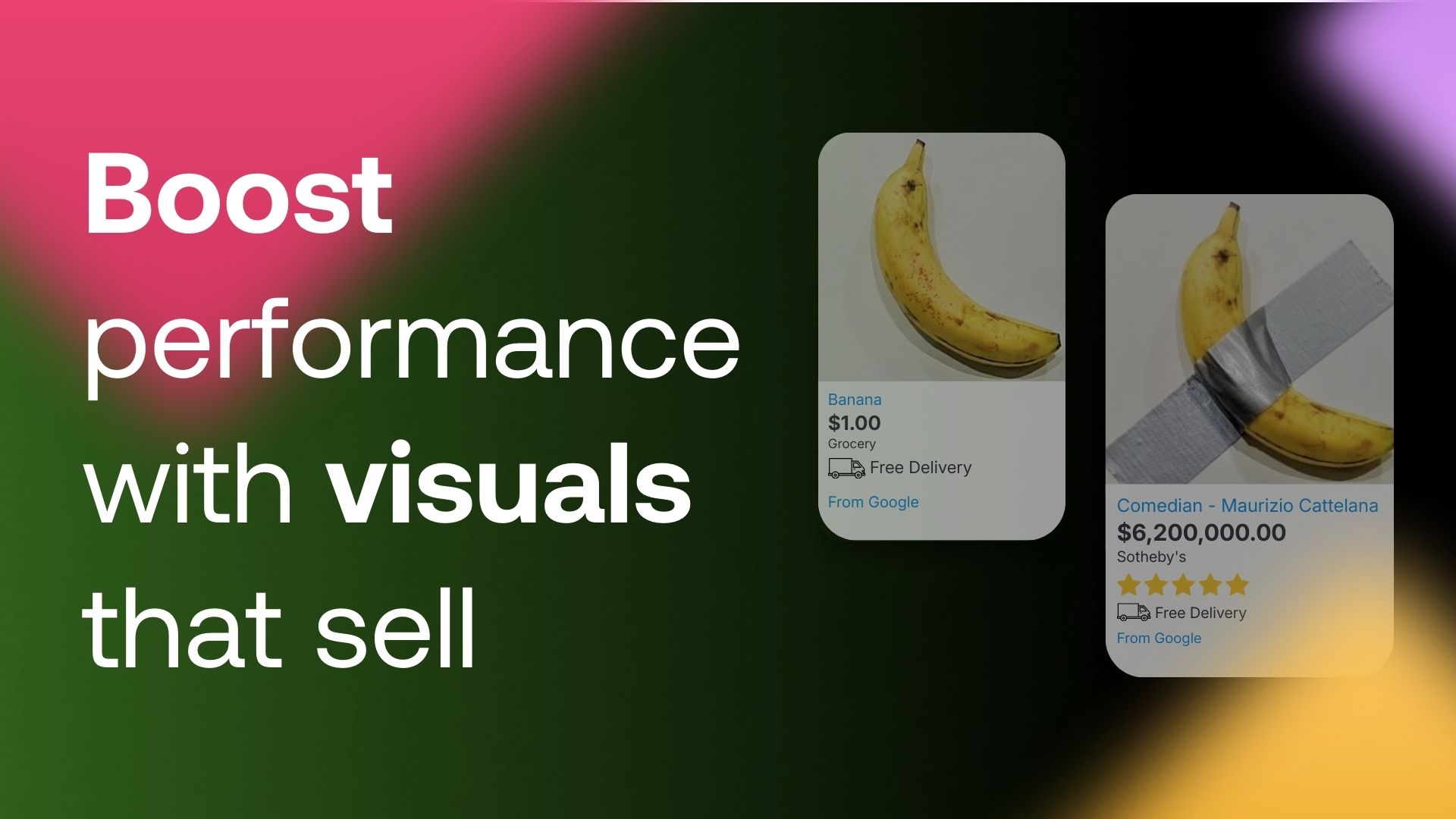
### **How to Boost Banner Performance Without Increasing Your Budget: 6 Practical Tips**
](https://www.mergado.com/blog/creative-wins)
## Don’t miss *anything*
Sign up for our newsletter
By logging in, you agree that we will process your data by the [terms of personal data protection](https://www.mergado.com/cookies).
Thank you, you have successfully joined our subscriber's list.
function ml_webform_success_5807248() {
var r = ml_jQuery || jQuery
r('.ml-subscribe-form-5807248 .row-success').show(), r('.ml-subscribe-form-5807248 .row-form').hide()
}