- [Case Studies](https://www.mergado.com/category/case-studies)
- [eCommerce tips](https://www.mergado.com/category/ecommerce-tips)
- [Online Store Solutions and Platforms](https://www.mergado.com/category/online-store-solutions-and-platforms)
- [Mergado Pack](https://www.mergado.com/category/mergado-pack)
- [Mergado tips](https://www.mergado.com/category/mergado-tips)
- [Mergado News](https://www.mergado.com/category/mergado-news)
- [eCommerce News](https://www.mergado.com/category/ecommerce-news)
- [How to use Mergado](https://www.mergado.com/category/how-to-use-mergado)
- [Interviews with e‑commerce gurus](https://www.mergado.com/category/interviews-e-commerce-gurus)
- [Extensions](https://www.mergado.com/category/apps-bidding-image-marketing-and-more)
- [Expansion with Mergado](https://www.mergado.com/category/expansion-with-mergado)
- [Mergado Lifestyle](https://www.mergado.com/category/mergado-lifestyle)
1. [ Home ](https://www.mergado.com/)
2. [ Mergado Blog ](https://www.mergado.com/blog)
3. [ How to use Mergado ](https://www.mergado.com/category/how-to-use-mergado)
4. **How to use AI to manage data in MERGADO**
# **How to use AI to manage data in MERGADO**
[  Veronika Kusalíková ](https://www.mergado.com/blog/veronika-kusalikova) [How to use Mergado](https://www.mergado.com/category/how-to-use-mergado)
25. 5. 2023
5 minutes read

Keeping up with AI pays off in e‑commerce. In many cases, it can **simplify your work** and **save you time**, but it can also **make your advertising more precise** and bring you more profits. See how you can use AI to work with MERGADO right now.
function tableOfContents() {
return {
headings_menu: [],
heading_active: '', // Added to track the active section
shouldBeSticky: false,
generateToC() {
const headings = document.querySelectorAll('.js-article-full-headings h2, .js-article-full-headings h3');
let headingMap = {};
headings.forEach((heading) => { // Use an arrow function to maintain `this` context
// Normalize heading text to remove diacritics, then replace non-alphanumeric characters with dashes
var normalizedText = heading.textContent.normalize("NFD").replace(/[\u0300-\u036f]/g, ""); // Remove diacritics
var id = heading.id ? heading.id : normalizedText.trim().toLowerCase()
.split(' ').join('-').replace(/[^a-z0-9\-]/ig, ''); // Updated regex to replace non-alphanumeric characters
headingMap[id] = headingMap[id] !== undefined ? ++headingMap[id] : 0;
// Use the updated `id` with diacritics removed for the heading id and the TOC
const finalId = headingMap[id] ? `${id}-${headingMap[id]}` : id;
this.headings_menu.push({
id: finalId,
title: heading.textContent,
level: heading.tagName.toLowerCase(), // Track heading level
active: false, // Initially set active to false
});
heading.id = finalId;
});
},
checkStickyNeeded() {
const ul = this.$el.querySelector('ul');
if (ul) {
this.shouldBeSticky = ul.scrollHeight < window.innerHeight;
}
},
setActiveHeading() {
// disabled not working with active state on click
// add @scroll.window="setActiveHeading()" to the parent div
// const headings = document.querySelectorAll('.js-article-full-headings h2');
// let activeHeading = '';
// let closestHeadingDistance = Infinity;
// headings.forEach((heading) => {
// const rect = heading.getBoundingClientRect();
// const offset = rect.top - window.innerHeight / 2; // Consider heading in the middle of the screen as active
// if (offset < 0 && Math.abs(offset) < closestHeadingDistance) {
// activeHeading = heading.id;
// closestHeadingDistance = Math.abs(offset);
// }
// });
// // Update the active state in headings_menu
// if (activeHeading !== this.heading_active) {
// this.headings_menu = this.headings_menu.map(item => ({
// ...item,
// active: item.id === activeHeading,
// }));
// this.heading_active = activeHeading;
// }
},
setActiveItem(clickedId) {
this.headings_menu.forEach(item => {
item.active = (item.id === clickedId);
});
this.heading_active = clickedId; // Optionally update the heading_active property if used
},
};
}
1. —
Keeping up with **AI** pays off in e‑commerce. In many cases, it can **simplify your work** and **save you time**, but it can also **make your advertising more precise** and bring you **more profits**. See how you can use AI to work with MERGADO right now.
 Mergado with a 30-day free trial
- optimize your feed by yourself and save the cost for the developer’s time
- full access to all features already in the trial version
[Try Mergado for free](https://accounts.mergado.com/register/)

Artificial Intelligence (AI) is currently one of the most important and debated topics in technology, but also in **e‑commerce**. With the help of AI-enabled product data management tools, e‑commerce businesses can **automate tasks** such as data entry, product categorization and attribute mapping, saving them significant time. AI can also help businesses identify and resolve product data issues, such as missing or incorrect data, and optimize product descriptions and names for better visibility in search engines.
## AI and MERGADO System
Whether you’re removing watermarks and backgrounds from product images in [Feed Image Editor](https://store.mergado.com/detail/feedimageeditor/#about), pulling information from the web with [Scraping Camel](https://store.mergado.com/detail/scrapingcamel/#about), or merging categories in MERGADO Editor, **you’re using AI without probably realizing it**. In fact, we’ve been working with AI at MERGADO since 2017. Let’s show you where AI is already helping you and where it’s just waiting to be discovered.
## Create rules with ChatGPT
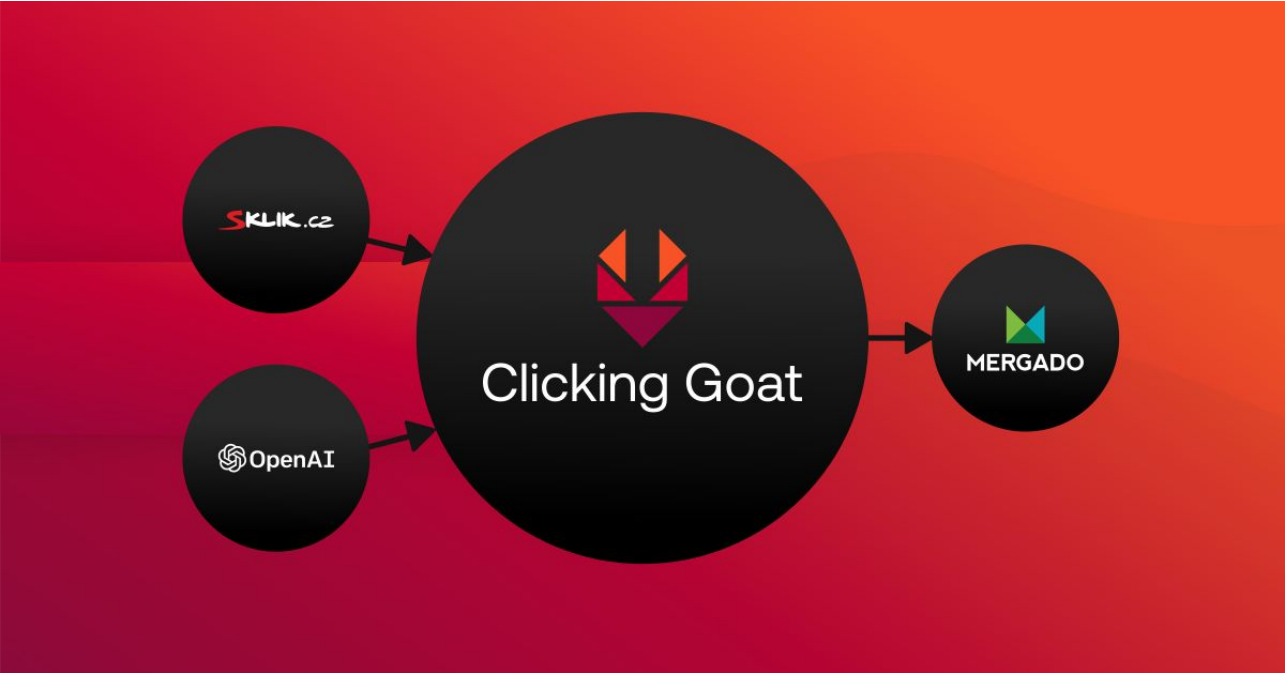
One example of where we work with AI is the [Clicking Goat](https://store.mergado.com/detail/clickinggoat/) app. It allows you to write data from an external data source to an export in the MERGADO Store. Until now, you could only use one data source, which was the PPC system **Sklik**. This was connected to Clicking Goat via API and then allowed the user to enter the average click price or average keyword search rate into the export. Now you can choose **ChatGPT** as another data source, which opens up a lot of interesting possibilities to delegate your work to AI.
[  ](https://www.mergado.com/sites/default/files/perm/paragraph-image/clicking_goat_ai.png)
### What will you use OpenAI for in Clicking Goat?
You have **several options for delegating work to a chatbot**. You can use OpenAI to **generate the text of product descriptions**, **to sort products** (or keywords) **into categories**, to **translate text** into a foreign language (it can also process text in different languages) or to **extract parameters from text**.
The OpenAI setup is similar to Sklik. You put your API key into the data source settings and then create rules. As with Sklik, the connection works by having Clicking Goat load the input data after the first export is processed in the MERGADO Editor. The OpenAI API then queries the results. On each subsequent re-generation, it writes the obtained results. It keeps these in memory and does not ask for the same input repeatedly.
The OpenAI/GPT API responses vary in speed and the speed varies throughout the day. Sometimes they can be very slow and take longer to process data.
[ 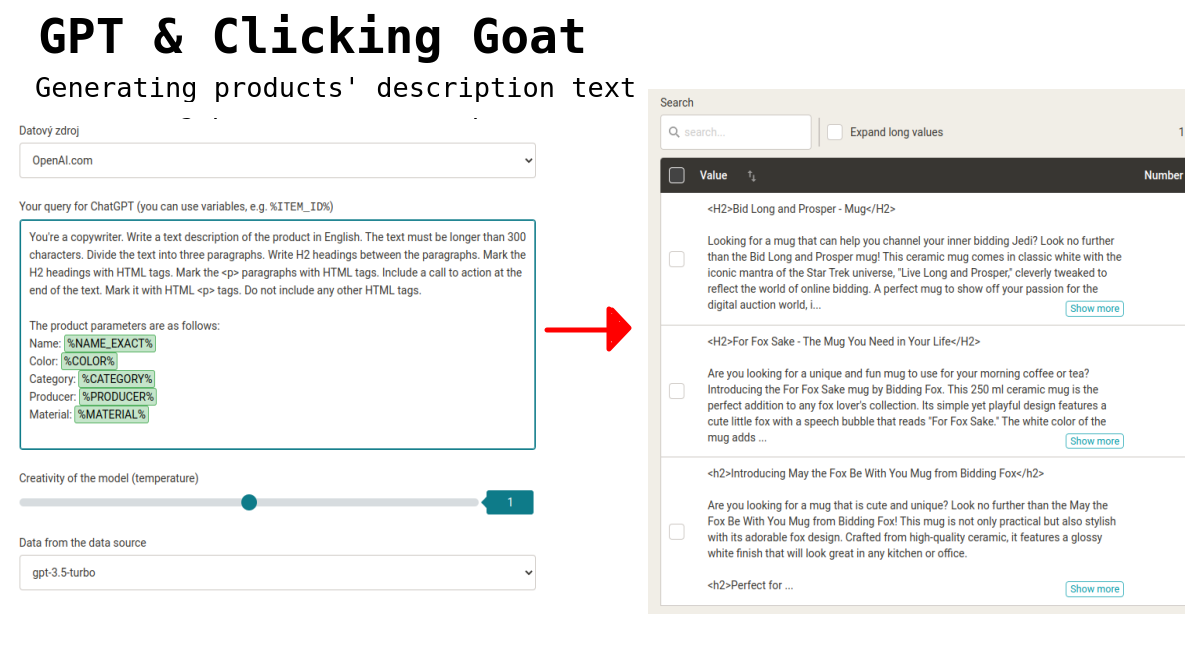 ](https://www.mergado.com/sites/default/files/perm/paragraph-image/chatgpt-clicking-goat.png) Example of using ChatGPT to generate product descriptions
### How do I start using ChatGPT in Clicking Goat?
1. If you don’t have the app yet, **activate** it in the MERGADO Store.
2. Then **create an account** in the [OpenAI administration](https://auth0.openai.com/u/login/identifier?state=hKFo2SBRM3VHcWJTejlranpuYWcycTJqQ0QxejBrYk1sOEpSM6Fur3VuaXZlcnNhbC1sb2dpbqN0aWTZIEphajFiRkRiYmZ5LXJHdnZZeW1SZUFkMlNTTzNOc1ZFo2NpZNkgRFJpdnNubTJNdTQyVDNLT3BxZHR3QjNOWXZpSFl6d0Q).
3. Create an [API key](https://platform.openai.com/account/api-keys) in the OpenAI administration.
4. Don’t forget to **set your $ spending limits** in OpenAI.
5. **Insert the OpenAI API key** into the Clicking Goat app.
6. In Clicking Goat, **create the element(s)**, test the prompts directly in the Clicking Goat interface or in the [sandbox](https://platform.openai.com/playground).
7. Check the **results**.
8. **Use** them in the MERGADO Editor.
## Have ChatGPT generate regular expressions
[Regular expressions](https://forum.mergado.com/t/basic-overview-of-regular-expression-tags/756) are a handy tool that helps you search or replace text and filter data in text or code. They’re basically **useful shortcuts for a lot of different commands, requirements, and rules** that you would otherwise have to deal with in many steps.
But the truth is that it can also be a long slog to find the correct form of a regular expression. Or at least it had been like that until we discovered a clever helper. **ChatGPT**.
Our support specialist Ludek has been chatting with ChatGPT about regular expressions for a while now. He has tested what ChatGPT can help you with, and what it is still short on. What is Ludek’s verdict?
The good news is that ChatGPT can really help you with regular expressions. For one thing, it explains nicely what each tag means, and if you give it **a clear enough input**, it will **generate the regular expression itself** without any problem.
We started the conversation gently and asked the chatbot to explain the meaning of the basic regular expressions in general. You can take a look at the picture to see how he did it.
[ 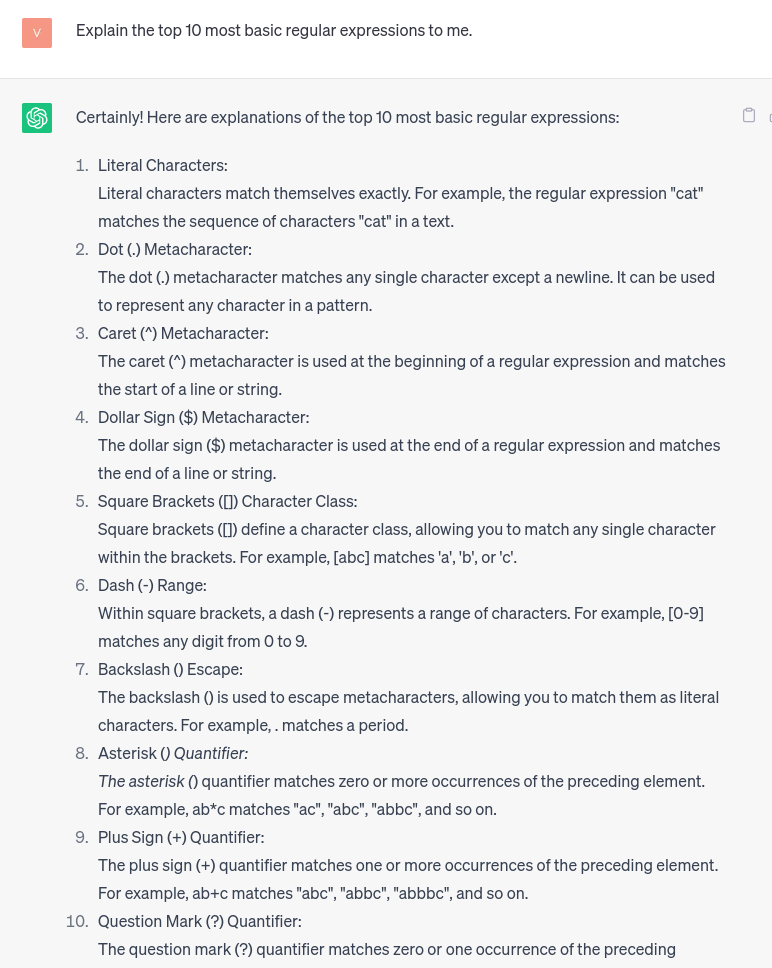 ](https://www.mergado.com/sites/default/files/perm/paragraph-image/basic-regex-chatgpt.png) Overview of basic regular expressions from ChatGPT
After ChatGPT generated a list of basic regular expressions, we asked it to generate **an expression that finds the number at the end of the string**. It made it **without any problems**.
[ 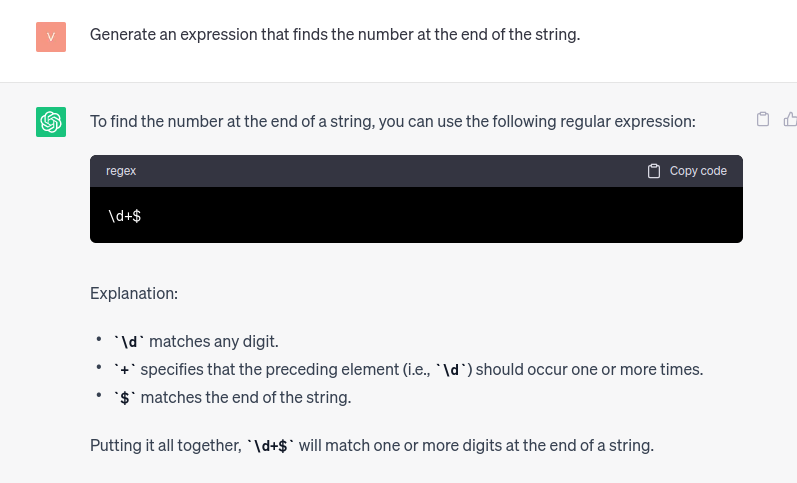 ](https://www.mergado.com/sites/default/files/perm/paragraph-image/regex-chatgpt-string.png) The regular expression that finds the number at the end of the string was easily generated by ChatGPT
We decided to test its capabilities on more challenging examples. We asked it for a regular expression that would **remove all the colors** in our sample data. ChatGPT also handled this task nicely and actually **provided us with a regular expression** with which to remove the colors.
[ 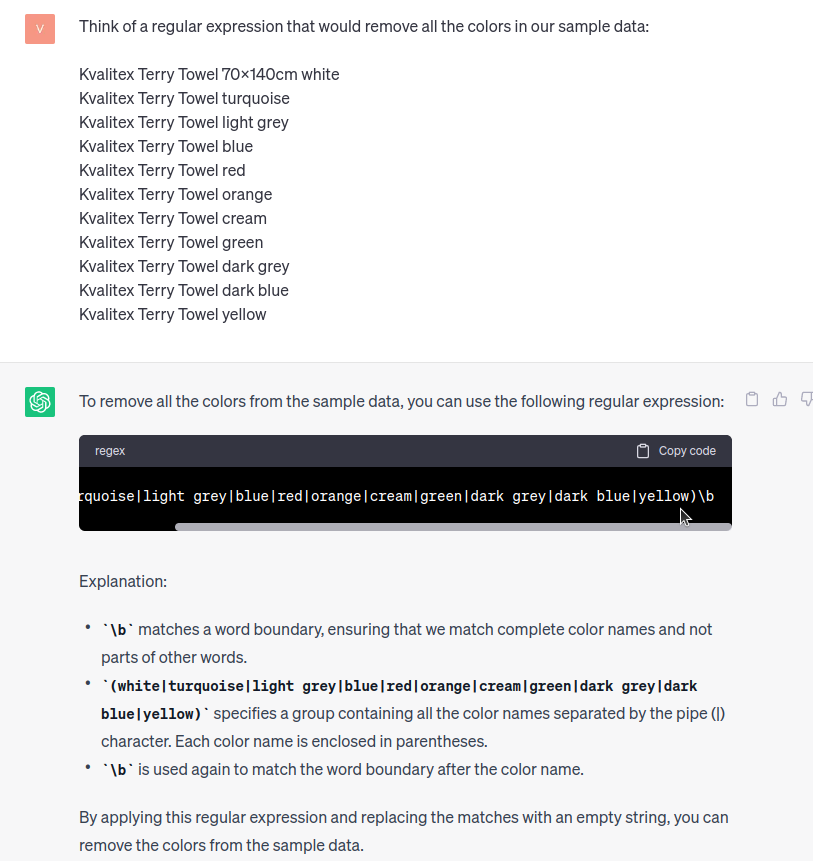 ](https://www.mergado.com/sites/default/files/perm/paragraph-image/remove-colors-chatgpt.png) He also had no trouble removing the paint
### Trust but clarify the chatbot
ChatGPT has proven to be a good helper in creating regexes. ChatGPT has proven to be a good assistant in creating regexes. However, it is not flawless, so don’t rely on it 100%. What’s worked for us is to be **as specific as possible**. You can’t go wrong by giving the chatbot an **example** of what you want it to do either. Don’t be afraid to have a dialogue with it and to specify your request. And finally, don’t forget to check the correctness of the regex, whether created by you or the chatbot, on e.g. the aforementioned [Regex101](https://regex101.com/).
## Download entire website into one CSV
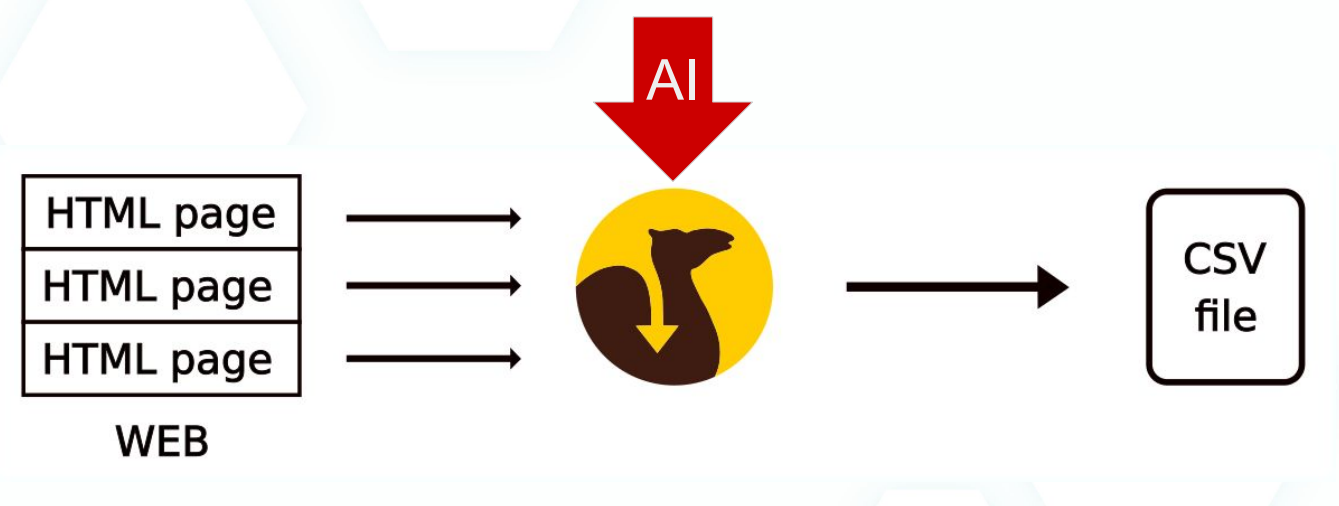
Another **smart** app we recommend you start using is [Scraping Camel](https://store.mergado.com/detail/scrapingcamel/#about). This app crawls the pages of your website, saves the necessary information, and then creates a CSV file from it. You’ll use this for both automating ad creation and analyzing the site itself. Thanks to AI, Scraping Camel can count words on sites or generate **keywords**.
[  ](https://www.mergado.com/sites/default/files/perm/paragraph-image/scraping_camel_ai.png)
### How to enable Scraping Camel AI?
1. **Activate** the application in the MERGADO Store.
2. Create a web page and **enable AI elements** (e.g. SC\_WORDS\_AGG\_MIN\_FREQ\_3 or SC\_NUMBER\_OF\_WORDS).
3. Create your **first keyword analysis**.
Whether you’re actively using AI tools or are just getting started, in this article we’ve shown you how to use **AI** in the **MERGADO System** today. AI opens the door to faster bulk data editing, which is why its benefits are worth leveraging for your business. What are other ways to use AI to manage your data? We’ll explore that in future articles!
## Read more:
[ 
### How We Migrated an E‑Shop from Shoptet to Shopify with Mergado: A Complete Migration Without Data Loss
](https://www.mergado.com/blog/how-we-migrated-e-shop-shoptet-shopify-mergado-complete-migration-without-data-loss)
[ 
### How to open large XML file
](https://www.mergado.com/blog/how-to-open-large-xml-file)
[ 
### Introducing smart value insertion. It will speed up the creation of bulk rules
](https://www.mergado.com/blog/smart-value-insertion)
- [ AI ](https://www.mergado.com/tema/ai)
[  ](https://www.mergado.com/blog/veronika-kusalikova)### [ Veronika Kusalíková ](https://www.mergado.com/blog/veronika-kusalikova)
A copywriter and content specialist Veronika is in charge of the English content and communication. She spreads the word about Mergado and e‑commerce on our blog and social media. After she shuts her computer down, you can catch her knitting a sweater, strolling around second-hand shops or traveling.
## What you *might be interested in next*
[ 
### How We Migrated an E‑Shop from Shoptet to Shopify with Mergado: A Complete Migration Without Data Loss
](https://www.mergado.com/blog/how-we-migrated-e-shop-shoptet-shopify-mergado-complete-migration-without-data-loss)
[ 
### How to open large XML file
](https://www.mergado.com/blog/how-to-open-large-xml-file)
[ 
### Introducing smart value insertion. It will speed up the creation of bulk rules
](https://www.mergado.com/blog/smart-value-insertion)
## Don’t miss *anything*
Sign up for our newsletter
By logging in, you agree that we will process your data by the [terms of personal data protection](https://www.mergado.com/cookies).
Thank you, you have successfully joined our subscriber's list.
function ml_webform_success_5807248() {
var r = ml_jQuery || jQuery
r('.ml-subscribe-form-5807248 .row-success').show(), r('.ml-subscribe-form-5807248 .row-form').hide()
}