- [Case Studies](https://www.mergado.com/category/case-studies)
- [eCommerce tips](https://www.mergado.com/category/ecommerce-tips)
- [Online Store Solutions and Platforms](https://www.mergado.com/category/online-store-solutions-and-platforms)
- [Mergado Pack](https://www.mergado.com/category/mergado-pack)
- [Mergado tips](https://www.mergado.com/category/mergado-tips)
- [Mergado News](https://www.mergado.com/category/mergado-news)
- [eCommerce News](https://www.mergado.com/category/ecommerce-news)
- [How to use Mergado](https://www.mergado.com/category/how-to-use-mergado)
- [Interviews with e‑commerce gurus](https://www.mergado.com/category/interviews-e-commerce-gurus)
- [Extensions](https://www.mergado.com/category/apps-bidding-image-marketing-and-more)
- [Expansion with Mergado](https://www.mergado.com/category/expansion-with-mergado)
- [Mergado Lifestyle](https://www.mergado.com/category/mergado-lifestyle)
1. [ Home ](https://www.mergado.com/)
2. [ Mergado Blog ](https://www.mergado.com/blog)
3. [ How to use Mergado ](https://www.mergado.com/category/how-to-use-mergado)
4. **Find out what’s new in Mergado 2. How does the tabular view make your work more efficient?**
# **Find out what’s new in Mergado 2. How does the tabular view make your work more efficient?**
[  Petra Marková ](https://www.mergado.com/blog/petra-markova) [How to use Mergado](https://www.mergado.com/category/how-to-use-mergado)
26. 8. 2022
3 minutes read
[Mergado 2](https://www.mergado.com/blog/introducing-mergado-2) introduces **major changes** to the core and UI of our editor. The new range of tools is most visible on the Products page, where you’ll find an **improved tabular display** of elements. Learn what functions we have added and how to use them.
function tableOfContents() {
return {
headings_menu: [],
heading_active: '', // Added to track the active section
shouldBeSticky: false,
generateToC() {
const headings = document.querySelectorAll('.js-article-full-headings h2, .js-article-full-headings h3');
let headingMap = {};
headings.forEach((heading) => { // Use an arrow function to maintain `this` context
// Normalize heading text to remove diacritics, then replace non-alphanumeric characters with dashes
var normalizedText = heading.textContent.normalize("NFD").replace(/[\u0300-\u036f]/g, ""); // Remove diacritics
var id = heading.id ? heading.id : normalizedText.trim().toLowerCase()
.split(' ').join('-').replace(/[^a-z0-9\-]/ig, ''); // Updated regex to replace non-alphanumeric characters
headingMap[id] = headingMap[id] !== undefined ? ++headingMap[id] : 0;
// Use the updated `id` with diacritics removed for the heading id and the TOC
const finalId = headingMap[id] ? `${id}-${headingMap[id]}` : id;
this.headings_menu.push({
id: finalId,
title: heading.textContent,
level: heading.tagName.toLowerCase(), // Track heading level
active: false, // Initially set active to false
});
heading.id = finalId;
});
},
checkStickyNeeded() {
const ul = this.$el.querySelector('ul');
if (ul) {
this.shouldBeSticky = ul.scrollHeight < window.innerHeight;
}
},
setActiveHeading() {
// disabled not working with active state on click
// add @scroll.window="setActiveHeading()" to the parent div
// const headings = document.querySelectorAll('.js-article-full-headings h2');
// let activeHeading = '';
// let closestHeadingDistance = Infinity;
// headings.forEach((heading) => {
// const rect = heading.getBoundingClientRect();
// const offset = rect.top - window.innerHeight / 2; // Consider heading in the middle of the screen as active
// if (offset < 0 && Math.abs(offset) < closestHeadingDistance) {
// activeHeading = heading.id;
// closestHeadingDistance = Math.abs(offset);
// }
// });
// // Update the active state in headings_menu
// if (activeHeading !== this.heading_active) {
// this.headings_menu = this.headings_menu.map(item => ({
// ...item,
// active: item.id === activeHeading,
// }));
// this.heading_active = activeHeading;
// }
},
setActiveItem(clickedId) {
this.headings_menu.forEach(item => {
item.active = (item.id === clickedId);
});
this.heading_active = clickedId; // Optionally update the heading_active property if used
},
};
}
1. —
[Mergado 2](https://www.mergado.com/blog/introducing-mergado-2) introduces **major changes** to the core and UI of our editor. The new range of tools is most visible on the Products page, where you’ll find an **improved tabular display** of elements. Learn what functions we have added and how to use them.
## Improve your product overview
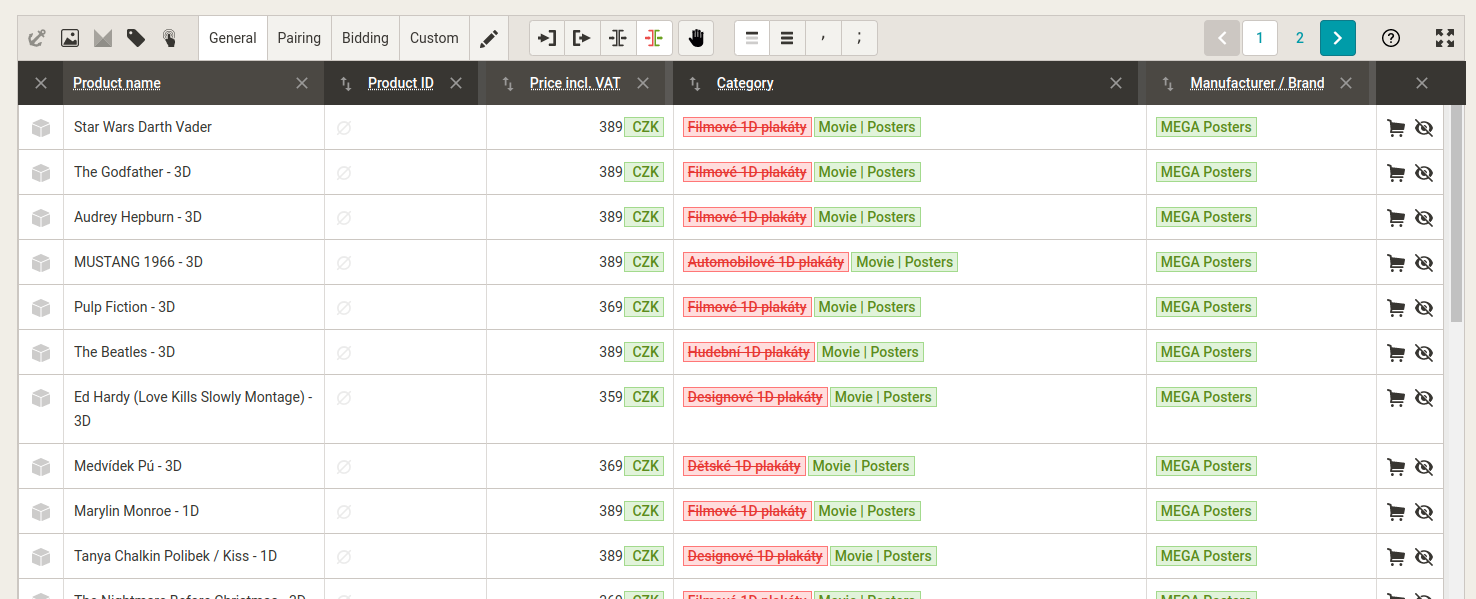
- A completely new and elaborate table **corresponds to the standard of Google Sheets or Excel**. Marketers and online store operators who use them daily can now find this option in Mergado. Compared to the original version, it is **clearer**, and you can perform all the basic operations in a few clicks.
- The table displays data similarly to, for example, a **CSV feed** — one line is one product, and one column is one element.
- At the same time, the tabular view **expands product control**. You can work with predefined groups of elements suitable for *bidding*, *pairing products*, or *defining your own combination of elements* using the **Custom** element. You can also choose which groups of elements you need.
- The table can now also **work with parameters and attributes**.
- By choosing a specific query, you can **dynamically change** which products the data is displayed for. You can see if the value of a product does not match, for example, the number of characters or if the value is missing somewhere.
Do you have a group of elements that we could **define and save** similar to, for example, a bidding or pairing group? Write it to [our forum](https://forum.mergado.com/tag/mergado-2). We will be happy to consider it and add it to Mergado.
[  ](https://www.mergado.com/sites/default/files/perm/paragraph-image/new-tabular-view.png)
### What’s in the new toolbar?
1\. Icons for **special columns** (anchor, image, Mergado ID, Product Name, Product Action).

2\. Bookmarks for **presets** (pairing, bidding, and others) + **own preset** see. below.

3\. Block of icons for setting **the input and output values** display (display only input/output, both, changes).
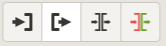
4\. Icon for enabling **manual changes in columns**.

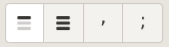
5\. Icon block for **display settings regarding multiple values** (first, one value per line, value separator selection).
6\. **Paging** (also used by the current Mergado, just in a different place).

7\. The icon for switching to **fullscreen** (the current Mergado also has it).

### In the header, you can find:
- icon for the **sorting** option (not for special columns)
- tweaks to **display EP info column title**
- cross for **temporarily hiding the column** (temporary = disappears if, for example, the page is refreshed or the preset is changed and does not affect the saved own preset)
###
We have improved the display of the table
We have changed the display so that it **corresponds to the standards of spreadsheet editors** (for example, from Google Sheets or Excel):
- **input is always on the left, output on the right**
- you can view different values
- numerical values are aligned **to the right** (ID, prices, etc.)
- the bordered differences between columns and cells are **more visible**
- new option to lock columns with special columns
- the cursor behaves like in Excel
- keyboard controls remain the same as in the current Mergado
### How does a custom preset work?
- it is an element path list
- in the drop-down list next to the tab for your own preset, you can set **which columns will be displayed**
- **preset is saved for each user**
- change order via drag and drop
 Mergado with a 30-day free trial
- optimize your feed by yourself and save the cost for the developer’s time
- full access to all features already in the trial version
[Try Mergado for free](https://accounts.mergado.com/register/)

*Mergado 2* brings **simpler advertising management and acceleration of important functions**. Wondering what the difference is between the current and the new version? Read the [introductory article](https://www.mergado.com/blog/introducing-mergado-2).
### Read more:
[ 
### What should a proper client context look like for performance specialists?
](https://www.mergado.com/blog/master-prompt-eshopy-b2c)
[ 
### How Feed Optimization Unlocked Meta Ads Performance without Increasing Ad Spend
](https://www.mergado.com/blog/feed-optimization-for-meta-ads)
[ 
### How to Sell Successfully on idealo
](https://www.mergado.com/blog/successful-sale-on-idealo)
[  ](https://www.mergado.com/blog/petra-markova)### [ Petra Marková ](https://www.mergado.com/blog/petra-markova)
With her melodious Slovak language skills, copywriter Petra takes care of the Slovak market. She texts, blogs, translates and passionately creates content on social networks. And when she’s not looking for the right words, she dedicates time to her residential jungle, baking, cafes, or traveling.
## What you *might be interested in next*
[ 
### How We Migrated an E‑Shop from Shoptet to Shopify with Mergado: A Complete Migration Without Data Loss
](https://www.mergado.com/blog/how-we-migrated-e-shop-shoptet-shopify-mergado-complete-migration-without-data-loss)
[ 
### How to open large XML file
](https://www.mergado.com/blog/how-to-open-large-xml-file)
[ 
### Introducing smart value insertion. It will speed up the creation of bulk rules
](https://www.mergado.com/blog/smart-value-insertion)
## Don’t miss *anything*
Sign up for our newsletter
By logging in, you agree that we will process your data by the [terms of personal data protection](https://www.mergado.com/cookies).
Thank you, you have successfully joined our subscriber's list.
function ml_webform_success_5807248() {
var r = ml_jQuery || jQuery
r('.ml-subscribe-form-5807248 .row-success').show(), r('.ml-subscribe-form-5807248 .row-form').hide()
}