- [Case Studies](https://www.mergado.com/category/case-studies)
- [eCommerce tips](https://www.mergado.com/category/ecommerce-tips)
- [Online Store Solutions and Platforms](https://www.mergado.com/category/online-store-solutions-and-platforms)
- [Mergado Pack](https://www.mergado.com/category/mergado-pack)
- [Mergado tips](https://www.mergado.com/category/mergado-tips)
- [Mergado News](https://www.mergado.com/category/mergado-news)
- [eCommerce News](https://www.mergado.com/category/ecommerce-news)
- [How to use Mergado](https://www.mergado.com/category/how-to-use-mergado)
- [Interviews with e‑commerce gurus](https://www.mergado.com/category/interviews-e-commerce-gurus)
- [Extensions](https://www.mergado.com/category/apps-bidding-image-marketing-and-more)
- [Expansion with Mergado](https://www.mergado.com/category/expansion-with-mergado)
- [Mergado Lifestyle](https://www.mergado.com/category/mergado-lifestyle)
1. [ Home ](https://www.mergado.com/)
2. [ Mergado Blog ](https://www.mergado.com/blog)
3. [ Extensions ](https://www.mergado.com/category/apps-bidding-image-marketing-and-more)
4. **More Efficient Expansion Into Any Market With An Automatic Translation Of Your Website Texts. Manage it with the Ordelogy Translate app**
# **More Efficient Expansion Into Any Market With An Automatic Translation Of Your Website Texts. Manage it with the Ordelogy Translate app**
[  Lukáš Horák ](https://www.mergado.com/blog/lukas-horak) [Extensions](https://www.mergado.com/category/apps-bidding-image-marketing-and-more)
5. 4. 2022
3 minutes read
Are you expanding into a foreign e‑commerce environment, and a manual **translation of your product data** takes a long time? Do it automatically. It speeds up the whole process and eliminates possible errors.
function tableOfContents() {
return {
headings_menu: [],
heading_active: '', // Added to track the active section
shouldBeSticky: false,
generateToC() {
const headings = document.querySelectorAll('.js-article-full-headings h2, .js-article-full-headings h3');
let headingMap = {};
headings.forEach((heading) => { // Use an arrow function to maintain `this` context
// Normalize heading text to remove diacritics, then replace non-alphanumeric characters with dashes
var normalizedText = heading.textContent.normalize("NFD").replace(/[\u0300-\u036f]/g, ""); // Remove diacritics
var id = heading.id ? heading.id : normalizedText.trim().toLowerCase()
.split(' ').join('-').replace(/[^a-z0-9\-]/ig, ''); // Updated regex to replace non-alphanumeric characters
headingMap[id] = headingMap[id] !== undefined ? ++headingMap[id] : 0;
// Use the updated `id` with diacritics removed for the heading id and the TOC
const finalId = headingMap[id] ? `${id}-${headingMap[id]}` : id;
this.headings_menu.push({
id: finalId,
title: heading.textContent,
level: heading.tagName.toLowerCase(), // Track heading level
active: false, // Initially set active to false
});
heading.id = finalId;
});
},
checkStickyNeeded() {
const ul = this.$el.querySelector('ul');
if (ul) {
this.shouldBeSticky = ul.scrollHeight < window.innerHeight;
}
},
setActiveHeading() {
// disabled not working with active state on click
// add @scroll.window="setActiveHeading()" to the parent div
// const headings = document.querySelectorAll('.js-article-full-headings h2');
// let activeHeading = '';
// let closestHeadingDistance = Infinity;
// headings.forEach((heading) => {
// const rect = heading.getBoundingClientRect();
// const offset = rect.top - window.innerHeight / 2; // Consider heading in the middle of the screen as active
// if (offset < 0 && Math.abs(offset) < closestHeadingDistance) {
// activeHeading = heading.id;
// closestHeadingDistance = Math.abs(offset);
// }
// });
// // Update the active state in headings_menu
// if (activeHeading !== this.heading_active) {
// this.headings_menu = this.headings_menu.map(item => ({
// ...item,
// active: item.id === activeHeading,
// }));
// this.heading_active = activeHeading;
// }
},
setActiveItem(clickedId) {
this.headings_menu.forEach(item => {
item.active = (item.id === clickedId);
});
this.heading_active = clickedId; // Optionally update the heading_active property if used
},
};
}
1. —
Are you expanding into a foreign e‑commerce environment, and a manual **translation of your product data** takes a long time? Do it automatically. It speeds up the whole process and eliminates possible errors. With [Ordelogy Translate](https://store.mergado.com/detail/ordelogytranslate/#about), you automatically translate product descriptions and texts from websites. You only need them to be **in formats that Mergado processes**.
## What Ordelogy Translate Can Do
- If you use [XML](https://www.mergado.com/tag/xml-feed) or [CSV](https://www.mergado.com/tag/csv) format, it **translates the data in Mergado exports** into the required language.
- It uses the **DeepL** or **Google Translate** API for translation.
- Depending on the number of products or other texts, it can do the initial translation, usually **within minutes to an hour**.
- After that, **the new products will be translated automaticall**y during the normal automatic feed regeneration in Mergado.
### Into Which Languages The App Translates
- **24 European** (English, Bulgarian, Czech, Danish, Estonian, Finnish, French, Dutch, Irish, Italian, Lithuanian, Latvian, Hungarian, Maltese, German, Polish, Romanian, Croatian, Russian, Greek, Slovak, Slovenian, Spanish, Swedish)
- **2 Asian** (Chinese, Japanese)
## How Ordelogy Translate Works
**1. Set up a connection to the external servic**e you want to translate with (*Google Translate* or *DeepL*).
- **Google Translate** provides **$ 300 free credit** for the introductory translation. It may be enough for a translation of about 20 thousand products (depending on the length of the texts).
- According to many sources, [DeepL](https://www.deepl.com/pro#developer) is the best machine translation.
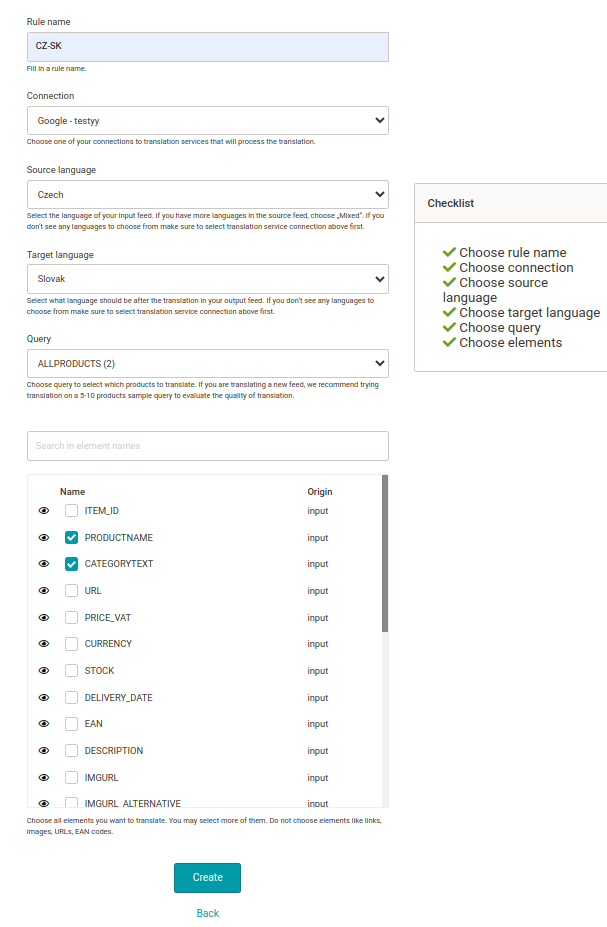
**2.** Create **a translation rule** in the app. You set:
- what translator to use
- from which language to translate
- what product query to translate
- **which elements from the feed to translate**
[  ](https://www.mergado.com/sites/default/files/perm/paragraph-image/google-translate-mergado.png)
**3.** The translation takes place **while applying the rules during the regeneration of the fee**d in Mergado.
4\. **Translation fine-tuning** is possible via manual adjustments or rules in Mergado.
- The rules must be included in the rules overview under the translation rule.
### What You Can Use Ordelogy Translate For
- translation of **an online store for expansion to another country**
- translation of product data for **foreign advertising or marketplaces**
- translation of product data from f**oreign suppliers**
- translation of product data for **foreign wholesale customers**
## How Much Does Ordelogy Translate Cost
When translating with Ordelogy Translate, **you pay for**:
1. **using the app**
2. **the price of the translation itself** in Google Translate or DeepL. You have an account in the translation service
3. NOTE:
1. the application **does not charge a surcharge** for translated characters
2. the first 30 days of its use are **free**
You can find a **summary** of prices according to the price lists of individual services and a **model example** for a better insight at the [Mergado Store Ordelogy Translate profile](https://store.mergado.com/detail/ordelogytranslate/#about).
 Try The Ordelogy Translate App
- automatically translates online store product data and texts on the web
- speeds up expansion and eliminates possible manual errors
[Activate Ordelogy Translate for 30 free days](https://store.mergado.com/detail/ordelogytranslate/#about)

Ordelogy Translate is **a powerful tool** for all expanding enterprises, with which it speeds up and automates all translations into other language versions of its websites. Try its qualities for 30 free days.
### **Read More:**
[ 
### MASTER PROMPT TEMPLATE FOR ECOMMERCE
](https://www.mergado.com/blog/master-prompt-eshopy-b2c)
[ 
### How Feed Optimization Unlocked Meta Ads Performance without Increasing Ad Spend
](https://www.mergado.com/blog/feed-optimization-for-meta-ads)
[ 
### How to Sell Successfully on idealo
](https://www.mergado.com/blog/successful-sale-on-idealo)
[  ](https://www.mergado.com/blog/lukas-horak)### [ Lukáš Horák ](https://www.mergado.com/blog/lukas-horak)
Lukáš takes care of most of the Czech and English communication in Mergado. Through blogs, e‑mail, and social networks, he regularly supplies readers with e‑commerce news and news and tips from Mergado. In his time off, he enjoys simple things like badminton, digging the hidden gems of the 80’s, and seafood served with red wine.
## What you *might be interested in next*
[ 
### GPSR on Allegro and Kaufland
](https://www.mergado.com/blog/gpsr-allegro-kaufland)
[ 
### Show the most suitable alternative products. More customers will buy from you
](https://www.mergado.com/blog/alternative-products)
[ 
### How to optimise product images
](https://www.mergado.com/blog/how-optimise-product-images)
## Don’t miss *anything*
Sign up for our newsletter
By logging in, you agree that we will process your data by the [terms of personal data protection](https://www.mergado.com/cookies).
Thank you, you have successfully joined our subscriber's list.
function ml_webform_success_5807248() {
var r = ml_jQuery || jQuery
r('.ml-subscribe-form-5807248 .row-success').show(), r('.ml-subscribe-form-5807248 .row-form').hide()
}