- [Case Studies](https://www.mergado.com/category/case-studies)
- [eCommerce tips](https://www.mergado.com/category/ecommerce-tips)
- [Online Store Solutions and Platforms](https://www.mergado.com/category/online-store-solutions-and-platforms)
- [Mergado Pack](https://www.mergado.com/category/mergado-pack)
- [Mergado tips](https://www.mergado.com/category/mergado-tips)
- [Mergado News](https://www.mergado.com/category/mergado-news)
- [eCommerce News](https://www.mergado.com/category/ecommerce-news)
- [How to use Mergado](https://www.mergado.com/category/how-to-use-mergado)
- [Interviews with e‑commerce gurus](https://www.mergado.com/category/interviews-e-commerce-gurus)
- [Extensions](https://www.mergado.com/category/apps-bidding-image-marketing-and-more)
- [Expansion with Mergado](https://www.mergado.com/category/expansion-with-mergado)
- [Mergado Lifestyle](https://www.mergado.com/category/mergado-lifestyle)
1. [ Home ](https://www.mergado.com/)
2. [ Mergado Blog ](https://www.mergado.com/blog)
3. [ Mergado Pack ](https://www.mergado.com/category/mergado-pack)
4. **View GA statistics of a multi-currency store on PrestaShop with currencyCode**
# **View GA statistics of a multi-currency store on PrestaShop with currencyCode**
[  Lukáš Horák ](https://www.mergado.com/blog/lukas-horak) [Mergado Pack](https://www.mergado.com/category/mergado-pack)
18. 8. 2020
3 minutes read

Although your store on [PrestaShop](https://www.mergado.com/tag/prestashop) supports the possibility of a payment in several different currencies, the statistics on orders in Google Analytics are displayed for only one of them and are therefore **not** **correct**. So how do you arrange to provide the most accurate information possible? **Use currencyCode.** We’ll show you how.
function tableOfContents() {
return {
headings_menu: [],
heading_active: '', // Added to track the active section
shouldBeSticky: false,
generateToC() {
const headings = document.querySelectorAll('.js-article-full-headings h2, .js-article-full-headings h3');
let headingMap = {};
headings.forEach((heading) => { // Use an arrow function to maintain `this` context
// Normalize heading text to remove diacritics, then replace non-alphanumeric characters with dashes
var normalizedText = heading.textContent.normalize("NFD").replace(/[\u0300-\u036f]/g, ""); // Remove diacritics
var id = heading.id ? heading.id : normalizedText.trim().toLowerCase()
.split(' ').join('-').replace(/[^a-z0-9\-]/ig, ''); // Updated regex to replace non-alphanumeric characters
headingMap[id] = headingMap[id] !== undefined ? ++headingMap[id] : 0;
// Use the updated `id` with diacritics removed for the heading id and the TOC
const finalId = headingMap[id] ? `${id}-${headingMap[id]}` : id;
this.headings_menu.push({
id: finalId,
title: heading.textContent,
level: heading.tagName.toLowerCase(), // Track heading level
active: false, // Initially set active to false
});
heading.id = finalId;
});
},
checkStickyNeeded() {
const ul = this.$el.querySelector('ul');
if (ul) {
this.shouldBeSticky = ul.scrollHeight < window.innerHeight;
}
},
setActiveHeading() {
// disabled not working with active state on click
// add @scroll.window="setActiveHeading()" to the parent div
// const headings = document.querySelectorAll('.js-article-full-headings h2');
// let activeHeading = '';
// let closestHeadingDistance = Infinity;
// headings.forEach((heading) => {
// const rect = heading.getBoundingClientRect();
// const offset = rect.top - window.innerHeight / 2; // Consider heading in the middle of the screen as active
// if (offset < 0 && Math.abs(offset) < closestHeadingDistance) {
// activeHeading = heading.id;
// closestHeadingDistance = Math.abs(offset);
// }
// });
// // Update the active state in headings_menu
// if (activeHeading !== this.heading_active) {
// this.headings_menu = this.headings_menu.map(item => ({
// ...item,
// active: item.id === activeHeading,
// }));
// this.heading_active = activeHeading;
// }
},
setActiveItem(clickedId) {
this.headings_menu.forEach(item => {
item.active = (item.id === clickedId);
});
this.heading_active = clickedId; // Optionally update the heading_active property if used
},
};
}
1. —
Although your store on [PrestaShop](https://www.mergado.com/tag/prestashop) supports the possibility of a payment in several different currencies, the statistics on orders in Google Analytics are displayed for only one of them and are therefore **not** **correct**. So how do you arrange to provide the most accurate information possible? **Use currencyCode.** We’ll show you how.
## You don’t pay for running an online store on PrestaShop
[PrestaShop](https://www.prestashop.com/en) is an **open-source solution for online stores** that is used by thousands of users from 160 countries around the world. Shoppers do not have to interfere with its kernel code or templates. In its administration, they effectively set everything from URLs to individual tags and other details. It also has many **modules** (some are free, others paid) that you only install and use right away, so you save a lot of time with development and testing. PrestaShop is fast, which means that an [**inexpensive hosting provider is enough.**](https://cybernews.com/best-web-hosting/cheap-web-hosting/)
### How Google Analytics works
Google Analytics is a tool that **analyzes website traffic** and evaluates its success. To find out useful information about visitors to your site, you need to insert a **tracker** into its source code (Mergado Pack can do this function automatically, which will save you time). Using this javascript code, which the user loads along with the content of your site, Google Analytics collects information about the displayed page and the user. GA then processes them into comprehensive visits and displays them as **statistics** in reports.
### What is the role of currencyCode
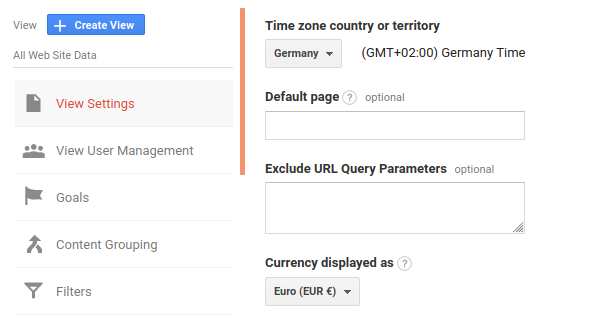
Most of the available solutions for implementing Google Analytics send order data, **including the** [currencyCode](https://support.google.com/analytics/answer/6205902?hl=en), to an online store. If you do not use the solution that sends the currencyCode, GA will not know in which currency the order has been created. It, therefore, displays it **in the main currency that you set in GA**.
[  ](https://www.mergado.com/sites/default/files/perm/paragraph-image/2-settings-in-ga.png)
**Example**
In the online store, you support payment **in CZK and EUR**. The customer creates an order for 400 EUR. If the GA script does not send the currencyCode, the GA displays the value of the transaction as 400 CZK because it has a currency set to display CZK.
[  ](https://www.mergado.com/sites/default/files/perm/paragraph-image/prehledobjednavekvedvoumenachvprestashopu.png)
[  ](https://www.mergado.com/sites/default/files/perm/paragraph-image/prehledtransakcivgoogleanalytics.png)
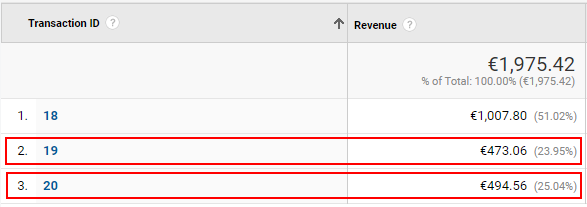
Both orders were the same product at the same price. This significant difference is caused by the outdated exchange rate in PrestaShop. Therefore, it is **necessary to update the exchange rate** in the store. You can also set up automatic updates from PrestaShop servers. Exchange rate differences may still exist, as Google and PrestaShop may have **a different source** for updating exchange rates. The actual sales figures will **slightly differ** from those in GA. However, this difference will be significantly lower when you **monitor if the individual courses are current**.
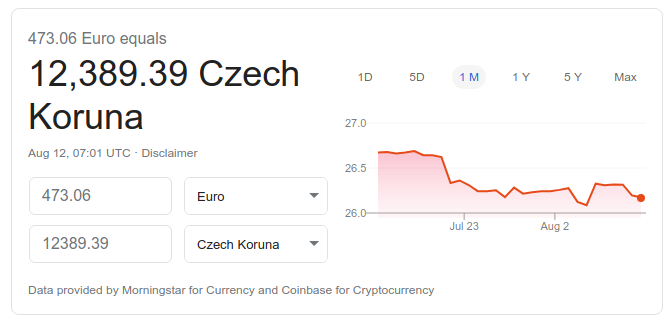
In the case of downloading order statistics, we were unable to determine where Google Analytics is taking the exchange rates from. We assume that it uses the same service as, for example, [currency conversion in search](https://www.google.com/intl/cs/googlefinance/disclaimer/).
[  ](https://www.mergado.com/sites/default/files/perm/paragraph-image/1-czech-crown-google.png)

Do you want to ease the worries of running a multi-currency store? Use the [Mergado Pack for PrestaShop](https://pack.mergado.com/prestashop). Its e‑commerce measurement function using GA **sends the currencyCode automatically**. Just activate it. You can choose from classic measurement, e‑commerce measurement, and extended e‑commerce.
That’s it. We recently looked at the [VAT settings in WooCommerce](https://www.mergado.com/blog/vat-woocommerce-foreign-countries). We will soon continue in a series of articles that will advise you on how to customize your business on e‑commerce platforms.
### **Read more:**
[ 
### MASTER PROMPT TEMPLATE FOR ECOMMERCE
](https://www.mergado.com/blog/master-prompt-eshopy-b2c)
[ 
### How Feed Optimization Unlocked Meta Ads Performance without Increasing Ad Spend
](https://www.mergado.com/blog/feed-optimization-for-meta-ads)
[ 
### How to Sell Successfully on idealo
](https://www.mergado.com/blog/successful-sale-on-idealo)
[  ](https://www.mergado.com/blog/lukas-horak)### [ Lukáš Horák ](https://www.mergado.com/blog/lukas-horak)
Lukáš takes care of most of the Czech and English communication in Mergado. Through blogs, e‑mail, and social networks, he regularly supplies readers with e‑commerce news and news and tips from Mergado. In his time off, he enjoys simple things like badminton, digging the hidden gems of the 80’s, and seafood served with red wine.
## What you *might be interested in next*
[ 
### Mergado Pack for WooCommerce will now help you collect reviews for Biano Star
](https://www.mergado.com/blog/mpack-woocommerce-biano-star)
[ 
### Mergado Pack v. 3 for PrestaShop simplifies many advertising operations
](https://www.mergado.com/blog/pack-prestashop-version-three)
[ 
### Install Mergado Pack for WooCommerce. You can do it in 2 minutes
](https://www.mergado.com/blog/mergado-pack-woocommerce-tutorial)
## Don’t miss *anything*
Sign up for our newsletter
By logging in, you agree that we will process your data by the [terms of personal data protection](https://www.mergado.com/cookies).
Thank you, you have successfully joined our subscriber's list.
function ml_webform_success_5807248() {
var r = ml_jQuery || jQuery
r('.ml-subscribe-form-5807248 .row-success').show(), r('.ml-subscribe-form-5807248 .row-form').hide()
}