- [Case Studies](https://www.mergado.com/category/case-studies)
- [eCommerce tips](https://www.mergado.com/category/ecommerce-tips)
- [Online Store Solutions and Platforms](https://www.mergado.com/category/online-store-solutions-and-platforms)
- [Mergado Pack](https://www.mergado.com/category/mergado-pack)
- [Mergado tips](https://www.mergado.com/category/mergado-tips)
- [Mergado News](https://www.mergado.com/category/mergado-news)
- [eCommerce News](https://www.mergado.com/category/ecommerce-news)
- [How to use Mergado](https://www.mergado.com/category/how-to-use-mergado)
- [Interviews with e‑commerce gurus](https://www.mergado.com/category/interviews-e-commerce-gurus)
- [Extensions](https://www.mergado.com/category/apps-bidding-image-marketing-and-more)
- [Expansion with Mergado](https://www.mergado.com/category/expansion-with-mergado)
- [Mergado Lifestyle](https://www.mergado.com/category/mergado-lifestyle)
1. [ Home ](https://www.mergado.com/)
2. [ Mergado Blog ](https://www.mergado.com/blog)
3. [ How to use Mergado ](https://www.mergado.com/category/how-to-use-mergado)
4. **Simplify your advertising on Google Ads by using Mergado**
# **Simplify your advertising on Google Ads by using Mergado**
[  Lukáš Horák ](https://www.mergado.com/blog/lukas-horak) [How to use Mergado](https://www.mergado.com/category/how-to-use-mergado)
25. 1. 2019
3 minutes read
In [the first part](https://www.mergado.com/reach-more-customers-with-google-ads) of the article introducing Google Ads, we’ve told you that using them helps you attract more customers and bring the audience of your choice. Today we will show you **how to use Google Ads together with Mergado**.
function tableOfContents() {
return {
headings_menu: [],
heading_active: '', // Added to track the active section
shouldBeSticky: false,
generateToC() {
const headings = document.querySelectorAll('.js-article-full-headings h2, .js-article-full-headings h3');
let headingMap = {};
headings.forEach((heading) => { // Use an arrow function to maintain `this` context
// Normalize heading text to remove diacritics, then replace non-alphanumeric characters with dashes
var normalizedText = heading.textContent.normalize("NFD").replace(/[\u0300-\u036f]/g, ""); // Remove diacritics
var id = heading.id ? heading.id : normalizedText.trim().toLowerCase()
.split(' ').join('-').replace(/[^a-z0-9\-]/ig, ''); // Updated regex to replace non-alphanumeric characters
headingMap[id] = headingMap[id] !== undefined ? ++headingMap[id] : 0;
// Use the updated `id` with diacritics removed for the heading id and the TOC
const finalId = headingMap[id] ? `${id}-${headingMap[id]}` : id;
this.headings_menu.push({
id: finalId,
title: heading.textContent,
level: heading.tagName.toLowerCase(), // Track heading level
active: false, // Initially set active to false
});
heading.id = finalId;
});
},
checkStickyNeeded() {
const ul = this.$el.querySelector('ul');
if (ul) {
this.shouldBeSticky = ul.scrollHeight < window.innerHeight;
}
},
setActiveHeading() {
// disabled not working with active state on click
// add @scroll.window="setActiveHeading()" to the parent div
// const headings = document.querySelectorAll('.js-article-full-headings h2');
// let activeHeading = '';
// let closestHeadingDistance = Infinity;
// headings.forEach((heading) => {
// const rect = heading.getBoundingClientRect();
// const offset = rect.top - window.innerHeight / 2; // Consider heading in the middle of the screen as active
// if (offset < 0 && Math.abs(offset) < closestHeadingDistance) {
// activeHeading = heading.id;
// closestHeadingDistance = Math.abs(offset);
// }
// });
// // Update the active state in headings_menu
// if (activeHeading !== this.heading_active) {
// this.headings_menu = this.headings_menu.map(item => ({
// ...item,
// active: item.id === activeHeading,
// }));
// this.heading_active = activeHeading;
// }
},
setActiveItem(clickedId) {
this.headings_menu.forEach(item => {
item.active = (item.id === clickedId);
});
this.heading_active = clickedId; // Optionally update the heading_active property if used
},
};
}
1. —
In [the first part](https://www.mergado.com/reach-more-customers-with-google-ads) of the article introducing Google Ads, we’ve told you that using them helps you attract more customers and bring the audience of your choice. Today we will show you **how to use Google Ads together with Mergado**. Mergado allows you to create **several types of Google Ads campaigns**. Its users can manage their Google ads **comfortably from one place**. Let’s introduce you each campaign.
## With Mergado you can easily create several types of Google Ads campaigns
In connection **with Mergado you can create Google Ads**:
1. DSA campaign
2. Dynamic remarketing campaign
3. Google Shopping campaign
### DSA campaign
[  ](https://www.mergado.com/sites/default/files/perm/paragraph-image/obr1_28.png)
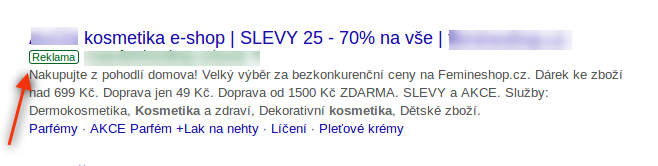
To target your ads [Dynamic Search Ads](https://support.google.com/google-ads/answer/2471185?hl=en) use your website. They also help to fill in the gaps of your keywords-based campaigns. When someone searches on Google with terms closely related to the titles and frequently used phrases on your website, Google Ads will use these titles and phrases to select a landing page and **generate a clear, relevant headline for your ad**.
*DSA feed specification*
The data between your site and DSA is transferred **using a CSV file**. When selecting the [information channel of the pages](https://support.google.com/google-ads/answer/7166527?hl=en&ref_topic=3119126) you use to target your ads, for DSA you have two options:
1. **Page URL**: targeting web site
2. **Custom label**: editing individual labels’ bids
*How to do it in Mergado*
In order to be able to advertise with DSA, you need to create a feed (for example by transferring it from some other feed, e.g. Google Shopping) **in the “Google AdWords DSA” specification** and then use this feed in Google Ads (see above).
We recently wrote about how to create DSA campaigns by using Mergado in [DSA campaigns: target the right audience in Google with ](https://www.mergado.com/dsa-campaigns)[Mergado](https://www.mergado.com/dsa-campaigns) article.
### Dynamic remarketing
[  ](https://www.mergado.com/sites/default/files/perm/paragraph-image/obr2_19.png)
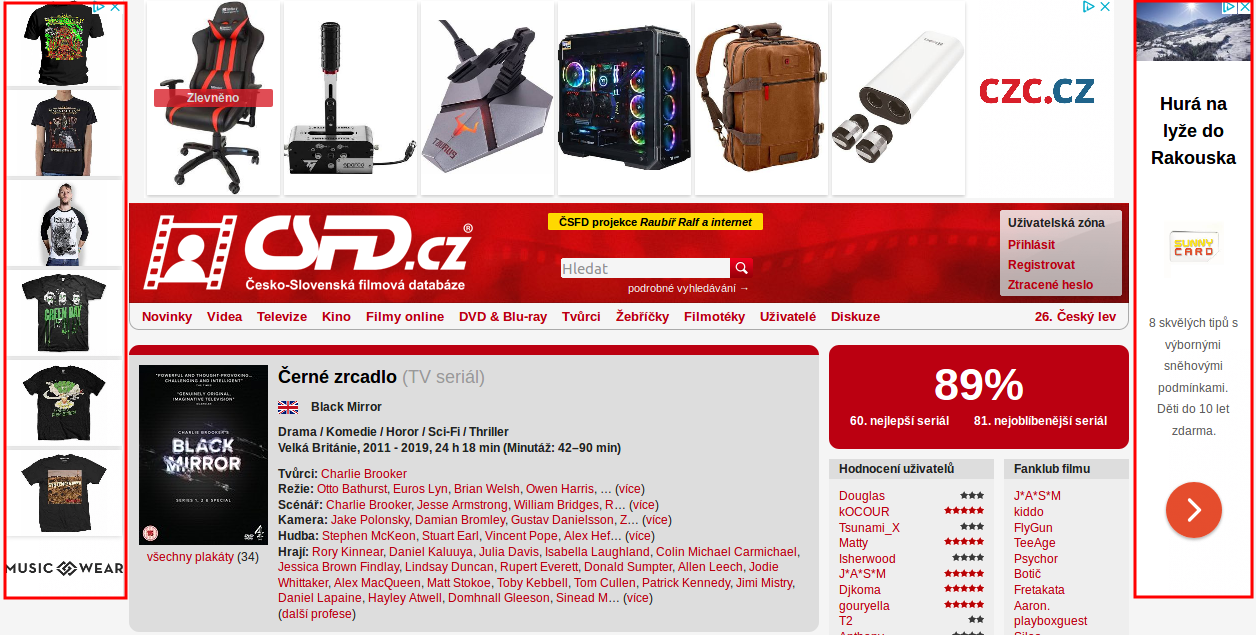
[Dynamic remarketing](https://support.google.com/google-ads/answer/3124536) works by displaying ads for specific products to users who **already viewed this particular item on your site**.
*Dynamic remarketing feed specification*
You also need a feed in CSV format. All required and recommended [elements can be found in the Support section](https://support.google.com/google-ads/answer/6053288?co=ADWORDS.IsAWNCustomer%3Dfalse&hl=en) clicking on the “Custom” section.
*How to do it in Mergado*
For advertising with dynamic remarketing, you also need to create a feed (you can also transfer it from some other feed) in **the “Google AdWords Dynamic Remarketing” specification** and then use this feed in Google Ads (see above).
### Google Shopping campaign
[  ](https://www.mergado.com/sites/default/files/perm/paragraph-image/obr3_2.png)
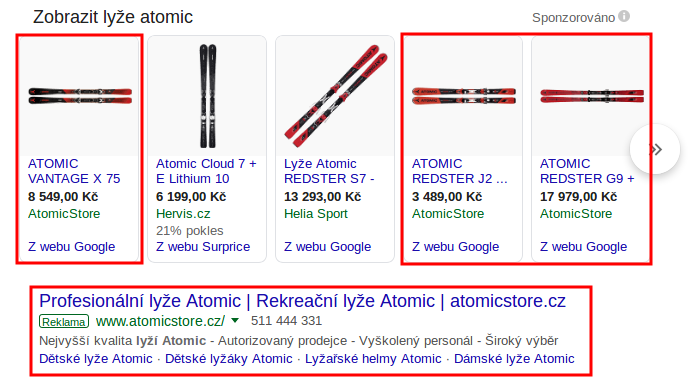
[Shopping campaigns](https://support.google.com/google-ads/answer/2454022?co=ADWORDS.IsAWNCustomer%3Dfalse&hl=en) help you promote your online and local inventory, boost traffic to your website or local store, and find better qualified leads. They show users **a photo of your product, plus a title, price, store name, and more**. These ads give users a strong sense of the product you’re selling before they click the ad.
*Google Shopping feed specification*
In Google Shopping ads, you work with an XML file. **Specifications** on how to format product data can be found in this [link](https://support.google.com/merchants/answer/7052112?visit_id=1544100136044-6680361974822298036&rd=1&hl=en). Feed in this specification can **also be used to create Facebook product ads**.
*How to do it in Mergado*
Create a feed, this time in **the “Google Shopping” specification**, then use the feed in [Google Merchant Center](https://www.google.com/retail/solutions/merchant-center/#?modal_active=none). The ads are created and set up in Google Ads. To properly link the Merchant Center and Google Ads, see The Complete Google Shopping Guide #1 — [1st](https://www.mergado.com/the-complete-google-shopping-guide-1) and [2nd part](https://www.mergado.com/the-complete-google-shopping-guide-2).
Google is a global search engine number one. It offers countless opportunities to online stores. Choose the most appropriate of its services, combine them with each other, do testing and optimize your feed with Mergado. It makes it easy to **manage your advertising from one place online**. Do you still not use Mergado? So let‘s [get started](https://www.mergado.com/get-started).
- [ Dynamic remarketing ](https://www.mergado.com/tag/dynamic-remarketing)
[  ](https://www.mergado.com/blog/lukas-horak)### [ Lukáš Horák ](https://www.mergado.com/blog/lukas-horak)
Lukáš takes care of most of the Czech and English communication in Mergado. Through blogs, e‑mail, and social networks, he regularly supplies readers with e‑commerce news and news and tips from Mergado. In his time off, he enjoys simple things like badminton, digging the hidden gems of the 80’s, and seafood served with red wine.
## What you *might be interested in next*
[ 
### How We Migrated an E‑Shop from Shoptet to Shopify with Mergado: A Complete Migration Without Data Loss
](https://www.mergado.com/blog/how-we-migrated-e-shop-shoptet-shopify-mergado-complete-migration-without-data-loss)
[ 
### How to open large XML file
](https://www.mergado.com/blog/how-to-open-large-xml-file)
[ 
### Introducing smart value insertion. It will speed up the creation of bulk rules
](https://www.mergado.com/blog/smart-value-insertion)
## Don’t miss *anything*
Sign up for our newsletter
By logging in, you agree that we will process your data by the [terms of personal data protection](https://www.mergado.com/cookies).
Thank you, you have successfully joined our subscriber's list.
function ml_webform_success_5807248() {
var r = ml_jQuery || jQuery
r('.ml-subscribe-form-5807248 .row-success').show(), r('.ml-subscribe-form-5807248 .row-form').hide()
}