- [Case Studies](https://www.mergado.com/category/case-studies)
- [eCommerce tips](https://www.mergado.com/category/ecommerce-tips)
- [Online Store Solutions and Platforms](https://www.mergado.com/category/online-store-solutions-and-platforms)
- [Mergado Pack](https://www.mergado.com/category/mergado-pack)
- [Mergado tips](https://www.mergado.com/category/mergado-tips)
- [Mergado News](https://www.mergado.com/category/mergado-news)
- [eCommerce News](https://www.mergado.com/category/ecommerce-news)
- [How to use Mergado](https://www.mergado.com/category/how-to-use-mergado)
- [Interviews with e‑commerce gurus](https://www.mergado.com/category/interviews-e-commerce-gurus)
- [Extensions](https://www.mergado.com/category/apps-bidding-image-marketing-and-more)
- [Expansion with Mergado](https://www.mergado.com/category/expansion-with-mergado)
- [Mergado Lifestyle](https://www.mergado.com/category/mergado-lifestyle)
1. [ Home ](https://www.mergado.com/)
2. [ Mergado Blog ](https://www.mergado.com/blog)
3. [ Mergado News ](https://www.mergado.com/category/mergado-news)
4. **Introducing smart value insertion. It will speed up the creation of bulk rules**
# **Introducing smart value insertion. It will speed up the creation of bulk rules**
[  Alžběta Kocmanová ](https://www.mergado.com/blog/alzbeta-kocmanova) [Mergado News](https://www.mergado.com/category/mergado-news) , [eCommerce News](https://www.mergado.com/category/ecommerce-news) , [How to use Mergado](https://www.mergado.com/category/how-to-use-mergado)
18. 3. 2025
2 minutes read

We have added the **ability to smart insert values** to the Mergado [rules](https://www.mergado.com/tag/rules-in-mergado) *Rename categories in bulk* and *Bulk rewriting by value*. It inserts the clipboard data split **directly into individual rows**.
function tableOfContents() {
return {
headings_menu: [],
heading_active: '', // Added to track the active section
shouldBeSticky: false,
generateToC() {
const headings = document.querySelectorAll('.js-article-full-headings h2, .js-article-full-headings h3');
let headingMap = {};
headings.forEach((heading) => { // Use an arrow function to maintain `this` context
// Normalize heading text to remove diacritics, then replace non-alphanumeric characters with dashes
var normalizedText = heading.textContent.normalize("NFD").replace(/[\u0300-\u036f]/g, ""); // Remove diacritics
var id = heading.id ? heading.id : normalizedText.trim().toLowerCase()
.split(' ').join('-').replace(/[^a-z0-9\-]/ig, ''); // Updated regex to replace non-alphanumeric characters
headingMap[id] = headingMap[id] !== undefined ? ++headingMap[id] : 0;
// Use the updated `id` with diacritics removed for the heading id and the TOC
const finalId = headingMap[id] ? `${id}-${headingMap[id]}` : id;
this.headings_menu.push({
id: finalId,
title: heading.textContent,
level: heading.tagName.toLowerCase(), // Track heading level
active: false, // Initially set active to false
});
heading.id = finalId;
});
},
checkStickyNeeded() {
const ul = this.$el.querySelector('ul');
if (ul) {
this.shouldBeSticky = ul.scrollHeight < window.innerHeight;
}
},
setActiveHeading() {
// disabled not working with active state on click
// add @scroll.window="setActiveHeading()" to the parent div
// const headings = document.querySelectorAll('.js-article-full-headings h2');
// let activeHeading = '';
// let closestHeadingDistance = Infinity;
// headings.forEach((heading) => {
// const rect = heading.getBoundingClientRect();
// const offset = rect.top - window.innerHeight / 2; // Consider heading in the middle of the screen as active
// if (offset < 0 && Math.abs(offset) < closestHeadingDistance) {
// activeHeading = heading.id;
// closestHeadingDistance = Math.abs(offset);
// }
// });
// // Update the active state in headings_menu
// if (activeHeading !== this.heading_active) {
// this.headings_menu = this.headings_menu.map(item => ({
// ...item,
// active: item.id === activeHeading,
// }));
// this.heading_active = activeHeading;
// }
},
setActiveItem(clickedId) {
this.headings_menu.forEach(item => {
item.active = (item.id === clickedId);
});
this.heading_active = clickedId; // Optionally update the heading_active property if used
},
};
}
1. —
## Smart value insertion works in two modes
1\. **Insert values on the left side** of the rule if you need to use data copied from one column.
[ 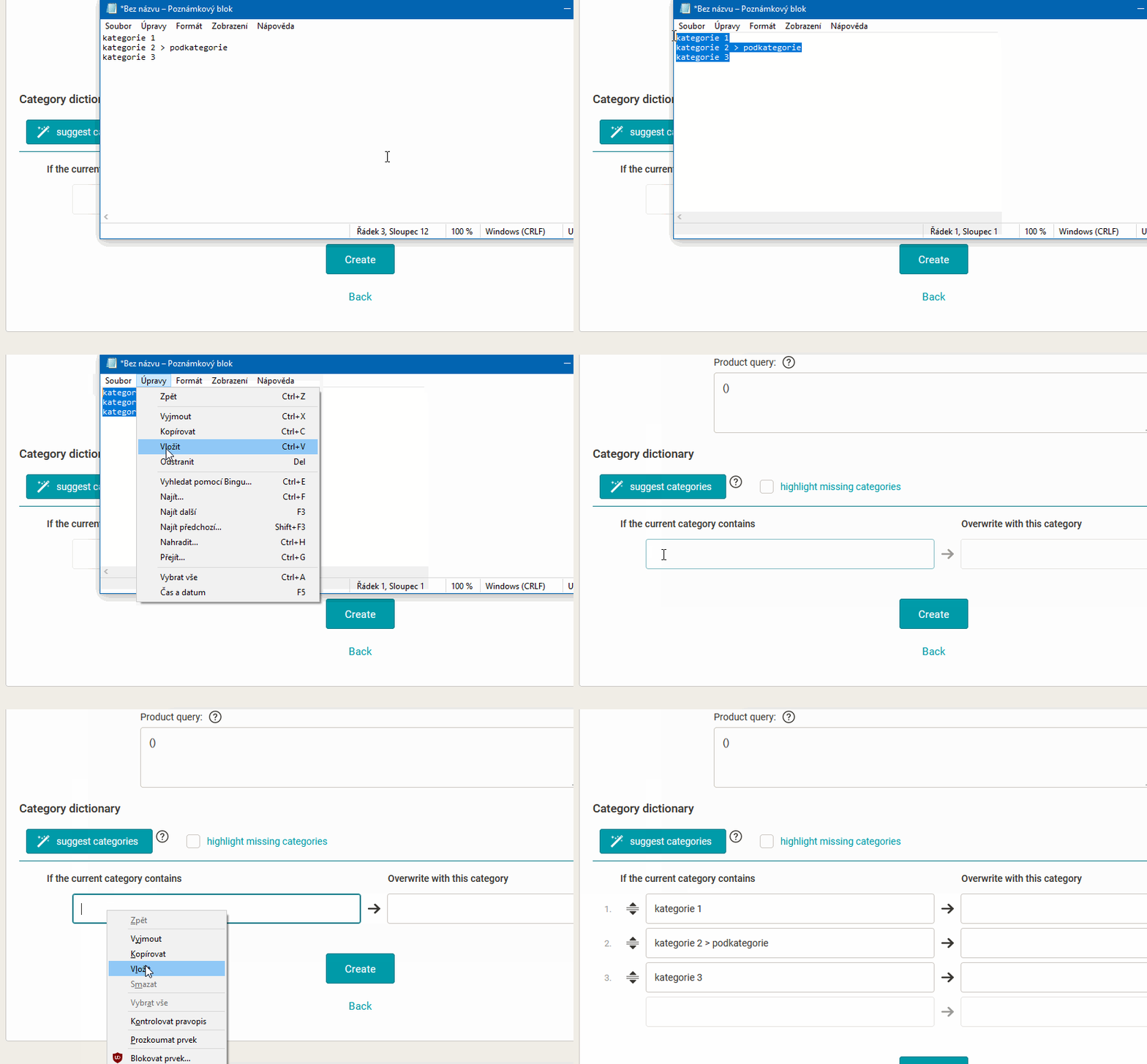 ](https://www.mergado.com/sites/default/files/perm/paragraph-image/vlozeni-leva-strana.gif)
2\. **Inserting values into both sides** of the rule will help you get the values from the two copied columns into the left and right columns correctly.
Take **advantage of other useful features** that Mergado rules offer:
- **prefill values button** will prefill the original categories from the input feed in one click
- a **button for exporting data** to CSV makes it easy to transfer tabular data
### An example of how to use smart value insertion in practice:
1. For the *Bulk rewriting by value* rule, **set the elements** on the left and right side of the rule.
2. Then we just **need to use the button to prefill the left side of the data** (i.e. the data from the selected element is filled in).
3. We can then **download the data** as a [CSV](https://www.mergado.com/tema/csv-and-marketing) (using the appropriate button above the form).
4. **Open the CSV in a “spreadsheet program”** such as *Excel, Calc* or even *Google spreadsheet*.
5. Here **we can add the data** for the right-hand side of the rule in the second column (and in doing so we can use the functions of the program, from calculations to translations, etc.).
6. We **clean up the rows** of the rule.
7. Finally, **we copy the data** of both columns **and paste** them into the rule. The smart paste will split the data **flawlessly** into both sides of the rule.
#### *REMEMBER:*
You may encounter a situation where **a comma** is the separator in the text of the first column:
- The data **would not be inserted correctly** in this case by smart insertion.
[ 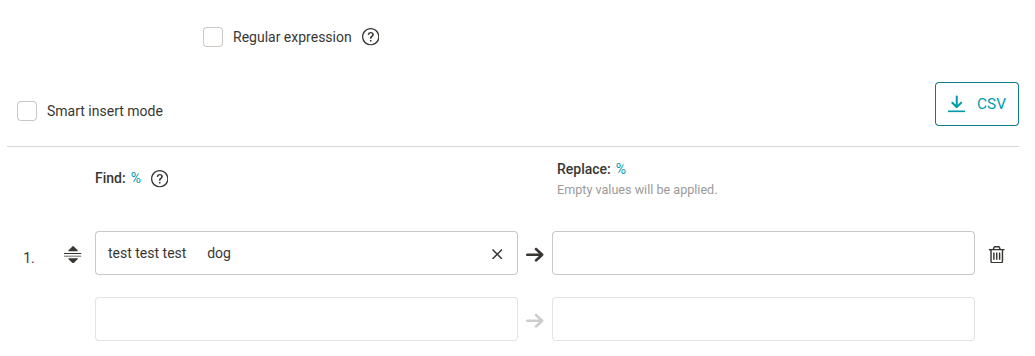 ](https://www.mergado.com/sites/default/files/perm/image/smart_value_insertion_error.png)
- The solution is to **enclose the text in quotation marks**.
[ 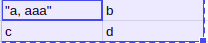 ](https://www.mergado.com/sites/default/files/perm/paragraph-image/chytre-vlozeni-hodnot-uvozovky.png)
- This way you can get the values into the columns **without any problems**.
[ 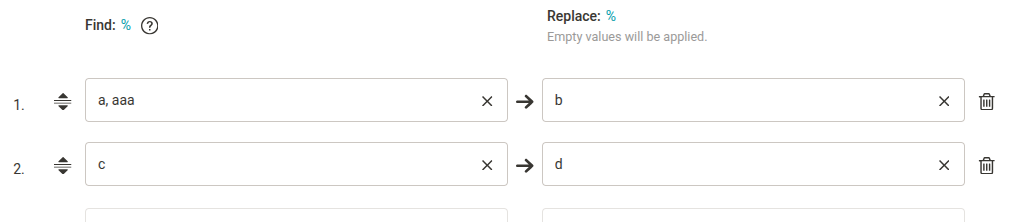 ](https://www.mergado.com/sites/default/files/perm/image/smart_insertion_value_0.png)
## Mergado will make most of the tasks of setting up your listing faster and more accurate
Use our [Editor](https://www.mergado.com/mergado-smart-product-feed-manager):
- It will **simplify** the administration of all [feed management](https://www.mergado.com/blog/how-feed-management-works) processes, so you can focus on other essential tasks of your business.
- Plus, you can manage [more than 650 sales channels in 50 countries](https://www.mergado.com/integrations) **from one place**.
- Thousands of Mergado users use it to **comply with all advertising channel rules** and can automatically update product data. The result is effective advertising that you [set up yourself](https://www.mergado.com/blog/how-mergado-works) without having to employ a programmer.
 Mergado with a 30-day free trial
- optimize your feed by yourself and save the cost for the developer’s time
- full access to all features already in the trial version
[Try Mergado for free](https://accounts.mergado.com/register/)

- [ Rules in MERGADO ](https://www.mergado.com/tag/rules-in-mergado)
- [ Tips for working with MERGADO ](https://www.mergado.com/topic/tips-for-working-with-mergado)
- [ CSV and marketing ](https://www.mergado.com/tema/csv-and-marketing)
[  ](https://www.mergado.com/blog/alzbeta-kocmanova)### [ Alžběta Kocmanová ](https://www.mergado.com/blog/alzbeta-kocmanova)
Copywriter and content specialist Alžběta combines her writing skills with her passion for journalism and sociology, which she studies. Her work focuses on creating quality content and communication that resonates with her target audience. When she’s not at work or school, she enjoys dancing, yoga, or spending time with her cat, who always keeps her on her toes.
## What you *might be interested in next*
[ 
### How to Sell Successfully on idealo
](https://www.mergado.com/blog/successful-sale-on-idealo)
[ 
### How We Migrated an E‑Shop from Shoptet to Shopify with Mergado: A Complete Migration Without Data Loss
](https://www.mergado.com/blog/how-we-migrated-e-shop-shoptet-shopify-mergado-complete-migration-without-data-loss)
[ 
### ChatGPT Shopping: The Future Is Already Here
](https://www.mergado.com/blog/chatgpt-shopping-future-already-here)
## Don’t miss *anything*
Sign up for our newsletter
By logging in, you agree that we will process your data by the [terms of personal data protection](https://www.mergado.com/cookies).
Thank you, you have successfully joined our subscriber's list.
function ml_webform_success_5807248() {
var r = ml_jQuery || jQuery
r('.ml-subscribe-form-5807248 .row-success').show(), r('.ml-subscribe-form-5807248 .row-form').hide()
}