- [Case Studies](https://www.mergado.com/category/case-studies)
- [eCommerce tips](https://www.mergado.com/category/ecommerce-tips)
- [Online Store Solutions and Platforms](https://www.mergado.com/category/online-store-solutions-and-platforms)
- [Mergado Pack](https://www.mergado.com/category/mergado-pack)
- [Mergado tips](https://www.mergado.com/category/mergado-tips)
- [Mergado News](https://www.mergado.com/category/mergado-news)
- [eCommerce News](https://www.mergado.com/category/ecommerce-news)
- [How to use Mergado](https://www.mergado.com/category/how-to-use-mergado)
- [Interviews with e‑commerce gurus](https://www.mergado.com/category/interviews-e-commerce-gurus)
- [Extensions](https://www.mergado.com/category/apps-bidding-image-marketing-and-more)
- [Expansion with Mergado](https://www.mergado.com/category/expansion-with-mergado)
- [Mergado Lifestyle](https://www.mergado.com/category/mergado-lifestyle)
1. [ Home ](https://www.mergado.com/)
2. [ Mergado Blog ](https://www.mergado.com/blog)
3. [ eCommerce News ](https://www.mergado.com/category/ecommerce-news)
4. **Speed up your work on the new Mergado Products page**
# **Speed up your work on the new Mergado Products page**
[  Lukáš Horák ](https://www.mergado.com/blog/lukas-horak) [eCommerce News](https://www.mergado.com/category/ecommerce-news)
6. 6. 2019
2 minutes read

At the end of May, we introduced another important release of Mergado. As a part of this, we have deployed **a new design of the Products page**, which has been completely rewritten. One of its new useful features is **“quick manual editing”**. Let’s see how it can help you speed up your work.
function tableOfContents() {
return {
headings_menu: [],
heading_active: '', // Added to track the active section
shouldBeSticky: false,
generateToC() {
const headings = document.querySelectorAll('.js-article-full-headings h2, .js-article-full-headings h3');
let headingMap = {};
headings.forEach((heading) => { // Use an arrow function to maintain `this` context
// Normalize heading text to remove diacritics, then replace non-alphanumeric characters with dashes
var normalizedText = heading.textContent.normalize("NFD").replace(/[\u0300-\u036f]/g, ""); // Remove diacritics
var id = heading.id ? heading.id : normalizedText.trim().toLowerCase()
.split(' ').join('-').replace(/[^a-z0-9\-]/ig, ''); // Updated regex to replace non-alphanumeric characters
headingMap[id] = headingMap[id] !== undefined ? ++headingMap[id] : 0;
// Use the updated `id` with diacritics removed for the heading id and the TOC
const finalId = headingMap[id] ? `${id}-${headingMap[id]}` : id;
this.headings_menu.push({
id: finalId,
title: heading.textContent,
level: heading.tagName.toLowerCase(), // Track heading level
active: false, // Initially set active to false
});
heading.id = finalId;
});
},
checkStickyNeeded() {
const ul = this.$el.querySelector('ul');
if (ul) {
this.shouldBeSticky = ul.scrollHeight < window.innerHeight;
}
},
setActiveHeading() {
// disabled not working with active state on click
// add @scroll.window="setActiveHeading()" to the parent div
// const headings = document.querySelectorAll('.js-article-full-headings h2');
// let activeHeading = '';
// let closestHeadingDistance = Infinity;
// headings.forEach((heading) => {
// const rect = heading.getBoundingClientRect();
// const offset = rect.top - window.innerHeight / 2; // Consider heading in the middle of the screen as active
// if (offset < 0 && Math.abs(offset) < closestHeadingDistance) {
// activeHeading = heading.id;
// closestHeadingDistance = Math.abs(offset);
// }
// });
// // Update the active state in headings_menu
// if (activeHeading !== this.heading_active) {
// this.headings_menu = this.headings_menu.map(item => ({
// ...item,
// active: item.id === activeHeading,
// }));
// this.heading_active = activeHeading;
// }
},
setActiveItem(clickedId) {
this.headings_menu.forEach(item => {
item.active = (item.id === clickedId);
});
this.heading_active = clickedId; // Optionally update the heading_active property if used
},
};
}
1. —
At the end of May, we introduced another important release of Mergado. As a part of this, we have deployed **a new design of the Products page**, which has been completely rewritten. One of its new useful features is **“quick manual editing”**. Let’s see how it can help you speed up your work.
## Faster way to make changes in advertising
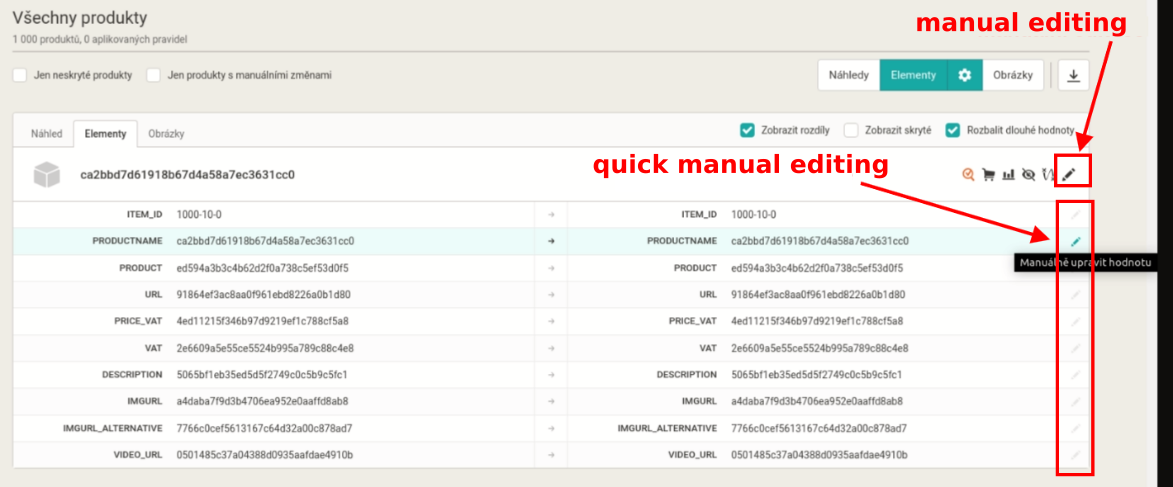
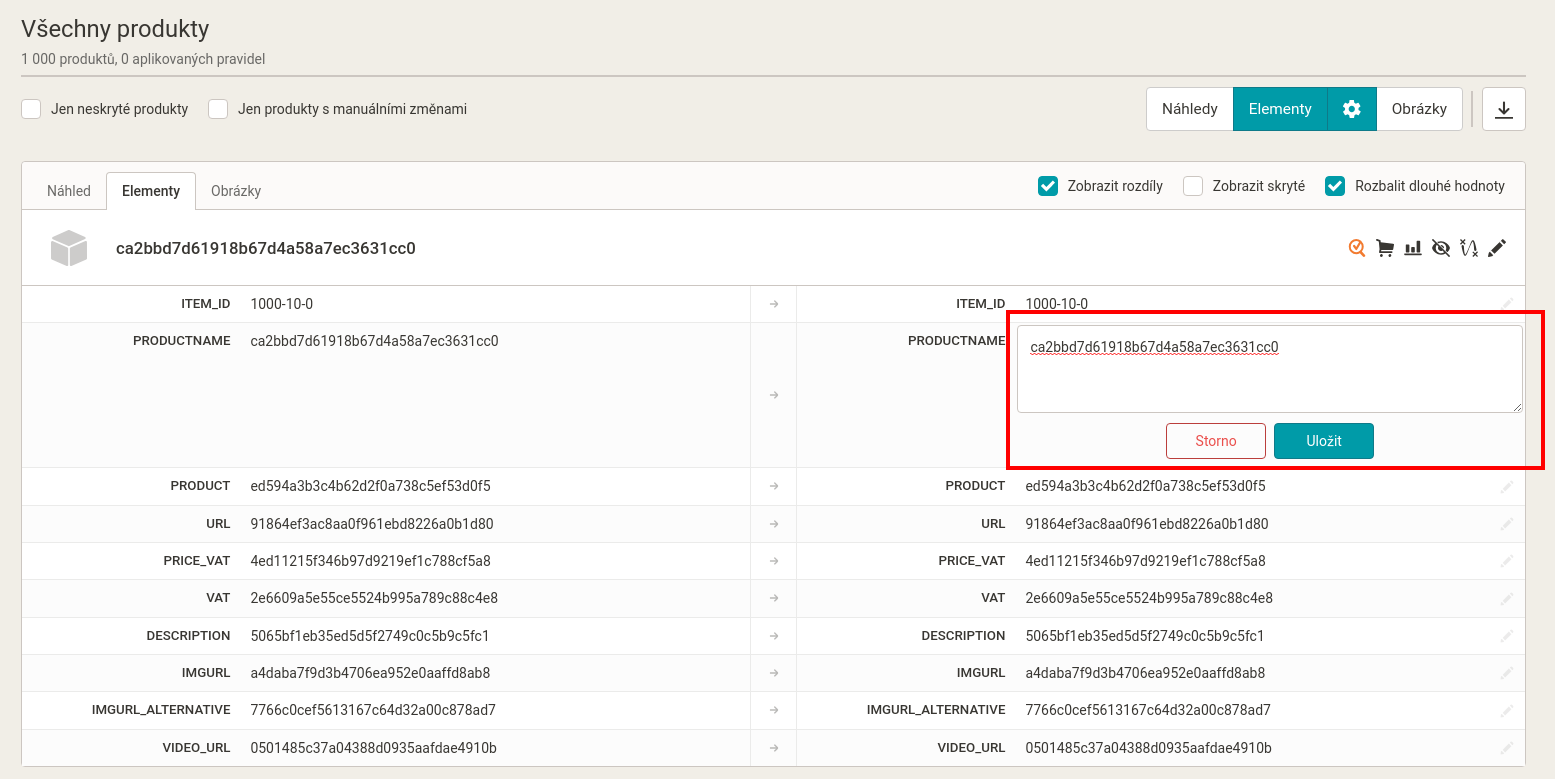
You can **continue to use** the previous manual editing method on the Products page. On a specific line of output values (on the right side of the product listing), you will now **find a pencil icon** that accesses a smaller pop-up window for setting the manual value.
[  ](https://www.mergado.com/sites/default/files/perm/paragraph-image/maned-eng-1.png)
Typically, these manual changes are made for **product** **pairing** where the values in PRODUCTNAME and possibly PRODUCT elements are changed directly, or when **missing** **parameters** for products (material, etc.) are added.
[  ](https://www.mergado.com/sites/default/files/perm/paragraph-image/maned-obr2.png)
### Working with the mouse and keyboard shortcuts together is the fastest
Of course, users can manually edit by clicking on the pencil icon on the line, filling the value, clicking on the save, and performing the operation as many times as needed. However, there is **a faster way**. It combines mouse and keyboard shortcuts.
**The fastest way to manually edit values:**
1\. **Prepare a clipboard value** that you want to set in a particular element (for example new text for PRODUCTNAME).
2\. **Press “Ctrl + click with the mouse”** anywhere in the line (no need to hit the edit icon) to open the editor, the cursor automatically focuses in and selects everything.
3\. **Use “Ctrl + V”** to rewrite the tagged content to the new value.
4\. **Press “Ctrl + Enter”** to save the change.
That’s all. Learning this operation is simple and using it will speed up your work. If you have an idea on how to improve current Product page features, [write us](https://mailto:mergado@mergado.com) please.
### **You could be interested in:**
[ 
### Google Images data now visible in Google Analytics
](https://www.mergado.com/google-images-update)
[ 
### Google rebranding: the end of Adwords and DoubleClick \*UPDATE
](https://www.mergado.com/google-rebranding)
[ 
### What should a proper client context look like for performance specialists?
](https://www.mergado.com/blog/master-prompt-eshopy-b2c)
[ 
### What should a proper client context look like for performance specialists?
](https://www.mergado.com/blog/master-prompt-eshopy-b2c)
[ 
### How Feed Optimization Unlocked Meta Ads Performance without Increasing Ad Spend
](https://www.mergado.com/blog/feed-optimization-for-meta-ads)
[ 
### How to Sell Successfully on idealo
](https://www.mergado.com/blog/successful-sale-on-idealo)
[  ](https://www.mergado.com/blog/lukas-horak)### [ Lukáš Horák ](https://www.mergado.com/blog/lukas-horak)
Lukáš takes care of most of the Czech and English communication in Mergado. Through blogs, e‑mail, and social networks, he regularly supplies readers with e‑commerce news and news and tips from Mergado. In his time off, he enjoys simple things like badminton, digging the hidden gems of the 80’s, and seafood served with red wine.
## What you *might be interested in next*
[ 
### How to Sell Successfully on idealo
](https://www.mergado.com/blog/successful-sale-on-idealo)
[ 
### More regulation in e‑commerce: what is EAA and what does it mean for your online business?
](https://www.mergado.com/blog/bfsg-european-accessibility-act)
[ 
### Introducing smart value insertion. It will speed up the creation of bulk rules
](https://www.mergado.com/blog/smart-value-insertion)
## Don’t miss *anything*
Sign up for our newsletter
By logging in, you agree that we will process your data by the [terms of personal data protection](https://www.mergado.com/cookies).
Thank you, you have successfully joined our subscriber's list.
function ml_webform_success_5807248() {
var r = ml_jQuery || jQuery
r('.ml-subscribe-form-5807248 .row-success').show(), r('.ml-subscribe-form-5807248 .row-form').hide()
}