- [Case Studies](https://www.mergado.com/category/case-studies)
- [eCommerce tips](https://www.mergado.com/category/ecommerce-tips)
- [Online Store Solutions and Platforms](https://www.mergado.com/category/online-store-solutions-and-platforms)
- [Mergado Pack](https://www.mergado.com/category/mergado-pack)
- [Mergado tips](https://www.mergado.com/category/mergado-tips)
- [Mergado News](https://www.mergado.com/category/mergado-news)
- [eCommerce News](https://www.mergado.com/category/ecommerce-news)
- [How to use Mergado](https://www.mergado.com/category/how-to-use-mergado)
- [Interviews with e‑commerce gurus](https://www.mergado.com/category/interviews-e-commerce-gurus)
- [Extensions](https://www.mergado.com/category/apps-bidding-image-marketing-and-more)
- [Expansion with Mergado](https://www.mergado.com/category/expansion-with-mergado)
- [Mergado Lifestyle](https://www.mergado.com/category/mergado-lifestyle)
1. [ Home ](https://www.mergado.com/)
2. [ Mergado Blog ](https://www.mergado.com/blog)
3. [ Online Store Solutions and Platforms ](https://www.mergado.com/category/online-store-solutions-and-platforms)
4. **Everything you need to know about running an online store on WooCommerce: Site’s technical settings**
# **Everything you need to know about running an online store on WooCommerce: Site’s technical settings**
[  Lukáš Horák ](https://www.mergado.com/blog/lukas-horak) [Online Store Solutions and Platforms](https://www.mergado.com/category/online-store-solutions-and-platforms)
3. 6. 2020
3 minutes read

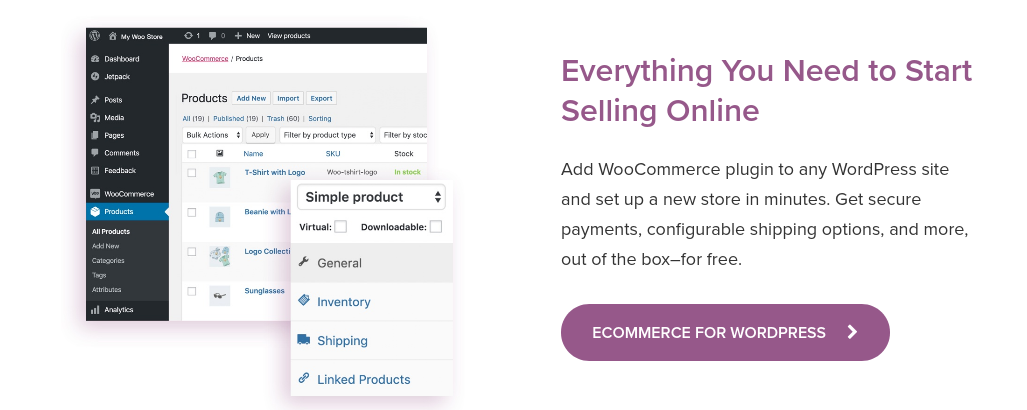
Build a technically functional online store on [WooCommerce](https://www.mergado.com/shopsystems/woocommerce). Even though it seems less important, cache settings and image optimization can bring **better user experience** with the web. Read the fourth part of our tips and prepare your store for a flawless start.
function tableOfContents() {
return {
headings_menu: [],
heading_active: '', // Added to track the active section
shouldBeSticky: false,
generateToC() {
const headings = document.querySelectorAll('.js-article-full-headings h2, .js-article-full-headings h3');
let headingMap = {};
headings.forEach((heading) => { // Use an arrow function to maintain `this` context
// Normalize heading text to remove diacritics, then replace non-alphanumeric characters with dashes
var normalizedText = heading.textContent.normalize("NFD").replace(/[\u0300-\u036f]/g, ""); // Remove diacritics
var id = heading.id ? heading.id : normalizedText.trim().toLowerCase()
.split(' ').join('-').replace(/[^a-z0-9\-]/ig, ''); // Updated regex to replace non-alphanumeric characters
headingMap[id] = headingMap[id] !== undefined ? ++headingMap[id] : 0;
// Use the updated `id` with diacritics removed for the heading id and the TOC
const finalId = headingMap[id] ? `${id}-${headingMap[id]}` : id;
this.headings_menu.push({
id: finalId,
title: heading.textContent,
level: heading.tagName.toLowerCase(), // Track heading level
active: false, // Initially set active to false
});
heading.id = finalId;
});
},
checkStickyNeeded() {
const ul = this.$el.querySelector('ul');
if (ul) {
this.shouldBeSticky = ul.scrollHeight < window.innerHeight;
}
},
setActiveHeading() {
// disabled not working with active state on click
// add @scroll.window="setActiveHeading()" to the parent div
// const headings = document.querySelectorAll('.js-article-full-headings h2');
// let activeHeading = '';
// let closestHeadingDistance = Infinity;
// headings.forEach((heading) => {
// const rect = heading.getBoundingClientRect();
// const offset = rect.top - window.innerHeight / 2; // Consider heading in the middle of the screen as active
// if (offset < 0 && Math.abs(offset) < closestHeadingDistance) {
// activeHeading = heading.id;
// closestHeadingDistance = Math.abs(offset);
// }
// });
// // Update the active state in headings_menu
// if (activeHeading !== this.heading_active) {
// this.headings_menu = this.headings_menu.map(item => ({
// ...item,
// active: item.id === activeHeading,
// }));
// this.heading_active = activeHeading;
// }
},
setActiveItem(clickedId) {
this.headings_menu.forEach(item => {
item.active = (item.id === clickedId);
});
this.heading_active = clickedId; // Optionally update the heading_active property if used
},
};
}
1. —
Build a technically functional online store on [WooCommerce](https://www.mergado.com/shopsystems/woocommerce). Even though it seems less important, cache settings and image optimization can bring **better user experience** with the web. Read the fourth part of our tips and prepare your store for a flawless start.
[  ](https://www.mergado.com/sites/default/files/perm/paragraph-image/screenshot-woocommercecom-20200522-125012.png)
## When building an online store, think one step ahead
Learn the technical subjects of the site step by step. This will **save you a lot of work** in the future. Here are some important parts you should not miss.
- ### 1. Cache Settings
Slow loading of a page, image, or product can discourage a customer. Using a cache **reduces** the complexity of retrieving a new page and speeds up its opening. Its main advantage is that it generates one version of the website into the server’s temporary memory, which it then sends to its visitors.
In WooCommerce, the way to a comfortable visit leads through added plugins. Once you install them, browsing on the store becomes **more** **dynamic**. Frequently used plugins include the free [WP Super Cache](https://cs.wordpress.org/plugins/wp-super-cache/) or [WP Rocket](https://cs.wordpress.org/plugins/wp-super-cache/). They speed up the loading of a website for **repeated and new visits**.
Another beneficial plugin is [Autoptimize](https://cs.wordpress.org/plugins/autoptimize/). It exists in free and paid versions and in addition to caching, it can also minify HTML and CSS. Also, you will find a special [Lazy Load](https://cs.wordpress.org/plugins/optimole-wp/) function in its menu, which starts loading images as they are scrolled.
A new feature among the technologies is the advanced [AMP](https://www.vzhurudolu.cz/prirucka/amp) cache, which runs on Google servers. The user can easily run it using plugins and create AMP versions of their site.
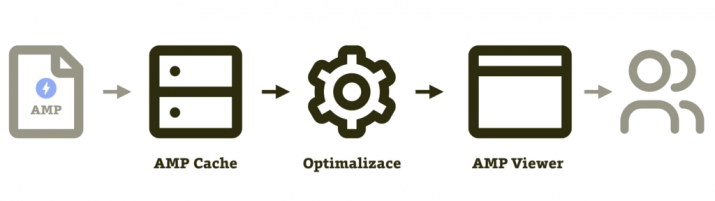
##### *The process of transition and optimization of the AMP page to the user. Source: *
- ### 2. Image Optimization
When uploading images to an online store, first pay attention to their size. In general, **the smaller an image is, the better** your site performs. Even in this case, use the tools menu to optimize and speed up the site.
Users often use the [OptiMole](https://cs.wordpress.org/plugins/optimole-wp/) plugin, which **reduces the size or resizes images** according to selected criteria directly in WordPress. Another option is to set the quality loss or turn on the previously mentioned [Lazy Load](https://cs.wordpress.org/plugins/optimole-wp/).
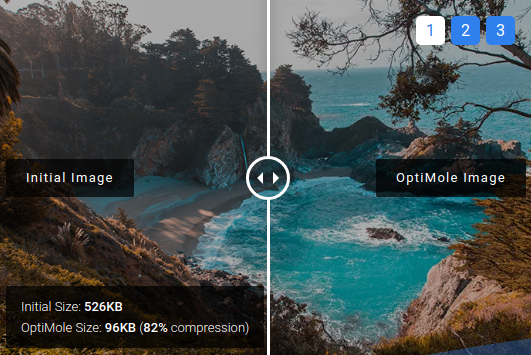
##### Editing a photo using the OptiMole plugin. Source: **
[Tinyjpg](https://tinyjpg.com/) and [Tinypng](https://tinypng.com/) plugins also optimize images for store content.
- ### 3. Backup
Ensure the most important parts when creating an online store and use the option of **automatic** **backup**. You can do a direct backup to the web host, or install another plugin. [Updraft](https://updraftplus.com/) offers timed backups linked to Google platforms, cloning, or differential backups. Plugin options are wide and provide **backups to servers, subdomains, or directly to the user’s computer**.

##### *Updraft plugin backup options . Zdroj: *
An important part of fast web loading is the **regular checking of plugins**. Please review your site to make sure everything works and is up to date. You can find useful information on testing plugins at the [fóru WooCommerce](https://woocommerce.com/blog/).
An online store, which is technically perfectly prepared, is one of the pillars of success. Manage your advertising on Woocommerce with the [Mergado Packu](https://www.mergado.com/category/mergado-pack). You can set up store operations with it in bulk and automatically.
### **You might be interested:**
[ 
### What should a proper client context look like for performance specialists?
](https://www.mergado.com/blog/master-prompt-eshopy-b2c)
[ 
### How Feed Optimization Unlocked Meta Ads Performance without Increasing Ad Spend
](https://www.mergado.com/blog/feed-optimization-for-meta-ads)
[ 
### How to Sell Successfully on idealo
](https://www.mergado.com/blog/successful-sale-on-idealo)
[  ](https://www.mergado.com/blog/lukas-horak)### [ Lukáš Horák ](https://www.mergado.com/blog/lukas-horak)
Lukáš takes care of most of the Czech and English communication in Mergado. Through blogs, e‑mail, and social networks, he regularly supplies readers with e‑commerce news and news and tips from Mergado. In his time off, he enjoys simple things like badminton, digging the hidden gems of the 80’s, and seafood served with red wine.
## What you *might be interested in next*
[ 
### How We Migrated an E‑Shop from Shoptet to Shopify with Mergado: A Complete Migration Without Data Loss
](https://www.mergado.com/blog/how-we-migrated-e-shop-shoptet-shopify-mergado-complete-migration-without-data-loss)
[ 
### Allegro — the most successful polish e‑commerce platform
](https://www.mergado.com/blog/meet-allegro)
[ 
### Everything you need to know about running an online store on WooCommerce: Analytics and Advertising Systems
](https://www.mergado.com/store-at-woocommerce-3)
## Don’t miss *anything*
Sign up for our newsletter
By logging in, you agree that we will process your data by the [terms of personal data protection](https://www.mergado.com/cookies).
Thank you, you have successfully joined our subscriber's list.
function ml_webform_success_5807248() {
var r = ml_jQuery || jQuery
r('.ml-subscribe-form-5807248 .row-success').show(), r('.ml-subscribe-form-5807248 .row-form').hide()
}