- [Case Studies](https://www.mergado.com/category/case-studies)
- [eCommerce tips](https://www.mergado.com/category/ecommerce-tips)
- [Online Store Solutions and Platforms](https://www.mergado.com/category/online-store-solutions-and-platforms)
- [Mergado Pack](https://www.mergado.com/category/mergado-pack)
- [Mergado tips](https://www.mergado.com/category/mergado-tips)
- [Mergado News](https://www.mergado.com/category/mergado-news)
- [eCommerce News](https://www.mergado.com/category/ecommerce-news)
- [How to use Mergado](https://www.mergado.com/category/how-to-use-mergado)
- [Interviews with e‑commerce gurus](https://www.mergado.com/category/interviews-e-commerce-gurus)
- [Extensions](https://www.mergado.com/category/apps-bidding-image-marketing-and-more)
- [Expansion with Mergado](https://www.mergado.com/category/expansion-with-mergado)
- [Mergado Lifestyle](https://www.mergado.com/category/mergado-lifestyle)
1. [ Home ](https://www.mergado.com/)
2. [ Mergado Blog ](https://www.mergado.com/blog)
3. [ Mergado Pack ](https://www.mergado.com/category/mergado-pack)
4. **Set up VAT in WooCommerce for foreign countries**
# **Set up VAT in WooCommerce for foreign countries**
[  Petra Marková ](https://www.mergado.com/blog/petra-markova) [Mergado Pack](https://www.mergado.com/category/mergado-pack)
12. 8. 2020
3 minutes read
Are you starting to run an online store on the [WooCommerce](https://pack.mergado.com/woocommerce) platform? When pricing, pay close attention to **VAT settings**, if you sell in foreign markets. Take a look at how to handle this task with the [Mergado Pack.](http://pack.mergado.com/)
function tableOfContents() {
return {
headings_menu: [],
heading_active: '', // Added to track the active section
shouldBeSticky: false,
generateToC() {
const headings = document.querySelectorAll('.js-article-full-headings h2, .js-article-full-headings h3');
let headingMap = {};
headings.forEach((heading) => { // Use an arrow function to maintain `this` context
// Normalize heading text to remove diacritics, then replace non-alphanumeric characters with dashes
var normalizedText = heading.textContent.normalize("NFD").replace(/[\u0300-\u036f]/g, ""); // Remove diacritics
var id = heading.id ? heading.id : normalizedText.trim().toLowerCase()
.split(' ').join('-').replace(/[^a-z0-9\-]/ig, ''); // Updated regex to replace non-alphanumeric characters
headingMap[id] = headingMap[id] !== undefined ? ++headingMap[id] : 0;
// Use the updated `id` with diacritics removed for the heading id and the TOC
const finalId = headingMap[id] ? `${id}-${headingMap[id]}` : id;
this.headings_menu.push({
id: finalId,
title: heading.textContent,
level: heading.tagName.toLowerCase(), // Track heading level
active: false, // Initially set active to false
});
heading.id = finalId;
});
},
checkStickyNeeded() {
const ul = this.$el.querySelector('ul');
if (ul) {
this.shouldBeSticky = ul.scrollHeight < window.innerHeight;
}
},
setActiveHeading() {
// disabled not working with active state on click
// add @scroll.window="setActiveHeading()" to the parent div
// const headings = document.querySelectorAll('.js-article-full-headings h2');
// let activeHeading = '';
// let closestHeadingDistance = Infinity;
// headings.forEach((heading) => {
// const rect = heading.getBoundingClientRect();
// const offset = rect.top - window.innerHeight / 2; // Consider heading in the middle of the screen as active
// if (offset < 0 && Math.abs(offset) < closestHeadingDistance) {
// activeHeading = heading.id;
// closestHeadingDistance = Math.abs(offset);
// }
// });
// // Update the active state in headings_menu
// if (activeHeading !== this.heading_active) {
// this.headings_menu = this.headings_menu.map(item => ({
// ...item,
// active: item.id === activeHeading,
// }));
// this.heading_active = activeHeading;
// }
},
setActiveItem(clickedId) {
this.headings_menu.forEach(item => {
item.active = (item.id === clickedId);
});
this.heading_active = clickedId; // Optionally update the heading_active property if used
},
};
}
1. —
## Deal with VAT
The basic tax settings in [WooCommerce](https://www.mergado.com/tag/woocommerce) are intuitive, and with the right procedure, you will avoid problems with displaying incorrect prices.
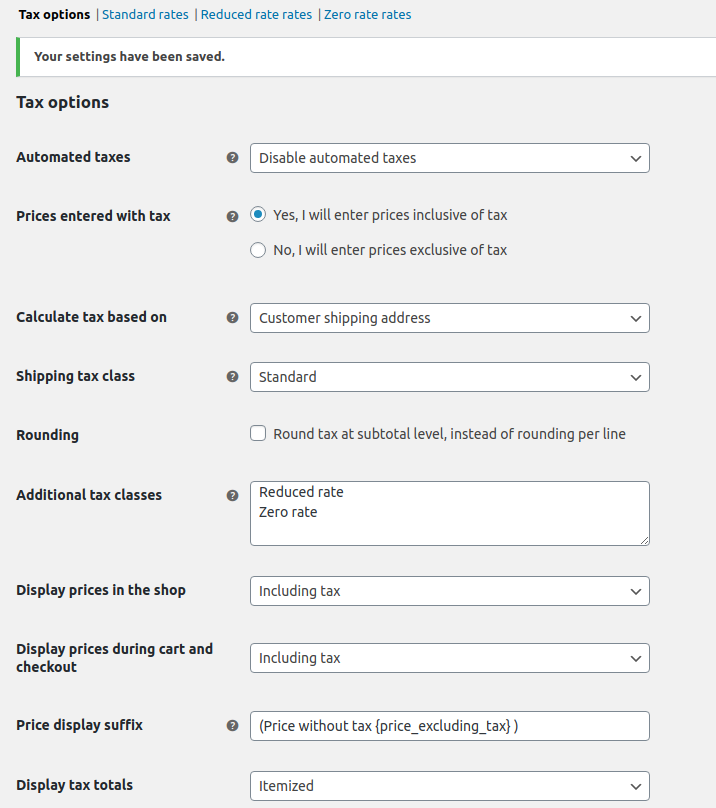
1. In the VAT section of WooCommerce, click on the *Settings* tab and decide **whether you enter prices with or without taxes**.
2. The calculation of taxes is subject to several factors — you can calculate VAT depending on the *invoicing*, *delivery address of the customer*, or the *primary address of the store*. This setting is especially important when selling **abroad**.
3. The display of prices in the basket, shop, and checkout is set **in the same way**.
[  ](https://www.mergado.com/sites/default/files/perm/paragraph-image/wootax01.png)
## Add tax rates for regions
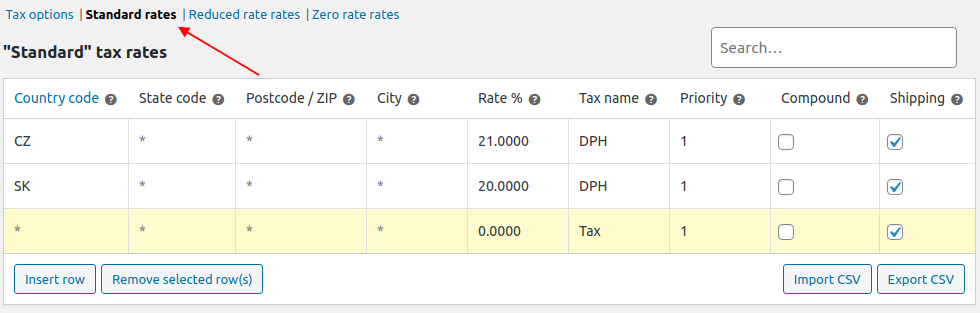
To set different tax rates, go to VAT -> *Standard* *rates*. You can find other **tax** **categories** in the appropriate settings, where you can also add lines for the state or city rate.
**There the following items in one line:**
- **Country** **code** — Is two letters, e. g. for the Czech Republic.
- **Country** **code** — Not required for Slovakia or the Czech Republic, but is suitable, for example, for the U.S.A.
- **Postcode and City** — Settings similar to the country code. In some countries, the tax may vary by region.
- **Rate** — Tax rate in percent, e. g. 21%.
- **Name of the tax** — In the Czech Republic classically VAT.
- **Priority** — When applying more rules at the same time. Priority determines which tax is displayed first.
- **Compound** — Compound tax determines whether a particular tax is calculated based on the price of the product excluding other taxes.
- **Recommendation** — determines whether the rate applies to transport.
The **“\*” symbol** entered in the line — such a rate applies to all **unspecified** **areas**. When you buy from the Czech Republic, and you have entered a tax rate for CZ, this type of rate applies. If you do not set this rate, the tax is 0%.
[  ](https://www.mergado.com/sites/default/files/perm/paragraph-image/wootax02.png)
### How to calculate taxes according to the customer’s billing address
If you sell abroad and pay VAT there, setting the tax for a foreign country will make the following **example** easier:
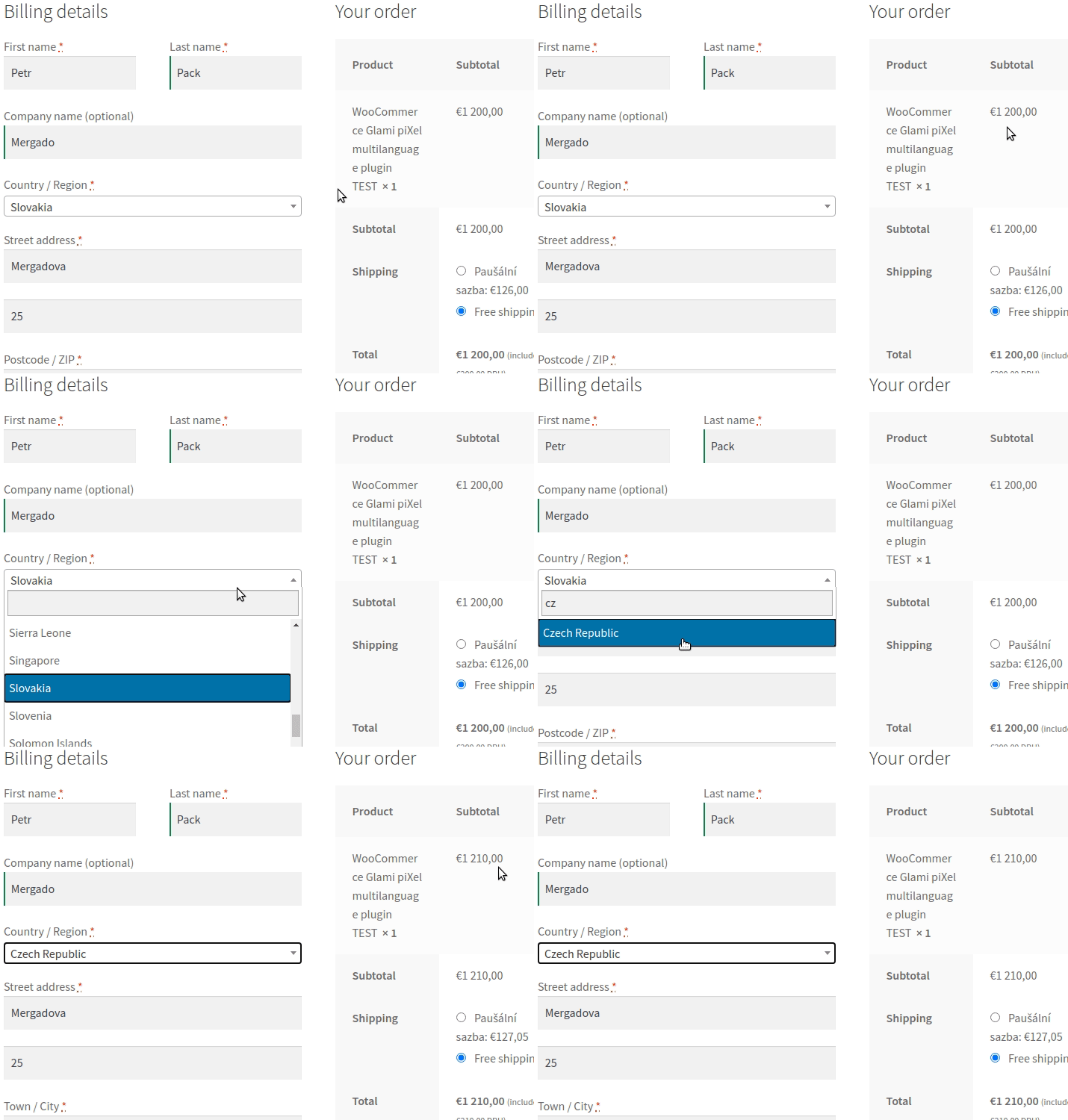
1. The first step is to **choose the online store address**. For example, if you set it for Slovakia, the tax rate of 20% applies here. You enter prices on the store, including tax, so WooCommerce must first calculate the price without the tax, which is based on the tax rate for the country.
2. Then you enter the price of 1,200 EUR including tax for the product, and WooCommerce **calculates the price without the tax** 1,200 / 1.20 = 1,000 EUR.
3. If the customer has a billing address in the Slovak Republic, the price of EUR 1,200 will be displayed in the Cashier. If the customer has a billing address in the Czech Republic, WooCommerce will **recalculate the price according to the tax rate** of 21%, and the price will be without tax 1,000 \* 1.21 = 1,210 EUR.

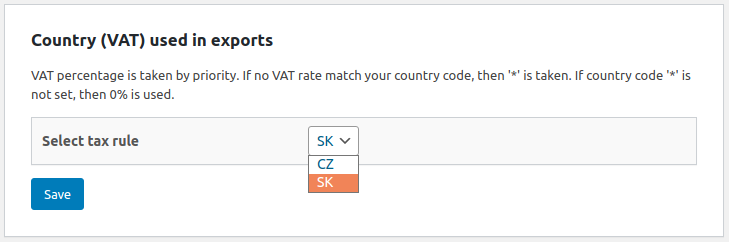
The [Mergado Pack](https://pack.mergado.com/) exports product feeds for various tax rates according to the WooCommerce settings. In the Mergado Pack administration, on the Settings page, choose **which tax rate you will use in the export**.
[  ](https://www.mergado.com/sites/default/files/perm/paragraph-image/wootax04.png)
Mergado Pack can only work with rates according to the **country** **code**. It can’t work with advanced tax rates by state, postcode or city yet, but you won’t even use it in these conditions.
If you set the SK rate — 20%, the price without tax of EUR 1,000, a price with the tax of EUR 1,200, and the tax of 20 (in percent) will be overwritten in the XML feed.
<VAT>20.0000</VAT>
<PRICE\_VAT>1200</PRICE\_VAT>
<PRICE>1000</PRICE>
If you use the CZ 21% rate for export, the feed will generate a price without tax of EUR 1,000, a price with the tax of EUR 1,210, and a tax of 21 (in percent).
Make the creation of an online store easier. Using our free Mergado Pack you connect your business to the biggest marketing channels.
[  ](https://www.mergado.com/blog/petra-markova)### [ Petra Marková ](https://www.mergado.com/blog/petra-markova)
With her melodious Slovak language skills, copywriter Petra takes care of the Slovak market. She texts, blogs, translates and passionately creates content on social networks. And when she’s not looking for the right words, she dedicates time to her residential jungle, baking, cafes, or traveling.
## What you *might be interested in next*
[ 
### Mergado Pack for WooCommerce will now help you collect reviews for Biano Star
](https://www.mergado.com/blog/mpack-woocommerce-biano-star)
[ 
### Mergado Pack v. 3 for PrestaShop simplifies many advertising operations
](https://www.mergado.com/blog/pack-prestashop-version-three)
[ 
### Install Mergado Pack for WooCommerce. You can do it in 2 minutes
](https://www.mergado.com/blog/mergado-pack-woocommerce-tutorial)
## Don’t miss *anything*
Sign up for our newsletter
By logging in, you agree that we will process your data by the [terms of personal data protection](https://www.mergado.com/cookies).
Thank you, you have successfully joined our subscriber's list.
function ml_webform_success_5807248() {
var r = ml_jQuery || jQuery
r('.ml-subscribe-form-5807248 .row-success').show(), r('.ml-subscribe-form-5807248 .row-form').hide()
}