- [Case Studies](https://www.mergado.com/category/case-studies)
- [eCommerce tips](https://www.mergado.com/category/ecommerce-tips)
- [Online Store Solutions and Platforms](https://www.mergado.com/category/online-store-solutions-and-platforms)
- [Mergado Pack](https://www.mergado.com/category/mergado-pack)
- [Mergado tips](https://www.mergado.com/category/mergado-tips)
- [Mergado News](https://www.mergado.com/category/mergado-news)
- [eCommerce News](https://www.mergado.com/category/ecommerce-news)
- [How to use Mergado](https://www.mergado.com/category/how-to-use-mergado)
- [Interviews with e‑commerce gurus](https://www.mergado.com/category/interviews-e-commerce-gurus)
- [Extensions](https://www.mergado.com/category/apps-bidding-image-marketing-and-more)
- [Expansion with Mergado](https://www.mergado.com/category/expansion-with-mergado)
- [Mergado Lifestyle](https://www.mergado.com/category/mergado-lifestyle)
1. [ Home ](https://www.mergado.com/)
2. [ Mergado Blog ](https://www.mergado.com/blog)
3. [ Extensions ](https://www.mergado.com/category/apps-bidding-image-marketing-and-more)
4. **Watermarks in advertising will no longer bother you. Feed Image Editor lets them disappear**
# **Watermarks in advertising will no longer bother you. Feed Image Editor lets them disappear**
[  Lukáš Horák ](https://www.mergado.com/blog/lukas-horak) [Extensions](https://www.mergado.com/category/apps-bidding-image-marketing-and-more)
17. 5. 2022
2 minutes read

Do you also **spend a lot of time removing watermarks** when setting up product images for advertising? [Feed Image Editor](https://www.feed-image-editor.com) will help you solve this unpopular task. With it, you can **delete watermarks in a few clicks**.
function tableOfContents() {
return {
headings_menu: [],
heading_active: '', // Added to track the active section
shouldBeSticky: false,
generateToC() {
const headings = document.querySelectorAll('.js-article-full-headings h2, .js-article-full-headings h3');
let headingMap = {};
headings.forEach((heading) => { // Use an arrow function to maintain `this` context
// Normalize heading text to remove diacritics, then replace non-alphanumeric characters with dashes
var normalizedText = heading.textContent.normalize("NFD").replace(/[\u0300-\u036f]/g, ""); // Remove diacritics
var id = heading.id ? heading.id : normalizedText.trim().toLowerCase()
.split(' ').join('-').replace(/[^a-z0-9\-]/ig, ''); // Updated regex to replace non-alphanumeric characters
headingMap[id] = headingMap[id] !== undefined ? ++headingMap[id] : 0;
// Use the updated `id` with diacritics removed for the heading id and the TOC
const finalId = headingMap[id] ? `${id}-${headingMap[id]}` : id;
this.headings_menu.push({
id: finalId,
title: heading.textContent,
level: heading.tagName.toLowerCase(), // Track heading level
active: false, // Initially set active to false
});
heading.id = finalId;
});
},
checkStickyNeeded() {
const ul = this.$el.querySelector('ul');
if (ul) {
this.shouldBeSticky = ul.scrollHeight < window.innerHeight;
}
},
setActiveHeading() {
// disabled not working with active state on click
// add @scroll.window="setActiveHeading()" to the parent div
// const headings = document.querySelectorAll('.js-article-full-headings h2');
// let activeHeading = '';
// let closestHeadingDistance = Infinity;
// headings.forEach((heading) => {
// const rect = heading.getBoundingClientRect();
// const offset = rect.top - window.innerHeight / 2; // Consider heading in the middle of the screen as active
// if (offset < 0 && Math.abs(offset) < closestHeadingDistance) {
// activeHeading = heading.id;
// closestHeadingDistance = Math.abs(offset);
// }
// });
// // Update the active state in headings_menu
// if (activeHeading !== this.heading_active) {
// this.headings_menu = this.headings_menu.map(item => ({
// ...item,
// active: item.id === activeHeading,
// }));
// this.heading_active = activeHeading;
// }
},
setActiveItem(clickedId) {
this.headings_menu.forEach(item => {
item.active = (item.id === clickedId);
});
this.heading_active = clickedId; // Optionally update the heading_active property if used
},
};
}
1. —
Do you also **spend a lot of time removing watermarks** when setting up product images for advertising? [Feed Image Editor](https://www.feed-image-editor.com) will help you solve this unpopular task. With it, you can **delete watermarks in a few clicks**.
## A standard protection feature that shopping engines do not support
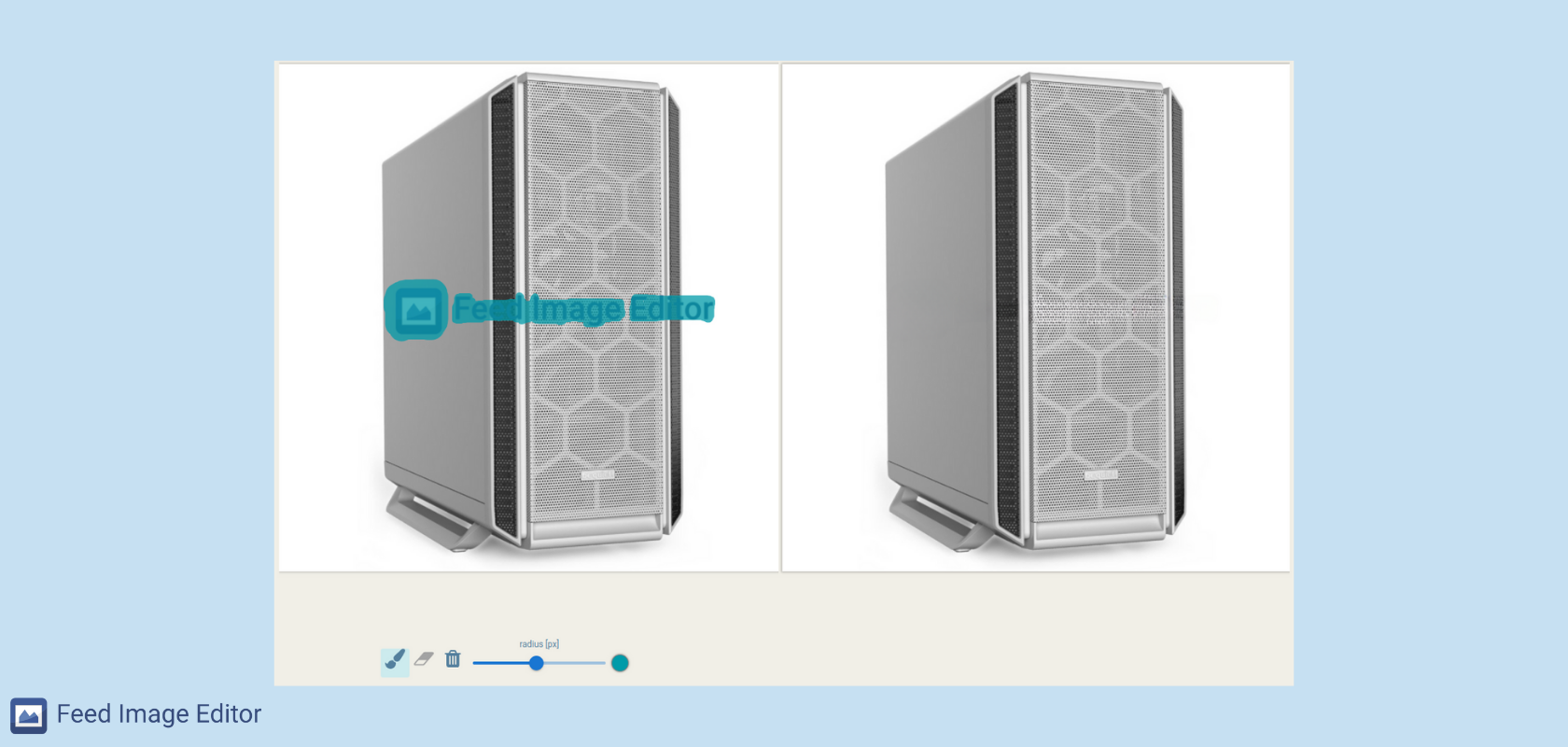
Watermarks in product images are often a problem when advertising. Many manufacturers or suppliers add them to imagery, which they send to retailers. Many online stores often use them as part of the legal protection of their goods. But **most comparison shopping engines do not allow their display**.
To avoid their advertising being rejected, retailers must remove them. The usual way is to get rid of watermarks manually. But it is **very lengthy and often ineffective**. *Feed Image Editor* has added a simple feature for their automatic removal.
[  ](https://www.mergado.com/sites/default/files/perm/paragraph-image/intuitive-watermark-removal.png)
## Deleting watermarks in the Feed Image Editor takes only a few seconds
It’s like waving a magic wand. Select the product image you want to edit. Choose the unnecessary watermark. And **the app will let it disappear**. The edited image will look perfect even if the watermark overlaps the product.
This way, you can **also remove other unwanted elements**, such as the logo, label, etc.
With Feed Image Editor, you can **also remove unwanted backgrounds** from your images. Article [Removing a background quickly and easily? With Feed Image Editor, you can do it in a few clicks](https://www.mergado.com/blog/fie-background-removal-sensitivity) will show you how to do it.
### **Procedure:**
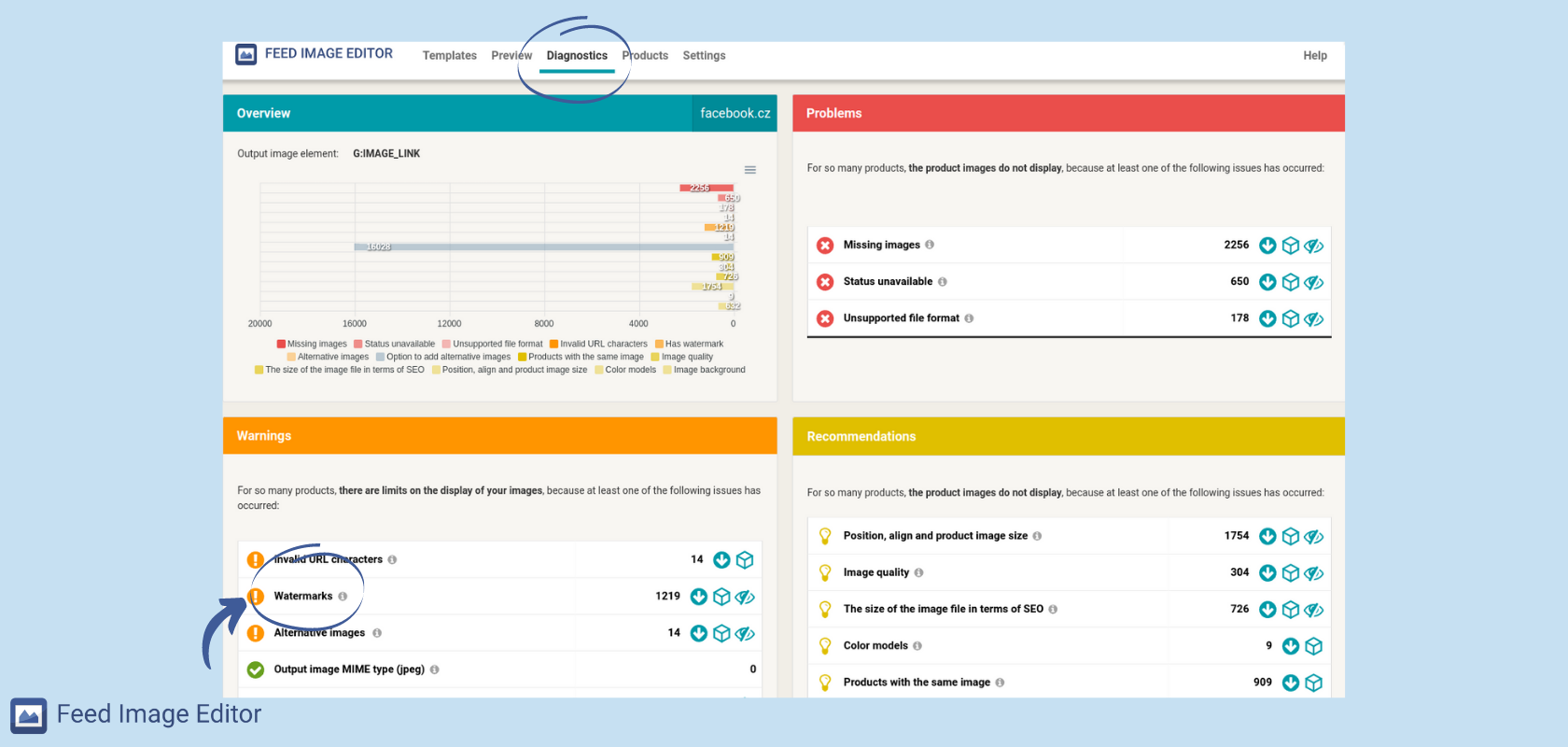
1\. First, go to the *Diagnostics* section. The detection tool will **check** which product images are likely to contain watermarks.
[  ](https://www.mergado.com/sites/default/files/perm/paragraph-image/diagnosticswatermarks.png)
2\. Click the detail to get to **the list** of product images with watermarks in the Products section.
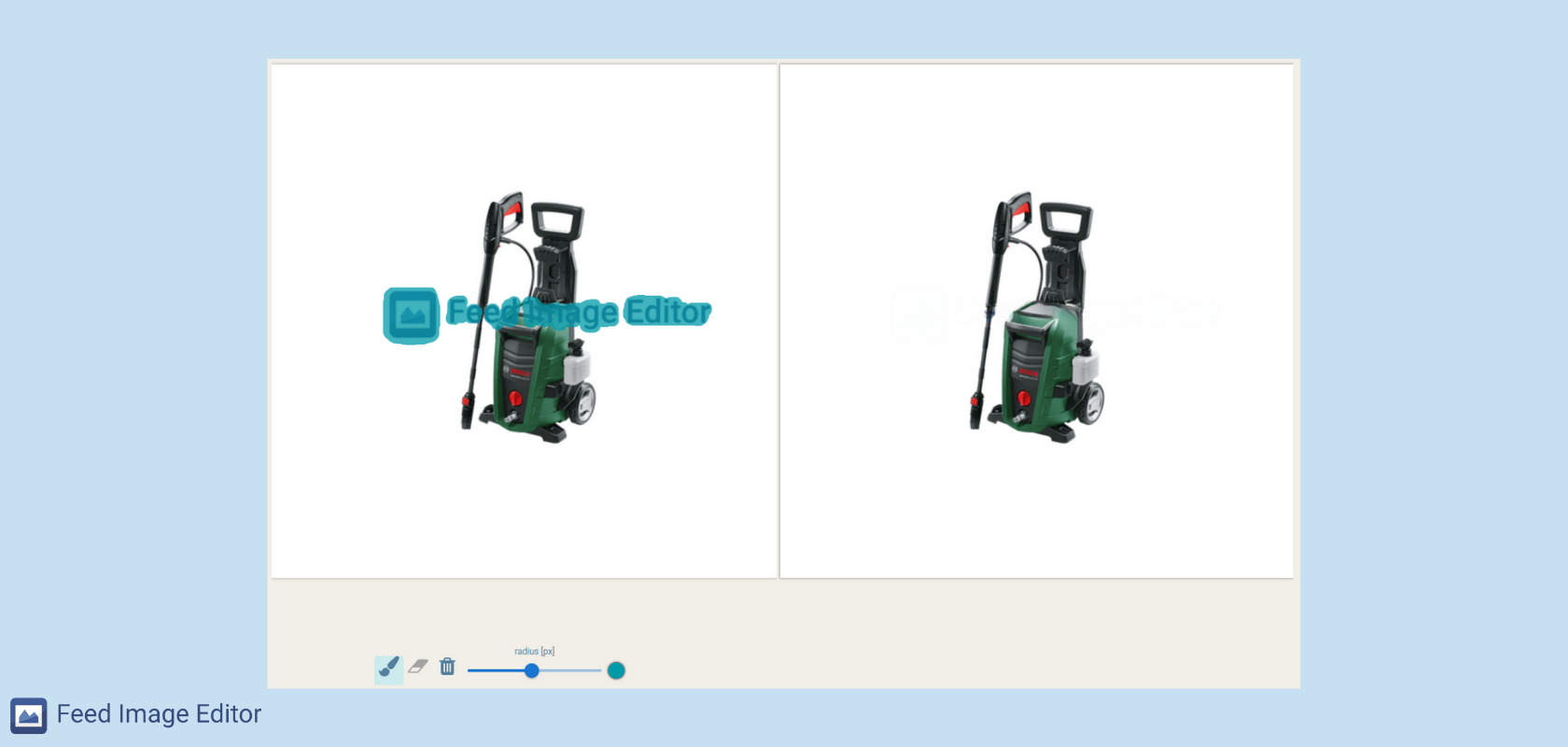
3\. **Select** the product image you want to edit. The image before editing is on the left, and the one right after it is on the right. Use the mouse wheel to zoom in or out on the left image, making it easier to select the area you want to delete.
4\. Below the left image, there is a **brush, eraser, trash**, and thickness settings.
[  ](https://www.mergado.com/sites/default/files/perm/paragraph-image/brush-eraser-trash.png)
5\. Use a brush to **mark the location of the watermark**. The app processes the image and shows its appearance on the right side. If you are not satisfied with the result, adjust the marked part with an eraser. To delete the entire drawing, place it in the trash.
6\. When you have finished editing, click **Done** in the upper right corner.
 Feed Image Editor for 30 free days
- increase the sales potential of products with attractive image marketing
- bulk and automated management of product images on comparison engines
[Try Feed Image Editor](https://store.mergado.com/detail/feedimageeditor/#about)

The Feed Image Editor offers many features that significantly **speed up the management of your image advertisement** on many systems. With it, your images will look good and will not contain any errors. Do you want to try it? We will **introduce you to its use free of charge**. Sign up for the [Image marketing made simple with Feed Image Editor](https://www.mergado.com/webinar-image-marketing-made-simple-with-feed-image-editor) webinar.
### **Read more:**
[ 
### What should a proper client context look like for performance specialists?
](https://www.mergado.com/blog/master-prompt-eshopy-b2c)
[ 
### How Feed Optimization Unlocked Meta Ads Performance without Increasing Ad Spend
](https://www.mergado.com/blog/feed-optimization-for-meta-ads)
[ 
### How to Sell Successfully on idealo
](https://www.mergado.com/blog/successful-sale-on-idealo)
[  ](https://www.mergado.com/blog/lukas-horak)### [ Lukáš Horák ](https://www.mergado.com/blog/lukas-horak)
Lukáš takes care of most of the Czech and English communication in Mergado. Through blogs, e‑mail, and social networks, he regularly supplies readers with e‑commerce news and news and tips from Mergado. In his time off, he enjoys simple things like badminton, digging the hidden gems of the 80’s, and seafood served with red wine.
## What you *might be interested in next*
[ 
### GPSR on Allegro and Kaufland
](https://www.mergado.com/blog/gpsr-allegro-kaufland)
[ 
### Show the most suitable alternative products. More customers will buy from you
](https://www.mergado.com/blog/alternative-products)
[ 
### How to optimise product images
](https://www.mergado.com/blog/how-optimise-product-images)
## Don’t miss *anything*
Sign up for our newsletter
By logging in, you agree that we will process your data by the [terms of personal data protection](https://www.mergado.com/cookies).
Thank you, you have successfully joined our subscriber's list.
function ml_webform_success_5807248() {
var r = ml_jQuery || jQuery
r('.ml-subscribe-form-5807248 .row-success').show(), r('.ml-subscribe-form-5807248 .row-form').hide()
}