- [Case Studies](https://www.mergado.com/category/case-studies)
- [eCommerce tips](https://www.mergado.com/category/ecommerce-tips)
- [Online Store Solutions and Platforms](https://www.mergado.com/category/online-store-solutions-and-platforms)
- [Mergado Pack](https://www.mergado.com/category/mergado-pack)
- [Mergado tips](https://www.mergado.com/category/mergado-tips)
- [Mergado News](https://www.mergado.com/category/mergado-news)
- [eCommerce News](https://www.mergado.com/category/ecommerce-news)
- [How to use Mergado](https://www.mergado.com/category/how-to-use-mergado)
- [Interviews with e‑commerce gurus](https://www.mergado.com/category/interviews-e-commerce-gurus)
- [Extensions](https://www.mergado.com/category/apps-bidding-image-marketing-and-more)
- [Expansion with Mergado](https://www.mergado.com/category/expansion-with-mergado)
- [Mergado Lifestyle](https://www.mergado.com/category/mergado-lifestyle)
1. [ Home ](https://www.mergado.com/)
2. [ Mergado Blog ](https://www.mergado.com/blog)
3. [ Mergado News ](https://www.mergado.com/category/mergado-news)
4. **Custom format — load any feed to Mergado**
# **Custom format — load any feed to Mergado**
[  Radim Zhoř ](https://www.mergado.com/blog/radim-zhor) [Mergado News](https://www.mergado.com/category/mergado-news)
2. 5. 2018
3 minutes read
We implemented a brand new feature into Mergado called Custom format. In other words, a universal or user feed. It allows you to load any XML or CSV feed to Mergado and then edit and work with it.
function tableOfContents() {
return {
headings_menu: [],
heading_active: '', // Added to track the active section
shouldBeSticky: false,
generateToC() {
const headings = document.querySelectorAll('.js-article-full-headings h2, .js-article-full-headings h3');
let headingMap = {};
headings.forEach((heading) => { // Use an arrow function to maintain `this` context
// Normalize heading text to remove diacritics, then replace non-alphanumeric characters with dashes
var normalizedText = heading.textContent.normalize("NFD").replace(/[\u0300-\u036f]/g, ""); // Remove diacritics
var id = heading.id ? heading.id : normalizedText.trim().toLowerCase()
.split(' ').join('-').replace(/[^a-z0-9\-]/ig, ''); // Updated regex to replace non-alphanumeric characters
headingMap[id] = headingMap[id] !== undefined ? ++headingMap[id] : 0;
// Use the updated `id` with diacritics removed for the heading id and the TOC
const finalId = headingMap[id] ? `${id}-${headingMap[id]}` : id;
this.headings_menu.push({
id: finalId,
title: heading.textContent,
level: heading.tagName.toLowerCase(), // Track heading level
active: false, // Initially set active to false
});
heading.id = finalId;
});
},
checkStickyNeeded() {
const ul = this.$el.querySelector('ul');
if (ul) {
this.shouldBeSticky = ul.scrollHeight < window.innerHeight;
}
},
setActiveHeading() {
// disabled not working with active state on click
// add @scroll.window="setActiveHeading()" to the parent div
// const headings = document.querySelectorAll('.js-article-full-headings h2');
// let activeHeading = '';
// let closestHeadingDistance = Infinity;
// headings.forEach((heading) => {
// const rect = heading.getBoundingClientRect();
// const offset = rect.top - window.innerHeight / 2; // Consider heading in the middle of the screen as active
// if (offset < 0 && Math.abs(offset) < closestHeadingDistance) {
// activeHeading = heading.id;
// closestHeadingDistance = Math.abs(offset);
// }
// });
// // Update the active state in headings_menu
// if (activeHeading !== this.heading_active) {
// this.headings_menu = this.headings_menu.map(item => ({
// ...item,
// active: item.id === activeHeading,
// }));
// this.heading_active = activeHeading;
// }
},
setActiveItem(clickedId) {
this.headings_menu.forEach(item => {
item.active = (item.id === clickedId);
});
this.heading_active = clickedId; // Optionally update the heading_active property if used
},
};
}
1. —
We implemented a **brand new feature** into Mergado called Custom format. In other words, a universal or user feed. It allows you to **load any XML or CSV feed to Mergado** and then edit and work with it.
## Why Custom format?
Until now, every new feed specification had to be implemented first by our developers before you were able to load a feed with that specification to Mergado. Even today this is the best way because we make sure the specification is correct. However, implementing new formats takes some time and so we decided to **give you the power to load feeds with an unknown specification**.
[  ](https://www.mergado.com/sites/default/files/perm/image/cf_1.png)
## How it works
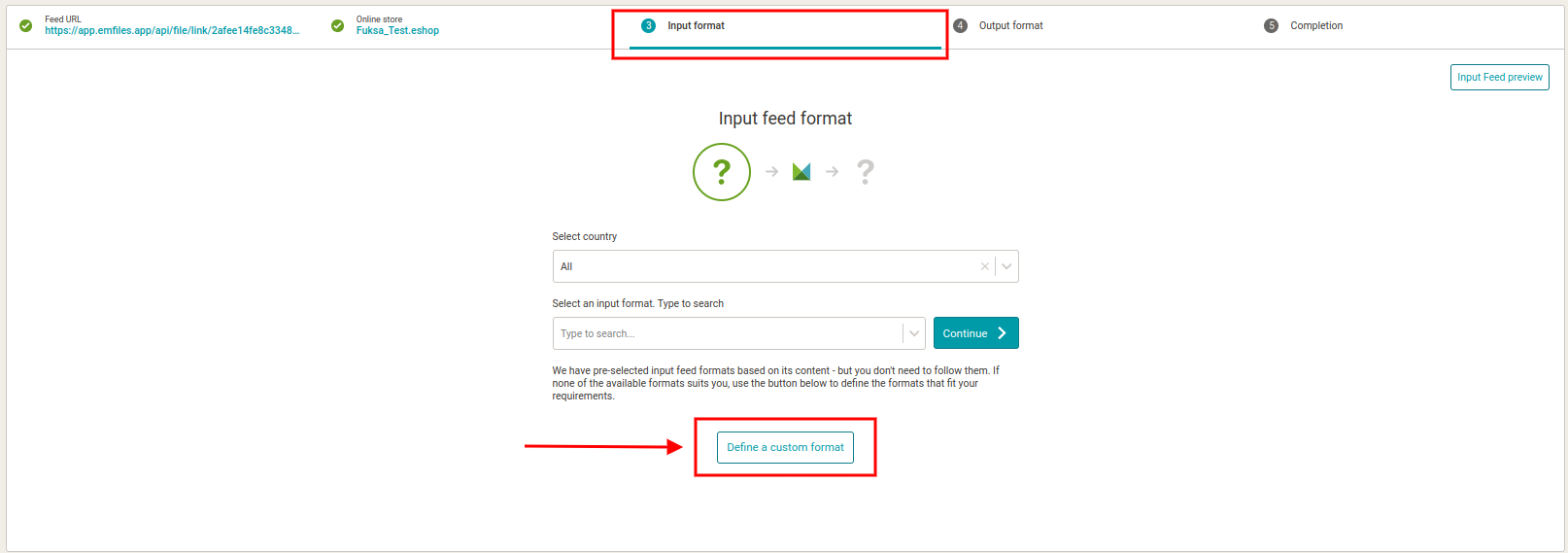
1. When creating a new export, load your feed address, wait for initial analysis until you get to the **additional settings** page. Here you can choose either from the supported formats or click the new button “**Set input format manually**” (image 1).
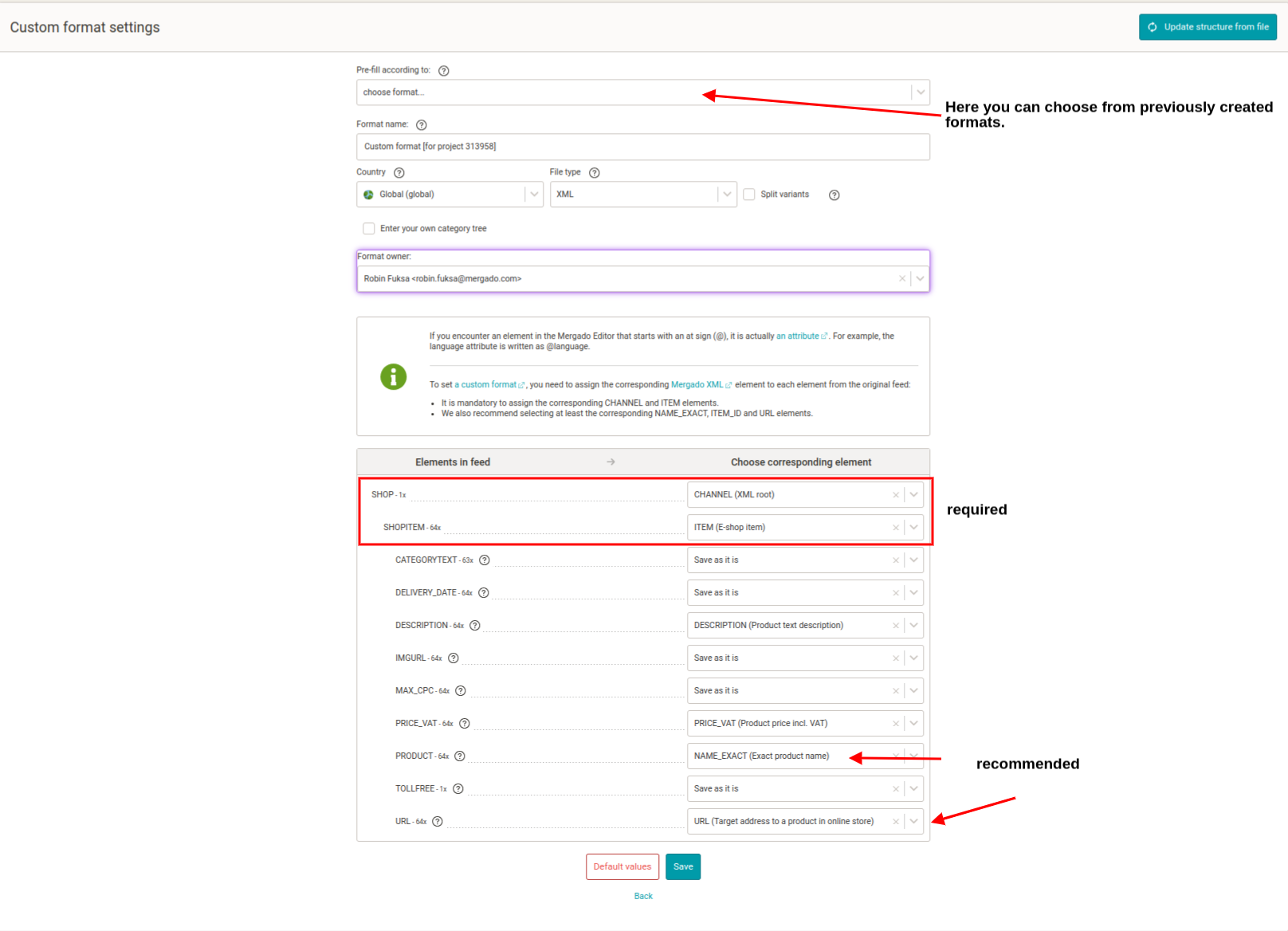
2. This button leads you to the Custom format page. Here you can define what each element in your original feed stands for and **select a respective element** from the list in the column on the right (image 2). To explain this process a bit more, we provide a more detailed explanation:
### Why so complicated?
Inside Mergado there is a so-called **Universal converter**. It enables us to convert any of the [supported feed formats](https://www.mergado.com/mergado-supported-channels) to any other supported format. It is sort of a big dictionary to all the supported feed formats and the entire app uses it.
When creating a custom format, you **teach this universal dictionary the “language” of your feed**. Mergado will save this and will then be able to work with your original feed as with any of the supported feeds. To make it easier, we use our [Mergado Product XML feed specification](http://mergado.github.io/docs/developers/mergado-xml.html).
### What is what
In the left column, you can see the **elements from your original feed**. They are displayed in a tree structure and ordered same as in the original feed.
In the right column, you **tell Mergado what is what**, i.e. which element is the root element, where is the product name, description, price, etc.
### Why are some elements mandatory
Because **without** these mandatory elements **Mergado cannot work**. The CHANNEL element (XML root) is required due to the validity of the whole XML file. And the ITEM element is required in order for Mergado to distinguish products from one another.
[  ](https://www.mergado.com/sites/default/files/perm/image/cf2.png)
3. Provide a **name** for your Custom feed
4. Click **Save**. This leads you back to Additional settings of export creation page, where your Custom format is chosen as the input format on the left. You can now **choose the output format** as usually on the right.
After you create an export this way, you can still edit the Custom format in *Settings -> Custom format*.
So this is, in short, our new feature. We hope it will help you work with unusual feeds and will be very happy for any feedback you can provide to our [forum](https://forum.mergado.com/) or at .
- [ CSV and marketing ](https://www.mergado.com/tema/csv-and-marketing)
- [ Custom format ](https://www.mergado.com/tag/custom-format)
- [ XML feed ](https://www.mergado.com/tag/xml-feed)
[  ](https://www.mergado.com/blog/radim-zhor)### [ Radim Zhoř ](https://www.mergado.com/blog/radim-zhor)
- He has several years of experience in e‑commerce.
- He works as a Business Development Specialist at Mergado, where he helps to market the Mergado product management tool.
## What you *might be interested in next*
[ 
### ChatGPT Shopping: The Future Is Already Here
](https://www.mergado.com/blog/chatgpt-shopping-future-already-here)
[ 
### Introducing smart value insertion. It will speed up the creation of bulk rules
](https://www.mergado.com/blog/smart-value-insertion)
[ 
### MERGADO 2 has new tool. It will help you to test element path
](https://www.mergado.com/blog/mergado-2-element-path-tool)
## Don’t miss *anything*
Sign up for our newsletter
By logging in, you agree that we will process your data by the [terms of personal data protection](https://www.mergado.com/cookies).
Thank you, you have successfully joined our subscriber's list.
function ml_webform_success_5807248() {
var r = ml_jQuery || jQuery
r('.ml-subscribe-form-5807248 .row-success').show(), r('.ml-subscribe-form-5807248 .row-form').hide()
}