- [Case Studies](https://www.mergado.com/category/case-studies)
- [eCommerce tips](https://www.mergado.com/category/ecommerce-tips)
- [Online Store Solutions and Platforms](https://www.mergado.com/category/online-store-solutions-and-platforms)
- [Mergado Pack](https://www.mergado.com/category/mergado-pack)
- [Mergado tips](https://www.mergado.com/category/mergado-tips)
- [Mergado News](https://www.mergado.com/category/mergado-news)
- [eCommerce News](https://www.mergado.com/category/ecommerce-news)
- [How to use Mergado](https://www.mergado.com/category/how-to-use-mergado)
- [Interviews with e‑commerce gurus](https://www.mergado.com/category/interviews-e-commerce-gurus)
- [Extensions](https://www.mergado.com/category/apps-bidding-image-marketing-and-more)
- [Expansion with Mergado](https://www.mergado.com/category/expansion-with-mergado)
- [Mergado Lifestyle](https://www.mergado.com/category/mergado-lifestyle)
1. [ Home ](https://www.mergado.com/)
2. [ Mergado Blog ](https://www.mergado.com/blog)
3. [ Mergado News ](https://www.mergado.com/category/mergado-news)
4. **Creating custom macros makes your work in Mergado easier**
# **Creating custom macros makes your work in Mergado easier**
[  Lukáš Horák ](https://www.mergado.com/blog/lukas-horak) [Mergado News](https://www.mergado.com/category/mergado-news)
19. 3. 2020
2 minutes read

On March 18, **two important Mergado features** were [released](https://forum.mergado.com/t/news-and-releases-in-mergado/212/22). In addition to minor innovations and fixes, the release includes two major tweaks that shorten the working time of online marketers. The first feature enables **creating own macros**. Learn how to set up your export quickly and easily.
function tableOfContents() {
return {
headings_menu: [],
heading_active: '', // Added to track the active section
shouldBeSticky: false,
generateToC() {
const headings = document.querySelectorAll('.js-article-full-headings h2, .js-article-full-headings h3');
let headingMap = {};
headings.forEach((heading) => { // Use an arrow function to maintain `this` context
// Normalize heading text to remove diacritics, then replace non-alphanumeric characters with dashes
var normalizedText = heading.textContent.normalize("NFD").replace(/[\u0300-\u036f]/g, ""); // Remove diacritics
var id = heading.id ? heading.id : normalizedText.trim().toLowerCase()
.split(' ').join('-').replace(/[^a-z0-9\-]/ig, ''); // Updated regex to replace non-alphanumeric characters
headingMap[id] = headingMap[id] !== undefined ? ++headingMap[id] : 0;
// Use the updated `id` with diacritics removed for the heading id and the TOC
const finalId = headingMap[id] ? `${id}-${headingMap[id]}` : id;
this.headings_menu.push({
id: finalId,
title: heading.textContent,
level: heading.tagName.toLowerCase(), // Track heading level
active: false, // Initially set active to false
});
heading.id = finalId;
});
},
checkStickyNeeded() {
const ul = this.$el.querySelector('ul');
if (ul) {
this.shouldBeSticky = ul.scrollHeight < window.innerHeight;
}
},
setActiveHeading() {
// disabled not working with active state on click
// add @scroll.window="setActiveHeading()" to the parent div
// const headings = document.querySelectorAll('.js-article-full-headings h2');
// let activeHeading = '';
// let closestHeadingDistance = Infinity;
// headings.forEach((heading) => {
// const rect = heading.getBoundingClientRect();
// const offset = rect.top - window.innerHeight / 2; // Consider heading in the middle of the screen as active
// if (offset < 0 && Math.abs(offset) < closestHeadingDistance) {
// activeHeading = heading.id;
// closestHeadingDistance = Math.abs(offset);
// }
// });
// // Update the active state in headings_menu
// if (activeHeading !== this.heading_active) {
// this.headings_menu = this.headings_menu.map(item => ({
// ...item,
// active: item.id === activeHeading,
// }));
// this.heading_active = activeHeading;
// }
},
setActiveItem(clickedId) {
this.headings_menu.forEach(item => {
item.active = (item.id === clickedId);
});
this.heading_active = clickedId; // Optionally update the heading_active property if used
},
};
}
1. —
On March 18, **two important Mergado features** were [released](https://forum.mergado.com/t/news-and-releases-in-mergado/212/22). In addition to minor innovations and fixes, the release includes two major tweaks that shorten the working time of online marketers. The first feature enables **creating own macros**. Learn how to set up your export quickly and easily.
## Create custom macros
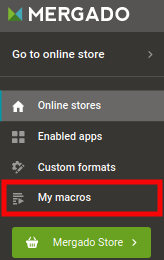
You can use macros — pre-set actions that will **speed up some tasks in Mergado**, [since last autumn](https://www.mergado.com/mergado-macros). Until now, however, you could only run macros that were preset by us. That’s why our development team has rebuilt the macro editor and the entire interface, so now you can **create macros by yourself**.
### How does a Mergado macro work?
A properly created macro will perform tasks in [Mergado](https://www.mergado.com/get-started) **faster and without error**. So why would you need to manually set up something in your exports when you can do everything **automated**?
**What macros do:**
- **create an element** — and optionally a variable
- **create a query** — input and output
- **create a rule** — currently, you **can’t create bulk rules**
[  ](https://www.mergado.com/sites/default/files/perm/paragraph-image/makra-ob1-eng.png)
### What is important to know
1. The macro **does not apply to any specific export** before it is started — so you will not see queries from any of your existing exports in it: The rules defined in the macro can only be applied to queries that are defined in the same macro.
2. The macro executes the prescribed actions but **is not linked to the export for which it was run**.
3. The function of a macro **can be changed for** a specific situation by defining the parameters:
- **title** (e. g. Price element)
- **type** (one of the options: text, number, element)
- **the** **default** **value** (e. g. PRICE\_VAT)
### Other macro features
- Macro **name**.
- Macro **description** (you can use [GitHub Flavored Markdown](https://guides.github.com/features/mastering-markdown/) to format it).
- Macro **language** (which specifies the language mutation of your macro).
- Macro **format** (which you specifies for which formats supported by Mergado your macro will be recommended).
### What to do with the created macro?
1. You can **run macros over your exports** in Mergado — you can find macros in exports.
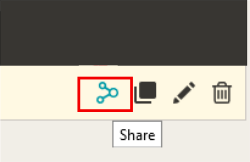
2. You can **share macros with other users** who can import them into their collections. If you edit a macro, all users who use it will be able to update the macro (or ignore it) according to your changes.
[  ](https://www.mergado.com/sites/default/files/perm/paragraph-image/makra-ob2.png)
Speed up your workflow with macros in Mergado. Try creating them, it’s very simple. We will inform you about other options for this tool soon. And if you have any feedback on using them, we’ll be happy if you [share them](https://mailto:mergado@mergado.com).
### **You could be interested in:**
[ 
### What should a proper client context look like for performance specialists?
](https://www.mergado.com/blog/master-prompt-eshopy-b2c)
[ 
### How Feed Optimization Unlocked Meta Ads Performance without Increasing Ad Spend
](https://www.mergado.com/blog/feed-optimization-for-meta-ads)
[ 
### How to Sell Successfully on idealo
](https://www.mergado.com/blog/successful-sale-on-idealo)
[  ](https://www.mergado.com/blog/lukas-horak)### [ Lukáš Horák ](https://www.mergado.com/blog/lukas-horak)
Lukáš takes care of most of the Czech and English communication in Mergado. Through blogs, e‑mail, and social networks, he regularly supplies readers with e‑commerce news and news and tips from Mergado. In his time off, he enjoys simple things like badminton, digging the hidden gems of the 80’s, and seafood served with red wine.
## What you *might be interested in next*
[ 
### ChatGPT Shopping: The Future Is Already Here
](https://www.mergado.com/blog/chatgpt-shopping-future-already-here)
[ 
### Introducing smart value insertion. It will speed up the creation of bulk rules
](https://www.mergado.com/blog/smart-value-insertion)
[ 
### MERGADO 2 has new tool. It will help you to test element path
](https://www.mergado.com/blog/mergado-2-element-path-tool)
## Don’t miss *anything*
Sign up for our newsletter
By logging in, you agree that we will process your data by the [terms of personal data protection](https://www.mergado.com/cookies).
Thank you, you have successfully joined our subscriber's list.
function ml_webform_success_5807248() {
var r = ml_jQuery || jQuery
r('.ml-subscribe-form-5807248 .row-success').show(), r('.ml-subscribe-form-5807248 .row-form').hide()
}