- [Case Studies](https://www.mergado.com/category/case-studies)
- [eCommerce tips](https://www.mergado.com/category/ecommerce-tips)
- [Online Store Solutions and Platforms](https://www.mergado.com/category/online-store-solutions-and-platforms)
- [Mergado Pack](https://www.mergado.com/category/mergado-pack)
- [Mergado tips](https://www.mergado.com/category/mergado-tips)
- [Mergado News](https://www.mergado.com/category/mergado-news)
- [eCommerce News](https://www.mergado.com/category/ecommerce-news)
- [How to use Mergado](https://www.mergado.com/category/how-to-use-mergado)
- [Interviews with e‑commerce gurus](https://www.mergado.com/category/interviews-e-commerce-gurus)
- [Extensions](https://www.mergado.com/category/apps-bidding-image-marketing-and-more)
- [Expansion with Mergado](https://www.mergado.com/category/expansion-with-mergado)
- [Mergado Lifestyle](https://www.mergado.com/category/mergado-lifestyle)
1. [ Home ](https://www.mergado.com/)
2. [ Mergado Blog ](https://www.mergado.com/blog)
3. **Manage low-margin products**
# **Manage low-margin products**
[  Lukáš Horák ](https://www.mergado.com/blog/lukas-horak)
2. 4. 2020
4 minutes read
One way to face e‑commerce challenges during quarantine is to **tune your feed** more than ever before. Focus your attention on low-margin products. Here’s how you can easily **hide** them in [Mergado](https://www.mergado.com/get-started), so they don’t slow down the profitability of your store.
function tableOfContents() {
return {
headings_menu: [],
heading_active: '', // Added to track the active section
shouldBeSticky: false,
generateToC() {
const headings = document.querySelectorAll('.js-article-full-headings h2, .js-article-full-headings h3');
let headingMap = {};
headings.forEach((heading) => { // Use an arrow function to maintain `this` context
// Normalize heading text to remove diacritics, then replace non-alphanumeric characters with dashes
var normalizedText = heading.textContent.normalize("NFD").replace(/[\u0300-\u036f]/g, ""); // Remove diacritics
var id = heading.id ? heading.id : normalizedText.trim().toLowerCase()
.split(' ').join('-').replace(/[^a-z0-9\-]/ig, ''); // Updated regex to replace non-alphanumeric characters
headingMap[id] = headingMap[id] !== undefined ? ++headingMap[id] : 0;
// Use the updated `id` with diacritics removed for the heading id and the TOC
const finalId = headingMap[id] ? `${id}-${headingMap[id]}` : id;
this.headings_menu.push({
id: finalId,
title: heading.textContent,
level: heading.tagName.toLowerCase(), // Track heading level
active: false, // Initially set active to false
});
heading.id = finalId;
});
},
checkStickyNeeded() {
const ul = this.$el.querySelector('ul');
if (ul) {
this.shouldBeSticky = ul.scrollHeight < window.innerHeight;
}
},
setActiveHeading() {
// disabled not working with active state on click
// add @scroll.window="setActiveHeading()" to the parent div
// const headings = document.querySelectorAll('.js-article-full-headings h2');
// let activeHeading = '';
// let closestHeadingDistance = Infinity;
// headings.forEach((heading) => {
// const rect = heading.getBoundingClientRect();
// const offset = rect.top - window.innerHeight / 2; // Consider heading in the middle of the screen as active
// if (offset < 0 && Math.abs(offset) < closestHeadingDistance) {
// activeHeading = heading.id;
// closestHeadingDistance = Math.abs(offset);
// }
// });
// // Update the active state in headings_menu
// if (activeHeading !== this.heading_active) {
// this.headings_menu = this.headings_menu.map(item => ({
// ...item,
// active: item.id === activeHeading,
// }));
// this.heading_active = activeHeading;
// }
},
setActiveItem(clickedId) {
this.headings_menu.forEach(item => {
item.active = (item.id === clickedId);
});
this.heading_active = clickedId; // Optionally update the heading_active property if used
},
};
}
1. —
One way to face e‑commerce challenges during quarantine is to **tune your feed** more than ever before. Focus your attention on low-margin products. Here’s how you can easily **hide** them in [Mergado](https://www.mergado.com/get-started), so they don’t slow down the profitability of your store.
## Set your products to hide by data type
- ### 1. Margin height is already available in the feed
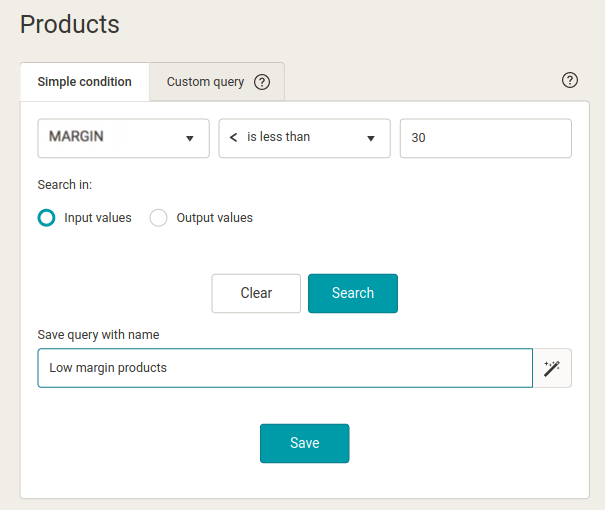
1.1. On the *Products* page, **create and save a query** to select products with a margin less than 30 %:
- choose an **element that contains a margin**, e. g. MARGIN
- enter the **condition is less <**
- enter the value: **30**
- click **Search**
- when the Save query box appears, enter a **name** in it, such as Low Margin Products
1.2. On the *Rules* page, add a new *“Hide Product”* rule that you apply to the query from the previous point.
1.3. In the left export menu select: *Settings* -> *Regenerate* -> click *“Regenerate all”*
1.4. On the *Products* page, click on the saved query from step 3. and make sure you have **hidden the correct products**.
- ### 2. Margin height is not available in the input feed, but the feed contains both the sale and the purchase price
To calculate the margin in Mergado, **follow these steps:**
2.1. On the *Elements* page, **add a new element**, such as MARGIN.
2.2. In this element, on the right side, click on the **eye icon**, where you hide the element for the output feed (it will not be generated into the output feed, but you will be able to work with it fully within Mergado).
2.3. On the *Rules* page, add a new *Calculation* rule. Save the value in an element named after the previous point — MARGIN. In the formula, use a variable containing purchase and sale prices. The indicators are entered using **the % character**. Don’t worry, you will see their name properly “wrapped” on both sides of the % character.
**The formula for the calculation rule will look like this:**
((% SalePrice% -% PurchasePrice%) /% SalePrice%) \* 100
2.4. On the *Products* page, create and save a query to select products with a margin less than 30 %:
- select **the MARGIN element**
- enter the **condition is less <**
- enter the value: **30**
- switch the searching from input **to output** — you are searching at the output
- click **Search**
- when the Save query box appears, enter a **name**, such as Low Margin Products
2.5. On the *Rules* page, add a new *“Hide Product”* rule that you apply to the query from the previous point.
2.6. In the left export menu, select: *Settings* -> *Regenerate* -> click *“Regenerate all”*.
2.7. On the *Products* page, click on the saved query from step 3. and make sure you have **hidden the correct products**.
- ### 3. Margin height is added to the feed by importing from an external source
Do this via the [Data File Import](https://www.mergado.com/preserving-values-with-new-rule) rule. This will import the **CSV file** containing the margin, e. g. into the MARGIN element.
3.1. On the *Elements* page, add a **new** **element**, such as MARGIN.
3.2. In this element, click on the **eye icon** on the right side to hide the element for the output feed (it will not be generated into the output feed, but you will be able to work with it fully within Mergado).
3.3. On the *Rules* page, add a new *Data File Import* rule. You can choose to import the CSV file from a specific URL or the uploaded file.
3.4. On the *Products* page, create and save a query to select products with a margin less than 30 %:
- select **the MARGIN element**
- enter the **condition is less <**
- enter the value: **30**
- switch the searching from input **to output** — you are searching at the output
- click **Search**
- when the Save query box appears, enter a **name**, such as Low Margin Products
3.5. On the *Rules* page, add a new *“Hide Product”* rule that you apply to the query from the previous point.
3.6. In the left export menu, select: *Settings* -> *Regenerate* -> click *“Regenerate all”*.
3.7. On the *Products* page, click on the saved query from step 3. and make sure you have **hidden the correct products**.
Get the most out of your products by focusing on details, including margins. Keep in mind that [macros](https://www.mergado.com/use-macros) will help you set up your advertising.
### **You could be interested in:**
[ 
### What should a proper client context look like for performance specialists?
](https://www.mergado.com/blog/master-prompt-eshopy-b2c)
[ 
### How Feed Optimization Unlocked Meta Ads Performance without Increasing Ad Spend
](https://www.mergado.com/blog/feed-optimization-for-meta-ads)
[ 
### How to Sell Successfully on idealo
](https://www.mergado.com/blog/successful-sale-on-idealo)
[  ](https://www.mergado.com/blog/lukas-horak)### [ Lukáš Horák ](https://www.mergado.com/blog/lukas-horak)
Lukáš takes care of most of the Czech and English communication in Mergado. Through blogs, e‑mail, and social networks, he regularly supplies readers with e‑commerce news and news and tips from Mergado. In his time off, he enjoys simple things like badminton, digging the hidden gems of the 80’s, and seafood served with red wine.
## What you *might be interested in next*
[ 
### What should a proper client context look like for performance specialists?
](https://www.mergado.com/blog/master-prompt-eshopy-b2c)
[ 
### How Feed Optimization Unlocked Meta Ads Performance without Increasing Ad Spend
](https://www.mergado.com/blog/feed-optimization-for-meta-ads)
[ 
### How to Sell Successfully on idealo
](https://www.mergado.com/blog/successful-sale-on-idealo)
## Don’t miss *anything*
Sign up for our newsletter
By logging in, you agree that we will process your data by the [terms of personal data protection](https://www.mergado.com/cookies).
Thank you, you have successfully joined our subscriber's list.
function ml_webform_success_5807248() {
var r = ml_jQuery || jQuery
r('.ml-subscribe-form-5807248 .row-success').show(), r('.ml-subscribe-form-5807248 .row-form').hide()
}