- [Case Studies](https://www.mergado.com/category/case-studies)
- [eCommerce tips](https://www.mergado.com/category/ecommerce-tips)
- [Online Store Solutions and Platforms](https://www.mergado.com/category/online-store-solutions-and-platforms)
- [Mergado Pack](https://www.mergado.com/category/mergado-pack)
- [Mergado tips](https://www.mergado.com/category/mergado-tips)
- [Mergado News](https://www.mergado.com/category/mergado-news)
- [eCommerce News](https://www.mergado.com/category/ecommerce-news)
- [How to use Mergado](https://www.mergado.com/category/how-to-use-mergado)
- [Interviews with e‑commerce gurus](https://www.mergado.com/category/interviews-e-commerce-gurus)
- [Extensions](https://www.mergado.com/category/apps-bidding-image-marketing-and-more)
- [Expansion with Mergado](https://www.mergado.com/category/expansion-with-mergado)
- [Mergado Lifestyle](https://www.mergado.com/category/mergado-lifestyle)
1. [ Home ](https://www.mergado.com/)
2. [ Mergado Blog ](https://www.mergado.com/blog)
3. [ Case Studies ](https://www.mergado.com/category/case-studies)
4. **Create a master feed and eliminate the need to edit each export separately**
# **Create a master feed and eliminate the need to edit each export separately**
[  Lukáš Horák ](https://www.mergado.com/blog/lukas-horak) [Case Studies](https://www.mergado.com/category/case-studies) , [How to use Mergado](https://www.mergado.com/category/how-to-use-mergado)
15. 4. 2020
4 minutes read

In [MERGADO](https://www.mergado.com/get-started), you manage advertising on comparison engines by **creating** **exports** in which you edit data. If you have multiple exports and make some changes repeatedly in each export, you can make the process more **efficient** by creating a **master** **feed**. Let’s show you how to set it up.
function tableOfContents() {
return {
headings_menu: [],
heading_active: '', // Added to track the active section
shouldBeSticky: false,
generateToC() {
const headings = document.querySelectorAll('.js-article-full-headings h2, .js-article-full-headings h3');
let headingMap = {};
headings.forEach((heading) => { // Use an arrow function to maintain `this` context
// Normalize heading text to remove diacritics, then replace non-alphanumeric characters with dashes
var normalizedText = heading.textContent.normalize("NFD").replace(/[\u0300-\u036f]/g, ""); // Remove diacritics
var id = heading.id ? heading.id : normalizedText.trim().toLowerCase()
.split(' ').join('-').replace(/[^a-z0-9\-]/ig, ''); // Updated regex to replace non-alphanumeric characters
headingMap[id] = headingMap[id] !== undefined ? ++headingMap[id] : 0;
// Use the updated `id` with diacritics removed for the heading id and the TOC
const finalId = headingMap[id] ? `${id}-${headingMap[id]}` : id;
this.headings_menu.push({
id: finalId,
title: heading.textContent,
level: heading.tagName.toLowerCase(), // Track heading level
active: false, // Initially set active to false
});
heading.id = finalId;
});
},
checkStickyNeeded() {
const ul = this.$el.querySelector('ul');
if (ul) {
this.shouldBeSticky = ul.scrollHeight < window.innerHeight;
}
},
setActiveHeading() {
// disabled not working with active state on click
// add @scroll.window="setActiveHeading()" to the parent div
// const headings = document.querySelectorAll('.js-article-full-headings h2');
// let activeHeading = '';
// let closestHeadingDistance = Infinity;
// headings.forEach((heading) => {
// const rect = heading.getBoundingClientRect();
// const offset = rect.top - window.innerHeight / 2; // Consider heading in the middle of the screen as active
// if (offset < 0 && Math.abs(offset) < closestHeadingDistance) {
// activeHeading = heading.id;
// closestHeadingDistance = Math.abs(offset);
// }
// });
// // Update the active state in headings_menu
// if (activeHeading !== this.heading_active) {
// this.headings_menu = this.headings_menu.map(item => ({
// ...item,
// active: item.id === activeHeading,
// }));
// this.heading_active = activeHeading;
// }
},
setActiveItem(clickedId) {
this.headings_menu.forEach(item => {
item.active = (item.id === clickedId);
});
this.heading_active = clickedId; // Optionally update the heading_active property if used
},
};
}
1. —
In [MERGADO](https://www.mergado.com/get-started), you manage advertising on comparison engines by **creating** **exports** in which you edit data. If you have multiple exports and make some changes repeatedly in each export, you can make the process more **efficient** by creating a **master** **feed**. Let’s show you how to set it up.
 Mergado with a 30-day free trial
- optimize your feed by yourself and save the cost for the developer’s time
- full access to all features already in the trial version
[Try Mergado for free](https://accounts.mergado.com/register/)

## Make general feed edits at once
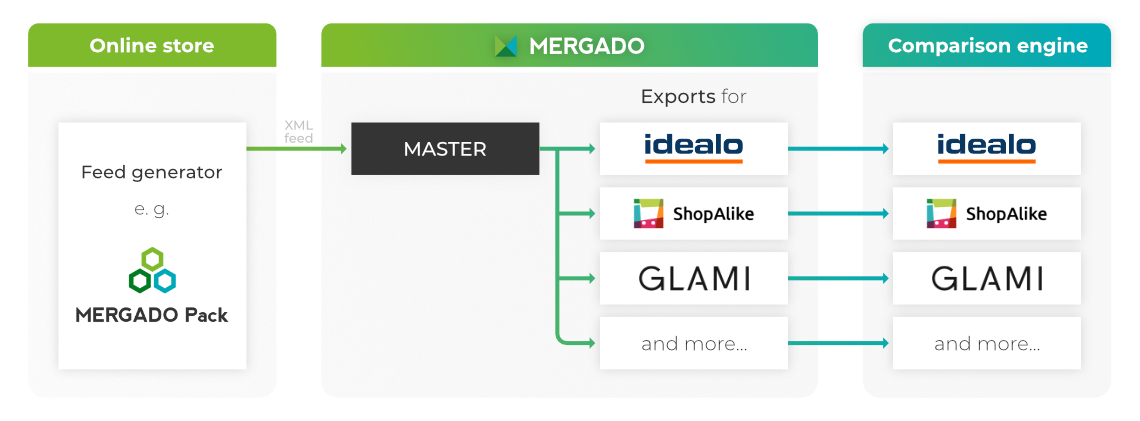
Having a master feed in MERGADO means making a **“major” export** and then creating “smaller” exports from its output URL. Master export makes it **easy to set up** general and basic data edits.
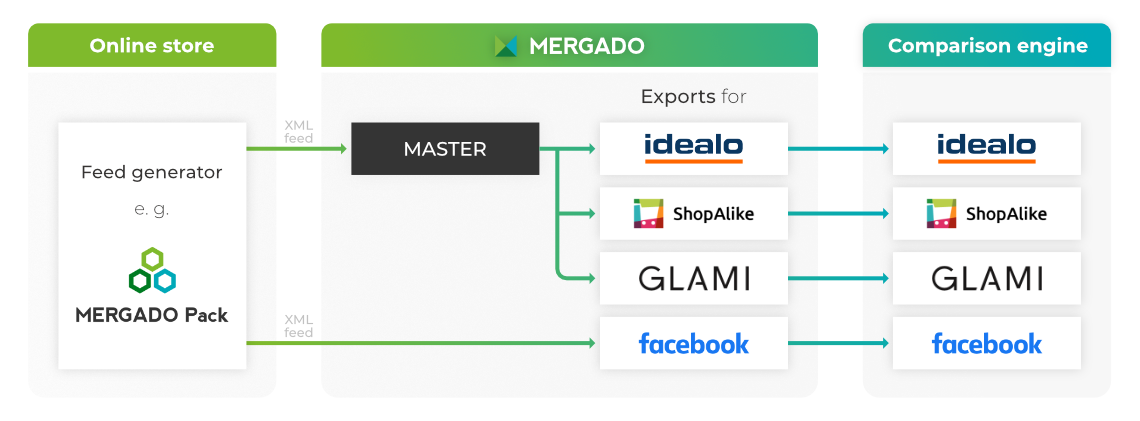
You can also **combine** both ways to edit your data. Of course, you may also correct your store feeds **with queries and** [rules](https://www.mergado.com/tag/rules-in-mergado) as you are used to.
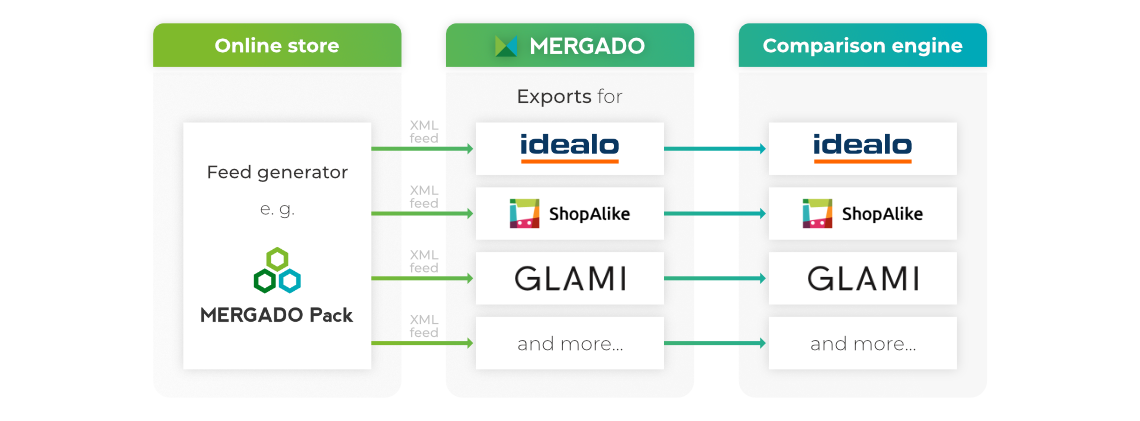
### What is the master feed scheme in MERGADO
- ### 1.1 State without master export
- ### 1.2 State with master export
- ### 1.3 Combination of master feed and classically created export
### **Benefits of a master feed**
- there is **no** **need** to make the same changes in individual exports
- you can make changes **quickly**, **easily**, and **without having to repeat** the action on the remaining smaller exports
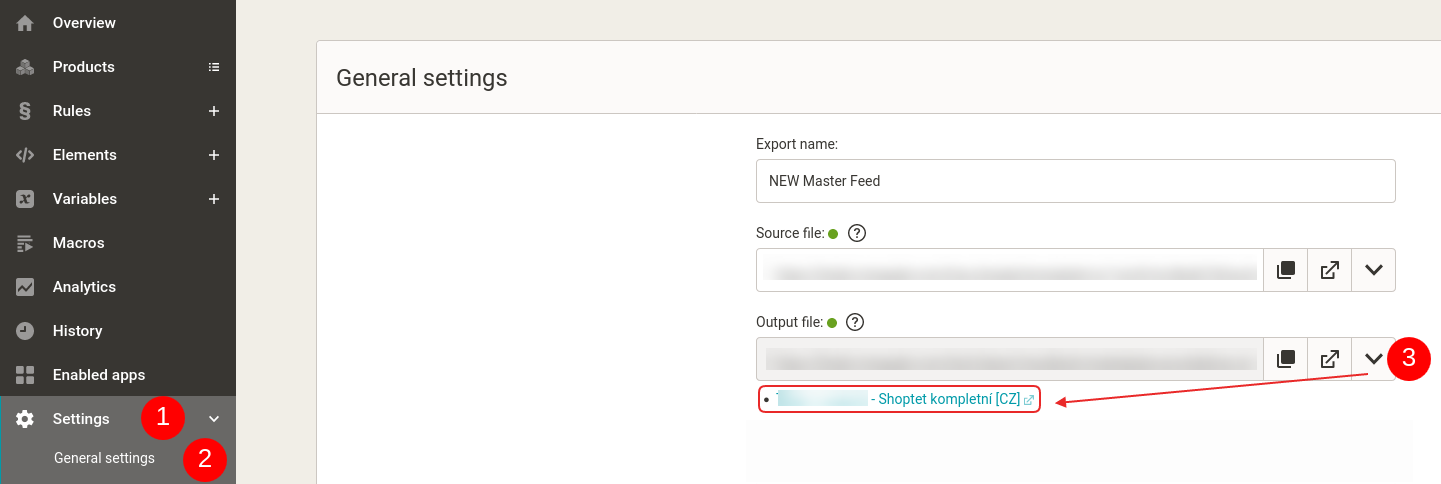
Get a complete **overview** of exports you created from the master feed in MERGADO. In the *Settings* section and on the *General* *settings* subpage, you find an arrow behind the output file address, where you can find **all exports created from the master feed**.
[  ](https://www.mergado.com/sites/default/files/perm/paragraph-image/settings-output-files_0.png)
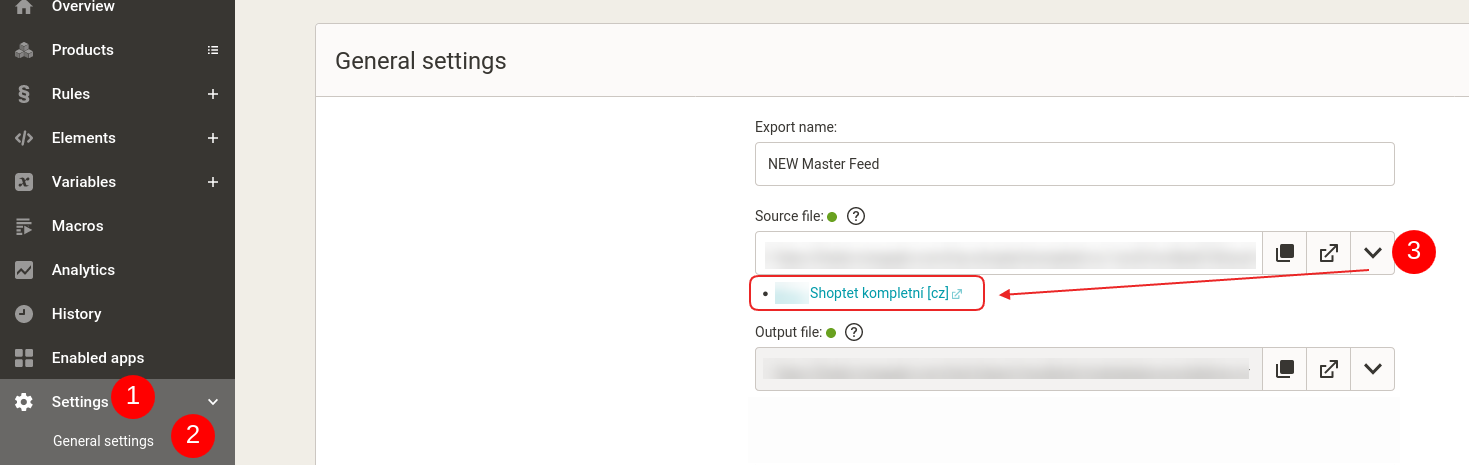
You can click the arrow symbol in the same way (in the *Settings* menu and on the *General Setting*s subpage) in **individual exports**. Here you will find the source from which the export is created. The names of individual exports are made up of **links**. You can easily click through from the master export to a smaller export and vice versa.
[  ](https://www.mergado.com/sites/default/files/perm/paragraph-image/settings-input-files_0.png)
## Typical examples of master feed usage in MERGADO Editor
**1.** If the input feed **is not consistent or does not contain complete data** (for this reason, you have to correct the same thing in each export). Specifically:
1. **Missing manufacturer** in the product name.
2. **Bad/non-existent EAN codes** — this data is suitable for almost all comparison engines.
3. **Incomplete or missing product parameters**, which are even mandatory for certain products on comparison engines and are also used for category parametric filters (at *GLAMI*, *FAVI*, *Biano*, *Google* *Shopping*).
By correcting this data in the master export, you will not have to make these corrections in every subsequent export that originates from the master feed.
**2.** If the input feed contains **unwanted products for advertising**. Typically products that are too cheap, products with a low margin, sold-out products, accessories, unique goods, etc.
If you hide such products in the master export, you will no longer need to hide them in subsequent exports.
**3.** **Setting the shipping price in one place for all comparison engines.** If you set the shipping prices and courier services in the master export, not only do you not have to set them in every subsequent export, but you also make your work easier during future changes. For example, if you **change the shipping prices** on the webshop or **introduce a new courier**, it is enough for you to make the change only in the master export. Such a change is automatically included in all subsequent exports.
Forget about the complicated search for different comparison engines administration to find out where and how to set shipping prices in them. With master export, you can **solve everything from one place**.
### How to navigate in the master export menu
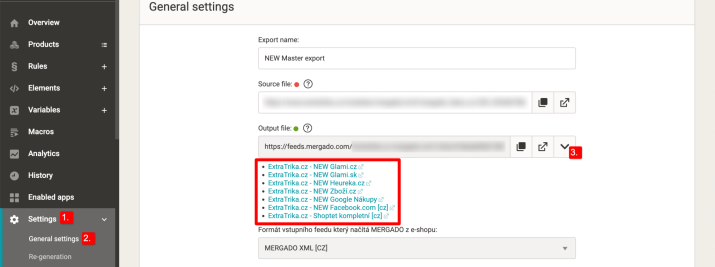
1\. If any other exports in the MERGADO Editor load the output feed from your master export, you can find their **list** in the master export menu:
*Settings -> General settings ->* under the *“down arrow”* by the output URL of the feed
[  ](https://www.mergado.com/sites/default/files/perm/paragraph-image/export-list-mergado.png)
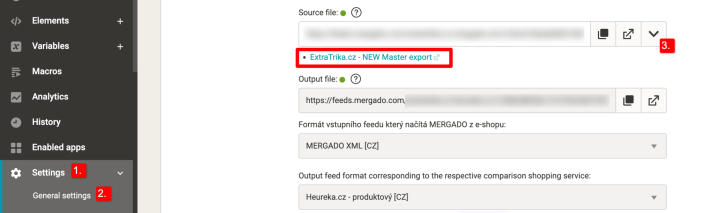
2\. If an export uses the **output from the master export as an input feed**, you can find it again in the menu of this export:
*Settings* -> *General settings* -> this time under the “down arrow” at the input URL, you can find **a link leading directly to the MASTER export**
Using a master feed and individual exports can **save you a lot of work**. You will make it easy for you to edit data and **target** with your store **directly** to a specific comparison engine.
### **You may be interested in:**
[  ](https://www.mergado.com/sites/default/files/perm/paragraph-image/direct-link-mergado.png)
Using a master feed and individual exports can **save you a lot of work**. You will make it easy for you to edit data and **target** with your store **directly** to a specific comparison engine.
Using a master feed and individual exports can **save you a lot of work**. You will make it easy for you to edit data and **target** with your store **directly** to a specific comparison engine.
## Read more:
[ 
### What should a proper client context look like for performance specialists?
](https://www.mergado.com/blog/master-prompt-eshopy-b2c)
[ 
### How Feed Optimization Unlocked Meta Ads Performance without Increasing Ad Spend
](https://www.mergado.com/blog/feed-optimization-for-meta-ads)
[ 
### How to Sell Successfully on idealo
](https://www.mergado.com/blog/successful-sale-on-idealo)
[  ](https://www.mergado.com/blog/lukas-horak)### [ Lukáš Horák ](https://www.mergado.com/blog/lukas-horak)
Lukáš takes care of most of the Czech and English communication in Mergado. Through blogs, e‑mail, and social networks, he regularly supplies readers with e‑commerce news and news and tips from Mergado. In his time off, he enjoys simple things like badminton, digging the hidden gems of the 80’s, and seafood served with red wine.
## What you *might be interested in next*
[ 
### How Feed Optimization Unlocked Meta Ads Performance without Increasing Ad Spend
](https://www.mergado.com/blog/feed-optimization-for-meta-ads)
[ 
### The Real Impact of Visual Product Image Optimization on Meta Campaign Performance
](https://www.mergado.com/blog/visuals-for-meta-campaigns)
[ 
### How We Migrated an E‑Shop from Shoptet to Shopify with Mergado: A Complete Migration Without Data Loss
](https://www.mergado.com/blog/how-we-migrated-e-shop-shoptet-shopify-mergado-complete-migration-without-data-loss)
## Don’t miss *anything*
Sign up for our newsletter
By logging in, you agree that we will process your data by the [terms of personal data protection](https://www.mergado.com/cookies).
Thank you, you have successfully joined our subscriber's list.
function ml_webform_success_5807248() {
var r = ml_jQuery || jQuery
r('.ml-subscribe-form-5807248 .row-success').show(), r('.ml-subscribe-form-5807248 .row-form').hide()
}