- [Case Studies](https://www.mergado.com/category/case-studies)
- [eCommerce tips](https://www.mergado.com/category/ecommerce-tips)
- [Online Store Solutions and Platforms](https://www.mergado.com/category/online-store-solutions-and-platforms)
- [Mergado Pack](https://www.mergado.com/category/mergado-pack)
- [Mergado tips](https://www.mergado.com/category/mergado-tips)
- [Mergado News](https://www.mergado.com/category/mergado-news)
- [eCommerce News](https://www.mergado.com/category/ecommerce-news)
- [How to use Mergado](https://www.mergado.com/category/how-to-use-mergado)
- [Interviews with e‑commerce gurus](https://www.mergado.com/category/interviews-e-commerce-gurus)
- [Extensions](https://www.mergado.com/category/apps-bidding-image-marketing-and-more)
- [Expansion with Mergado](https://www.mergado.com/category/expansion-with-mergado)
- [Mergado Lifestyle](https://www.mergado.com/category/mergado-lifestyle)
1. [ Home ](https://www.mergado.com/)
2. [ Mergado Blog ](https://www.mergado.com/blog)
3. [ How to use Mergado ](https://www.mergado.com/category/how-to-use-mergado)
4. **Set up Mergado effectively #1: Queries to input values**
# **Set up Mergado effectively #1: Queries to input values**
[  Lukáš Horák ](https://www.mergado.com/blog/lukas-horak) [How to use Mergado](https://www.mergado.com/category/how-to-use-mergado)
3. 4. 2019
3 minutes read

In the Mergado team, we see our platform as **a Swiss pen-knife for data feeds**. Thanks to **a large number of functionalities and experience** of solving the cases on our support, we have realized over time that Mergado has entered a new era. To an era where we need to teach our users how to work with this Swiss knife **effectively**.
function tableOfContents() {
return {
headings_menu: [],
heading_active: '', // Added to track the active section
shouldBeSticky: false,
generateToC() {
const headings = document.querySelectorAll('.js-article-full-headings h2, .js-article-full-headings h3');
let headingMap = {};
headings.forEach((heading) => { // Use an arrow function to maintain `this` context
// Normalize heading text to remove diacritics, then replace non-alphanumeric characters with dashes
var normalizedText = heading.textContent.normalize("NFD").replace(/[\u0300-\u036f]/g, ""); // Remove diacritics
var id = heading.id ? heading.id : normalizedText.trim().toLowerCase()
.split(' ').join('-').replace(/[^a-z0-9\-]/ig, ''); // Updated regex to replace non-alphanumeric characters
headingMap[id] = headingMap[id] !== undefined ? ++headingMap[id] : 0;
// Use the updated `id` with diacritics removed for the heading id and the TOC
const finalId = headingMap[id] ? `${id}-${headingMap[id]}` : id;
this.headings_menu.push({
id: finalId,
title: heading.textContent,
level: heading.tagName.toLowerCase(), // Track heading level
active: false, // Initially set active to false
});
heading.id = finalId;
});
},
checkStickyNeeded() {
const ul = this.$el.querySelector('ul');
if (ul) {
this.shouldBeSticky = ul.scrollHeight < window.innerHeight;
}
},
setActiveHeading() {
// disabled not working with active state on click
// add @scroll.window="setActiveHeading()" to the parent div
// const headings = document.querySelectorAll('.js-article-full-headings h2');
// let activeHeading = '';
// let closestHeadingDistance = Infinity;
// headings.forEach((heading) => {
// const rect = heading.getBoundingClientRect();
// const offset = rect.top - window.innerHeight / 2; // Consider heading in the middle of the screen as active
// if (offset < 0 && Math.abs(offset) < closestHeadingDistance) {
// activeHeading = heading.id;
// closestHeadingDistance = Math.abs(offset);
// }
// });
// // Update the active state in headings_menu
// if (activeHeading !== this.heading_active) {
// this.headings_menu = this.headings_menu.map(item => ({
// ...item,
// active: item.id === activeHeading,
// }));
// this.heading_active = activeHeading;
// }
},
setActiveItem(clickedId) {
this.headings_menu.forEach(item => {
item.active = (item.id === clickedId);
});
this.heading_active = clickedId; // Optionally update the heading_active property if used
},
};
}
1. —
In the Mergado team, we see our platform as **a Swiss pen-knife for data feeds**. Thanks to **a large number of functionalities and experience** of solving the cases on our support, we have realized over time that Mergado has entered a new era. To an era where we need to teach our users how to work with this Swiss knife **effectively**.
## Learn how to use Mergado for its best performance with the new mini-series
In this series, we will focus on **understanding the specific tasks** in setting up your export. By acquiring this knowledge, you can set your exports **efficiently**. And together we will achieve what you and our team are trying to do — **increase the performance** of Mergado and your data processing.
### Making queries to input values speeds up the processing of rules in Mergado
The mechanism of applying rules (and generally all Mergado) has a number of optimizations. One of them makes sure that when multiple rules are **applied to input queries**, such a set of rules can be **processed at once** — without having to store intermediate results between individual Mergado rules, and wasting time.
However, it is important to keep in mind that this optimization **cannot always be used:** Mergado has to assume that some rules are targeted to queries **for output**.
The “output” rules **are not processed together** with those “input” ones. Mergado must know the results of the previous rule before each “output” rule — because the previous rule changes the output values. Only on the basis of these output values can Mergado evaluate the “output” queries to learn which products to send to such a rule.
Therefore, if it is not strictly necessary, **do not make the rules at the output queries**, as this will **circumvent the above optimization and thus the rules can be drastically slowed down**. If it is appropriate in your situation, **use “input” queries as much as possible**. Such rules can then be processed in batches and thus significantly faster.
***Practical example***
Our support recently dealt with a case when rules **were slowly applied** in a large feed.
**What was it about:**
This client had dozens of transcription rules in his export, which were aimed **at queries for output**. However, each of these rules must be handled **separately** on output, which **affects** the overall **speed** of application of the rules.
**How we solved it:**
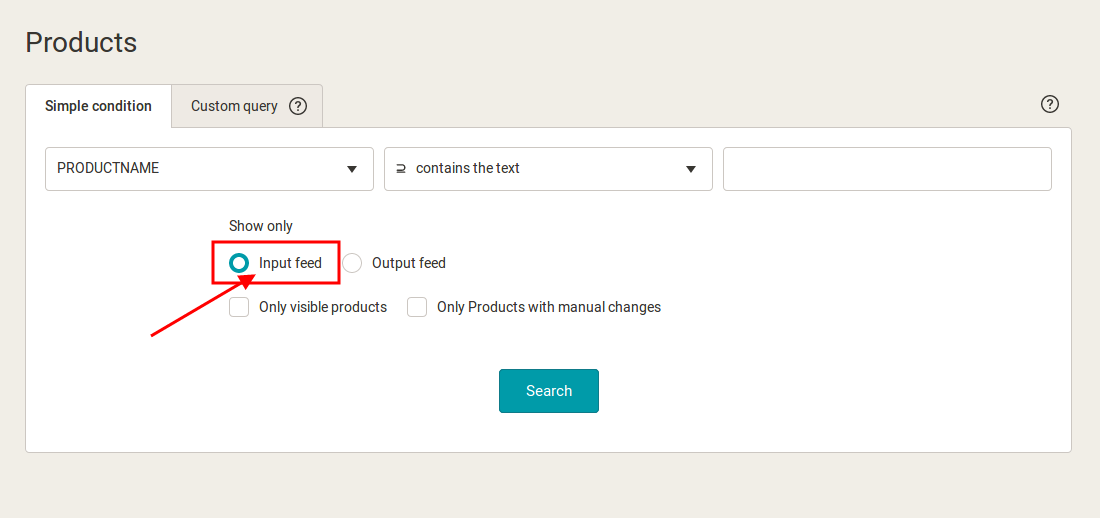
Our consultants reviewed the client’s export settings and found that most of the above-mentioned “output” queries **work with the** PRODUCTNAME **element**. However, this element **was not changed** by any previous rule — the input and output values of the PRODUCTNAME element were **exactly the same** when queries were made. Therefore, there was no reason for these queries to be made to “output”.
By **moving** these queries **to** **input**, our consultants have made these rules processing **together** and the application of the rules has become **faster**.
[  ](https://www.mergado.com/sites/default/files/perm/paragraph-image/screen-enpl.png)
**Check** your queries in Mergado. If you find any queries “to the output values”, consider whether this is really needed. If not, **redo** queries to input values to **speed** **up** the application of rules.
Learn from our new miniseries. It will help you improve your Mergado setup knowledge and you can use it to **work as quickly and efficiently as possible**. If you have any questions, do not hesitate to contact our [support](https://mailto:mergado@mergado.com).
### **You could be interested in:**
[ 
### E‑shopper‘s Guide: Master the basic operations in Mergado
](https://www.mergado.com/blog/e-shoppers-guide-master-the-basic-operations-in-mergado)
[ 
### The new version of Mergado brings faster functioning and many new features
](https://www.mergado.com/blog/the-new-version-of-mergado-brings-faster-functioning-and-many-new-features)
[ 
### What should a proper client context look like for performance specialists?
](https://www.mergado.com/blog/master-prompt-eshopy-b2c)
- [ Rules in MERGADO ](https://www.mergado.com/tag/rules-in-mergado)
[  ](https://www.mergado.com/blog/lukas-horak)### [ Lukáš Horák ](https://www.mergado.com/blog/lukas-horak)
Lukáš takes care of most of the Czech and English communication in Mergado. Through blogs, e‑mail, and social networks, he regularly supplies readers with e‑commerce news and news and tips from Mergado. In his time off, he enjoys simple things like badminton, digging the hidden gems of the 80’s, and seafood served with red wine.
## What you *might be interested in next*
[ 
### How We Migrated an E‑Shop from Shoptet to Shopify with Mergado: A Complete Migration Without Data Loss
](https://www.mergado.com/blog/how-we-migrated-e-shop-shoptet-shopify-mergado-complete-migration-without-data-loss)
[ 
### How to open large XML file
](https://www.mergado.com/blog/how-to-open-large-xml-file)
[ 
### Introducing smart value insertion. It will speed up the creation of bulk rules
](https://www.mergado.com/blog/smart-value-insertion)
## Don’t miss *anything*
Sign up for our newsletter
By logging in, you agree that we will process your data by the [terms of personal data protection](https://www.mergado.com/cookies).
Thank you, you have successfully joined our subscriber's list.
function ml_webform_success_5807248() {
var r = ml_jQuery || jQuery
r('.ml-subscribe-form-5807248 .row-success').show(), r('.ml-subscribe-form-5807248 .row-form').hide()
}