- [Case Studies](https://www.mergado.com/category/case-studies)
- [eCommerce tips](https://www.mergado.com/category/ecommerce-tips)
- [Online Store Solutions and Platforms](https://www.mergado.com/category/online-store-solutions-and-platforms)
- [Mergado Pack](https://www.mergado.com/category/mergado-pack)
- [Mergado tips](https://www.mergado.com/category/mergado-tips)
- [Mergado News](https://www.mergado.com/category/mergado-news)
- [eCommerce News](https://www.mergado.com/category/ecommerce-news)
- [How to use Mergado](https://www.mergado.com/category/how-to-use-mergado)
- [Interviews with e‑commerce gurus](https://www.mergado.com/category/interviews-e-commerce-gurus)
- [Extensions](https://www.mergado.com/category/apps-bidding-image-marketing-and-more)
- [Expansion with Mergado](https://www.mergado.com/category/expansion-with-mergado)
- [Mergado Lifestyle](https://www.mergado.com/category/mergado-lifestyle)
1. [ Home ](https://www.mergado.com/)
2. [ Mergado Blog ](https://www.mergado.com/blog)
3. [ Online Store Solutions and Platforms ](https://www.mergado.com/category/online-store-solutions-and-platforms)
4. **Everything you need to know about running an online store on WooCommerce: Basic settings**
# **Everything you need to know about running an online store on WooCommerce: Basic settings**
[  Lukáš Horák ](https://www.mergado.com/blog/lukas-horak) [Online Store Solutions and Platforms](https://www.mergado.com/category/online-store-solutions-and-platforms)
29. 4. 2020
3 minutes read

Increase the chance of the store on how to succeed among competing brands right from its **initial** **setup**. The [continuation of tips](https://www.mergado.com/store-at-woocommerce-1) for the successful involvement of the store on [WooCommerce](http://woocommerce.com/) will guide you through the preparation of **invoices**, **orders**, and **mailing**.
function tableOfContents() {
return {
headings_menu: [],
heading_active: '', // Added to track the active section
shouldBeSticky: false,
generateToC() {
const headings = document.querySelectorAll('.js-article-full-headings h2, .js-article-full-headings h3');
let headingMap = {};
headings.forEach((heading) => { // Use an arrow function to maintain `this` context
// Normalize heading text to remove diacritics, then replace non-alphanumeric characters with dashes
var normalizedText = heading.textContent.normalize("NFD").replace(/[\u0300-\u036f]/g, ""); // Remove diacritics
var id = heading.id ? heading.id : normalizedText.trim().toLowerCase()
.split(' ').join('-').replace(/[^a-z0-9\-]/ig, ''); // Updated regex to replace non-alphanumeric characters
headingMap[id] = headingMap[id] !== undefined ? ++headingMap[id] : 0;
// Use the updated `id` with diacritics removed for the heading id and the TOC
const finalId = headingMap[id] ? `${id}-${headingMap[id]}` : id;
this.headings_menu.push({
id: finalId,
title: heading.textContent,
level: heading.tagName.toLowerCase(), // Track heading level
active: false, // Initially set active to false
});
heading.id = finalId;
});
},
checkStickyNeeded() {
const ul = this.$el.querySelector('ul');
if (ul) {
this.shouldBeSticky = ul.scrollHeight < window.innerHeight;
}
},
setActiveHeading() {
// disabled not working with active state on click
// add @scroll.window="setActiveHeading()" to the parent div
// const headings = document.querySelectorAll('.js-article-full-headings h2');
// let activeHeading = '';
// let closestHeadingDistance = Infinity;
// headings.forEach((heading) => {
// const rect = heading.getBoundingClientRect();
// const offset = rect.top - window.innerHeight / 2; // Consider heading in the middle of the screen as active
// if (offset < 0 && Math.abs(offset) < closestHeadingDistance) {
// activeHeading = heading.id;
// closestHeadingDistance = Math.abs(offset);
// }
// });
// // Update the active state in headings_menu
// if (activeHeading !== this.heading_active) {
// this.headings_menu = this.headings_menu.map(item => ({
// ...item,
// active: item.id === activeHeading,
// }));
// this.heading_active = activeHeading;
// }
},
setActiveItem(clickedId) {
this.headings_menu.forEach(item => {
item.active = (item.id === clickedId);
});
this.heading_active = clickedId; // Optionally update the heading_active property if used
},
};
}
1. —
Increase the chance of the store on how to succeed among competing brands right from its **initial** **setup**. The [continuation of tips](https://www.mergado.com/store-at-woocommerce-1) for the successful involvement of the store on [WooCommerce](http://woocommerce.com/) will guide you through the preparation of **invoices**, **orders**, and **mailing**.
## Make full use of all the module options
Connecting an online store to [WooCommerce](https://www.mergado.com/tag/woocommerce) involves not only mandatory steps for setting up but also the use of **extensions**. See what you have to **focus** on.
### 1. Order numbering
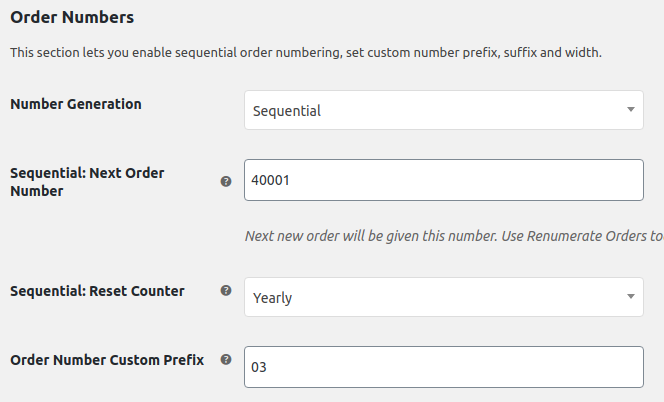
The WooCommerce module **uses the created ID** when numbering the order. If you need a custom system to run the store, deploy [plugins](https://wordpress.org/plugins/woocommerce-pdf-invoices-packing-slips/) on the module. Whether you prefer to use random assignments or a standard series of numbers, their packages allow you to set up **any** **combination**. If you do not use any of the plugins, avoid numbering orders according to invoices.
[  ](https://www.mergado.com/sites/default/files/perm/paragraph-image/woo-2-1.png)
### 2. Generating invoices
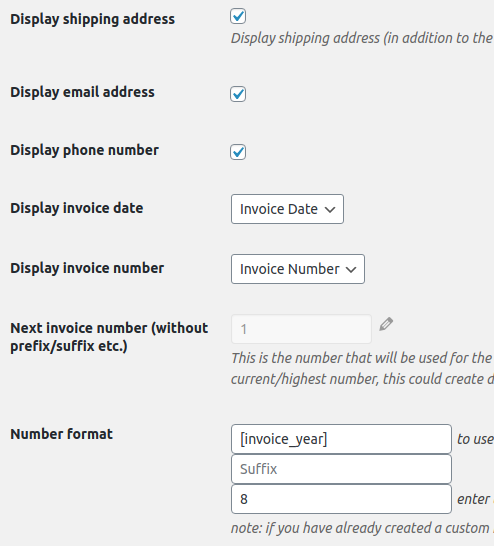
When generating invoices, the shop owner has an option of the **internal** **generation** directly in WooCommerce. With this simple plugin, he can create a basic invoice. In this case, he must download orders to an external accounting system **once a month**. The second option is to connect an **external accounting system** that will generate invoices for orders directly in WooCommerce.
[  ](https://www.mergado.com/sites/default/files/perm/paragraph-image/woo-2-2.png)
### 3. Information e‑mails
The basic WooCommerce package currently provides **several mailing variants** for each order status. You can control the settings for sending e‑mails on a simple level — by editing the template or disabling their sending. The extension consists of plugins with which you can create personal status or connect an e‑mail with a payment gateway.
### 4. Fields for ID and VAT data
An important step is to complete the fields for **ID and VAT information** with which you continue to work during invoicing. WooCommerce does not provide them in the base module. However, there are many free plugins to use.
### 5. Electronic records of sales
In many European countries, if you run a shop together with an online store, you must use **electronic records of the sales** [system](https://wordpress.org/plugins/woolab-ic-dic/). Same with cash on delivery or customer’s cash payment to the delivery company.
### 6. Transport
The inevitable step when starting an online store is the right choice of **transport** **method**. In the WooCommerce module, you primarily choose between pickup at the branch and delivery by post. Specific plugins help you with a simple implementation of various delivery services. There are also plugins and connectors, which automatically **transfer** **orders** directly to the deliverer’s system.
When setting up transport, the shop owner can also use the option of **zones and classes**. If you shop products past the borders of Europe, or your offer range contains oversized products, you must assign unique transport prices to the individual parts.
### 7. Payment
The module offers **four basic payment options** — PayPal, check, bank transfer, and cash upon delivery of the goods. For extensions such as the payment gateway, use the plugin menu. With their help, you will increase the number of payment methods and thus provide customers with **more** **alternatives** when purchasing.
Use the tips on setting up an online store before launching it and **impress** the customer with a flawlessly functioning website. In addition to the module for [WooCommerce](https://www.mergado.com/shopsystems/woocommerce), Mergado also supports [OpenCart](https://www.mergado.com/ecommerce-platforms/opencart) and [PrestaShop](https://www.mergado.com/ecommerce-solutions/prestashop). Simplify advertising on these platforms and discover the **benefits** of the [Mergado Pack](https://www.mergado.com/category/mergado-pack), which includes useful features for several advertising systems.
### **You might be interested:**
[ 
### What should a proper client context look like for performance specialists?
](https://www.mergado.com/blog/master-prompt-eshopy-b2c)
[ 
### How Feed Optimization Unlocked Meta Ads Performance without Increasing Ad Spend
](https://www.mergado.com/blog/feed-optimization-for-meta-ads)
[ 
### How to Sell Successfully on idealo
](https://www.mergado.com/blog/successful-sale-on-idealo)
[  ](https://www.mergado.com/blog/lukas-horak)### [ Lukáš Horák ](https://www.mergado.com/blog/lukas-horak)
Lukáš takes care of most of the Czech and English communication in Mergado. Through blogs, e‑mail, and social networks, he regularly supplies readers with e‑commerce news and news and tips from Mergado. In his time off, he enjoys simple things like badminton, digging the hidden gems of the 80’s, and seafood served with red wine.
## What you *might be interested in next*
[ 
### How We Migrated an E‑Shop from Shoptet to Shopify with Mergado: A Complete Migration Without Data Loss
](https://www.mergado.com/blog/how-we-migrated-e-shop-shoptet-shopify-mergado-complete-migration-without-data-loss)
[ 
### Allegro — the most successful polish e‑commerce platform
](https://www.mergado.com/blog/meet-allegro)
[ 
### Everything you need to know about running an online store on WooCommerce: Site’s technical settings
](https://www.mergado.com/blog/store-at-woocommerce-4)
## Don’t miss *anything*
Sign up for our newsletter
By logging in, you agree that we will process your data by the [terms of personal data protection](https://www.mergado.com/cookies).
Thank you, you have successfully joined our subscriber's list.
function ml_webform_success_5807248() {
var r = ml_jQuery || jQuery
r('.ml-subscribe-form-5807248 .row-success').show(), r('.ml-subscribe-form-5807248 .row-form').hide()
}