- [Case Studies](https://www.mergado.com/category/case-studies)
- [eCommerce tips](https://www.mergado.com/category/ecommerce-tips)
- [Online Store Solutions and Platforms](https://www.mergado.com/category/online-store-solutions-and-platforms)
- [Mergado Pack](https://www.mergado.com/category/mergado-pack)
- [Mergado tips](https://www.mergado.com/category/mergado-tips)
- [Mergado News](https://www.mergado.com/category/mergado-news)
- [eCommerce News](https://www.mergado.com/category/ecommerce-news)
- [How to use Mergado](https://www.mergado.com/category/how-to-use-mergado)
- [Interviews with e‑commerce gurus](https://www.mergado.com/category/interviews-e-commerce-gurus)
- [Extensions](https://www.mergado.com/category/apps-bidding-image-marketing-and-more)
- [Expansion with Mergado](https://www.mergado.com/category/expansion-with-mergado)
- [Mergado Lifestyle](https://www.mergado.com/category/mergado-lifestyle)
1. [ Home ](https://www.mergado.com/)
2. [ Mergado Blog ](https://www.mergado.com/blog)
3. [ Online Store Solutions and Platforms ](https://www.mergado.com/category/online-store-solutions-and-platforms)
4. **Everything you need to know about running an online store on WooCommerce: Analytics and Advertising Systems**
# **Everything you need to know about running an online store on WooCommerce: Analytics and Advertising Systems**
[  Lukáš Horák ](https://www.mergado.com/blog/lukas-horak) [Online Store Solutions and Platforms](https://www.mergado.com/category/online-store-solutions-and-platforms)
13. 5. 2020
3 minutes read

In addition to the [basic settings](https://www.mergado.com/store-at-woocommerce-2), a store must also ensure its visibility among other brands. Therefore, choose a **suitable** **advertising** **system** when creating it. Together with carefully set analytics, you will attract potential buyers better than other stores. Take a look at our tips and **ensure a flawless launch** of your online store.
function tableOfContents() {
return {
headings_menu: [],
heading_active: '', // Added to track the active section
shouldBeSticky: false,
generateToC() {
const headings = document.querySelectorAll('.js-article-full-headings h2, .js-article-full-headings h3');
let headingMap = {};
headings.forEach((heading) => { // Use an arrow function to maintain `this` context
// Normalize heading text to remove diacritics, then replace non-alphanumeric characters with dashes
var normalizedText = heading.textContent.normalize("NFD").replace(/[\u0300-\u036f]/g, ""); // Remove diacritics
var id = heading.id ? heading.id : normalizedText.trim().toLowerCase()
.split(' ').join('-').replace(/[^a-z0-9\-]/ig, ''); // Updated regex to replace non-alphanumeric characters
headingMap[id] = headingMap[id] !== undefined ? ++headingMap[id] : 0;
// Use the updated `id` with diacritics removed for the heading id and the TOC
const finalId = headingMap[id] ? `${id}-${headingMap[id]}` : id;
this.headings_menu.push({
id: finalId,
title: heading.textContent,
level: heading.tagName.toLowerCase(), // Track heading level
active: false, // Initially set active to false
});
heading.id = finalId;
});
},
checkStickyNeeded() {
const ul = this.$el.querySelector('ul');
if (ul) {
this.shouldBeSticky = ul.scrollHeight < window.innerHeight;
}
},
setActiveHeading() {
// disabled not working with active state on click
// add @scroll.window="setActiveHeading()" to the parent div
// const headings = document.querySelectorAll('.js-article-full-headings h2');
// let activeHeading = '';
// let closestHeadingDistance = Infinity;
// headings.forEach((heading) => {
// const rect = heading.getBoundingClientRect();
// const offset = rect.top - window.innerHeight / 2; // Consider heading in the middle of the screen as active
// if (offset < 0 && Math.abs(offset) < closestHeadingDistance) {
// activeHeading = heading.id;
// closestHeadingDistance = Math.abs(offset);
// }
// });
// // Update the active state in headings_menu
// if (activeHeading !== this.heading_active) {
// this.headings_menu = this.headings_menu.map(item => ({
// ...item,
// active: item.id === activeHeading,
// }));
// this.heading_active = activeHeading;
// }
},
setActiveItem(clickedId) {
this.headings_menu.forEach(item => {
item.active = (item.id === clickedId);
});
this.heading_active = clickedId; // Optionally update the heading_active property if used
},
};
}
1. —
In addition to the [basic settings](https://www.mergado.com/store-at-woocommerce-2), a store must also ensure its visibility among other brands. Therefore, choose a **suitable** **advertising** **system** when creating it. Together with carefully set analytics, you will attract potential buyers better than other stores. Take a look at our tips and **ensure a flawless launch** of your online store.
## Simplify store setup with Mergado Pack
The third part of the [miniseries](https://www.mergado.com/store-at-woocommerce-1) focused on the creation of online stores on the [WooCommerce](https://www.mergado.com/shopsystems/woocommerce) platform brings you an overview of important tasks that quality advertising cannot do without.
###
1. Analytics
The most common tool for measuring site traffic is [Google Analytics](https://analytics.google.com/analytics/web/provision/#/provision) — it mainly displays basic data about traffic or data flow. In the case of an online store, you need to analyze more detailed information. **What** **categories** do customers visit most often? **Which** **assortment** are they most interested in? Therefore, for more **effective e‑commerce analytics**, you need to track *E‑Commerce Events*. To set them up, use handy [plugins](https://cs.wordpress.org/plugins/enhanced-e-commerce-for-woocommerce-store/) that are fully compatible with the most used WordPress templates and the WooCommerce plugin.
###
2. Advertising systems
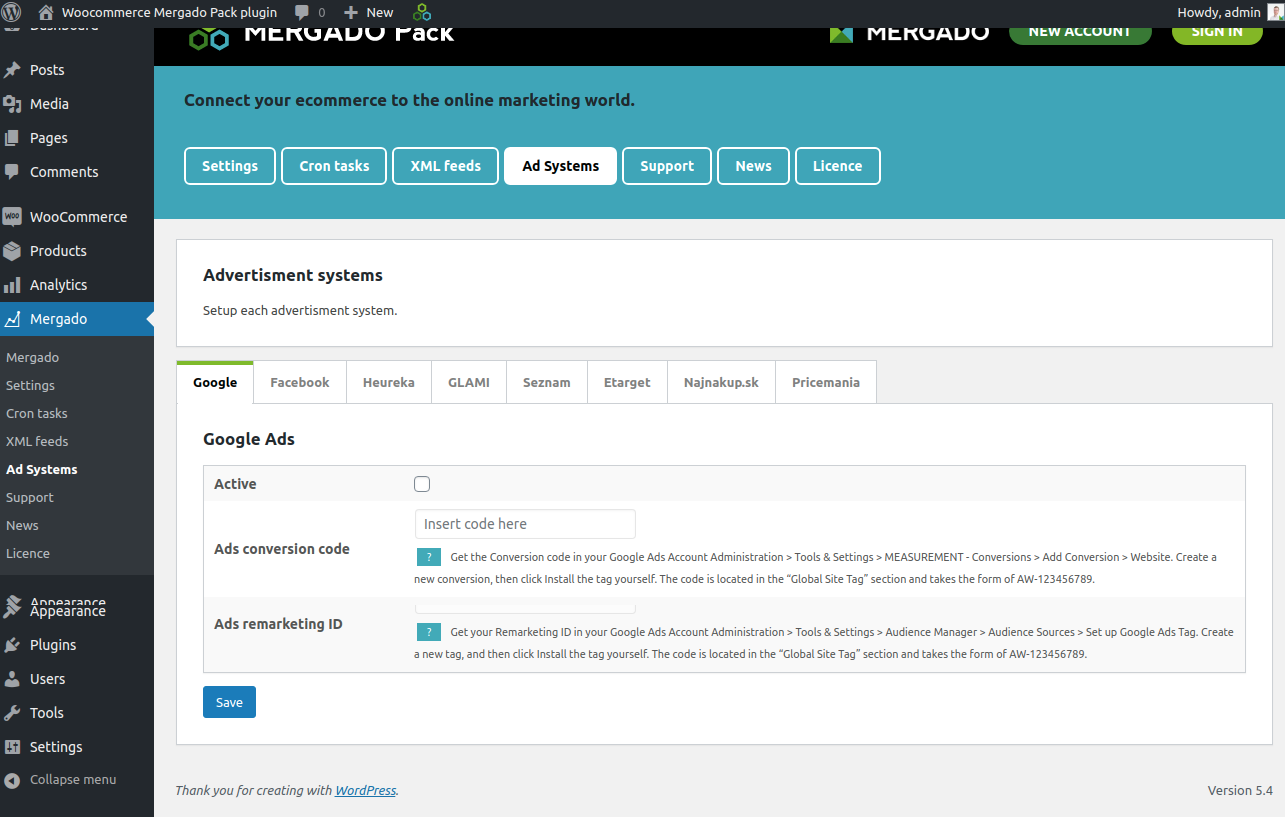
Be as visible to customers as possible and discover all the benefits of advertising systems. If you are targeting comparison engines such as [ShopAlike](https://www.mergado.com/tag/shopalike) or [GLAMI](https://www.mergado.com/tag/glami), use the free [Mergado Pack](https://www.mergado.com/tag/mergado-pack) module when connecting. With Mergado, you permanently display a **product** **feed** on a live address, which you can convert into a feed for the selected comparison engines after uploading.
Most advertising systems include support services, which you can connect to in a few simple steps thanks to the Mergado Packs.
- **GLAMI** uses the *GLAMI* *PiXel* function to monitor traffic pages, conversions, **improve** **positions** directly on the comparator and, through the *GLAMI* *TOP* service, collect feedback on brands or the purchase itself.
- **Google Ads** allows you to track conversions through a link to *Analytics*.
- [Facebook](https://www.mergado.com/tag/facebook), together with the **Facebook** **pixel** function, offers the creation of **dynamic** **advertising**.
For advertising systems, pay attention to their **payment**. The price of the advertisement is **charged** **without VAT** and the Mergado Pack also sends order data, e. g. when measuring conversions without VAT, the price for transport or payment.
[  ](https://www.mergado.com/sites/default/files/perm/paragraph-image/packy-woocomm2.png)
### 3. Stock services
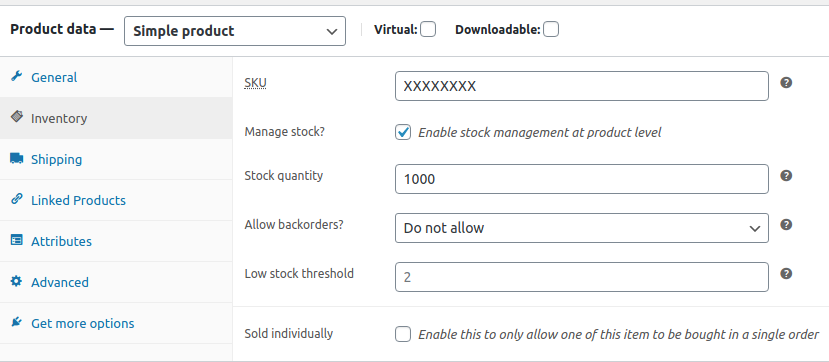
The WooCommerce module has several solutions ready for **stock** **management**. The basic settings include the option *is / is not in stock*. The second option is to activate Inventory Management at the product level on the *Product* *Detail* tab.
In this way, you assign specific data to the assortment, such as the quantity status, the *Low Stock Threshold* function, or the option of permitted purchases to order in the case of sold-out goods. After enabling this option, you can also use the Mergado Pack, which can **generate stocks into a product feed.**
[  ](https://www.mergado.com/sites/default/files/perm/paragraph-image/clipboard-13kveten20201240.png)
For a more sophisticated control, use a wide package of specialized [plugins](https://wordpress.org/plugins/woocommerce-stock-manager/). Their functions allow store owners to **edit stock, import and export data, or bulk upload assortment**. If you own a larger store, or manage several of them at once, reach for an **external stock management service**. There are many alternatives on the market that will help you synchronize your business with the billing system.
Connect the analytics on your online store with a correctly set up advertising system via [Mergado Packs](https://www.mergado.com/modules-for-ecommerce-platforms). You will find out specific sales data, which you will also use for warehouse management. Your offer will be **current and unmissable for target customers**.
### **You might be interested:**
[ 
### What should a proper client context look like for performance specialists?
](https://www.mergado.com/blog/master-prompt-eshopy-b2c)
[ 
### How Feed Optimization Unlocked Meta Ads Performance without Increasing Ad Spend
](https://www.mergado.com/blog/feed-optimization-for-meta-ads)
[ 
### How to Sell Successfully on idealo
](https://www.mergado.com/blog/successful-sale-on-idealo)
[  ](https://www.mergado.com/blog/lukas-horak)### [ Lukáš Horák ](https://www.mergado.com/blog/lukas-horak)
Lukáš takes care of most of the Czech and English communication in Mergado. Through blogs, e‑mail, and social networks, he regularly supplies readers with e‑commerce news and news and tips from Mergado. In his time off, he enjoys simple things like badminton, digging the hidden gems of the 80’s, and seafood served with red wine.
## What you *might be interested in next*
[ 
### How We Migrated an E‑Shop from Shoptet to Shopify with Mergado: A Complete Migration Without Data Loss
](https://www.mergado.com/blog/how-we-migrated-e-shop-shoptet-shopify-mergado-complete-migration-without-data-loss)
[ 
### Allegro — the most successful polish e‑commerce platform
](https://www.mergado.com/blog/meet-allegro)
[ 
### Everything you need to know about running an online store on WooCommerce: Site’s technical settings
](https://www.mergado.com/blog/store-at-woocommerce-4)
## Don’t miss *anything*
Sign up for our newsletter
By logging in, you agree that we will process your data by the [terms of personal data protection](https://www.mergado.com/cookies).
Thank you, you have successfully joined our subscriber's list.
function ml_webform_success_5807248() {
var r = ml_jQuery || jQuery
r('.ml-subscribe-form-5807248 .row-success').show(), r('.ml-subscribe-form-5807248 .row-form').hide()
}