- [Case Studies](https://www.mergado.com/category/case-studies)
- [eCommerce tips](https://www.mergado.com/category/ecommerce-tips)
- [Online Store Solutions and Platforms](https://www.mergado.com/category/online-store-solutions-and-platforms)
- [Mergado Pack](https://www.mergado.com/category/mergado-pack)
- [Mergado tips](https://www.mergado.com/category/mergado-tips)
- [Mergado News](https://www.mergado.com/category/mergado-news)
- [eCommerce News](https://www.mergado.com/category/ecommerce-news)
- [How to use Mergado](https://www.mergado.com/category/how-to-use-mergado)
- [Interviews with e‑commerce gurus](https://www.mergado.com/category/interviews-e-commerce-gurus)
- [Extensions](https://www.mergado.com/category/apps-bidding-image-marketing-and-more)
- [Expansion with Mergado](https://www.mergado.com/category/expansion-with-mergado)
- [Mergado Lifestyle](https://www.mergado.com/category/mergado-lifestyle)
1. [ Home ](https://www.mergado.com/)
2. [ Mergado Blog ](https://www.mergado.com/blog)
3. **12 most common XML feed errors and how to correct them. Part 1**
# **12 most common XML feed errors and how to correct them. Part 1**
[  Radim Zhoř ](https://www.mergado.com/blog/radim-zhor)
30. 11. 2017
3 minutes read
When advertising through product campaigns on e.g. comparison shopping services, having an XML feed with correct and up-to-date information is crucial. But that is not often the reality.
function tableOfContents() {
return {
headings_menu: [],
heading_active: '', // Added to track the active section
shouldBeSticky: false,
generateToC() {
const headings = document.querySelectorAll('.js-article-full-headings h2, .js-article-full-headings h3');
let headingMap = {};
headings.forEach((heading) => { // Use an arrow function to maintain `this` context
// Normalize heading text to remove diacritics, then replace non-alphanumeric characters with dashes
var normalizedText = heading.textContent.normalize("NFD").replace(/[\u0300-\u036f]/g, ""); // Remove diacritics
var id = heading.id ? heading.id : normalizedText.trim().toLowerCase()
.split(' ').join('-').replace(/[^a-z0-9\-]/ig, ''); // Updated regex to replace non-alphanumeric characters
headingMap[id] = headingMap[id] !== undefined ? ++headingMap[id] : 0;
// Use the updated `id` with diacritics removed for the heading id and the TOC
const finalId = headingMap[id] ? `${id}-${headingMap[id]}` : id;
this.headings_menu.push({
id: finalId,
title: heading.textContent,
level: heading.tagName.toLowerCase(), // Track heading level
active: false, // Initially set active to false
});
heading.id = finalId;
});
},
checkStickyNeeded() {
const ul = this.$el.querySelector('ul');
if (ul) {
this.shouldBeSticky = ul.scrollHeight < window.innerHeight;
}
},
setActiveHeading() {
// disabled not working with active state on click
// add @scroll.window="setActiveHeading()" to the parent div
// const headings = document.querySelectorAll('.js-article-full-headings h2');
// let activeHeading = '';
// let closestHeadingDistance = Infinity;
// headings.forEach((heading) => {
// const rect = heading.getBoundingClientRect();
// const offset = rect.top - window.innerHeight / 2; // Consider heading in the middle of the screen as active
// if (offset < 0 && Math.abs(offset) < closestHeadingDistance) {
// activeHeading = heading.id;
// closestHeadingDistance = Math.abs(offset);
// }
// });
// // Update the active state in headings_menu
// if (activeHeading !== this.heading_active) {
// this.headings_menu = this.headings_menu.map(item => ({
// ...item,
// active: item.id === activeHeading,
// }));
// this.heading_active = activeHeading;
// }
},
setActiveItem(clickedId) {
this.headings_menu.forEach(item => {
item.active = (item.id === clickedId);
});
this.heading_active = clickedId; // Optionally update the heading_active property if used
},
};
}
1. —
[  ](https://www.mergado.com/sites/default/files/perm/paragraph-image/xmlfeederrors.png)
When advertising through product campaigns on e.g. **comparison shopping services**, having an **XML feed** with correct and up-to-date information is crucial. But that is not often the reality.
We list the most common **XML feed errors** and provide you with tips on how to correct them. When making corrections you may often find yourself using regular expressions. In case you are not familiar with them, stay tuned as we will provide you with a guide to regular expressions. Or if you get really stuck just let us know and we will be happy to assist.
### \#1 EAN element contains invalid value
EAN is an important element for product identification, especially when advertising on **Google Shopping**. If your feed contains this error, try following these steps:
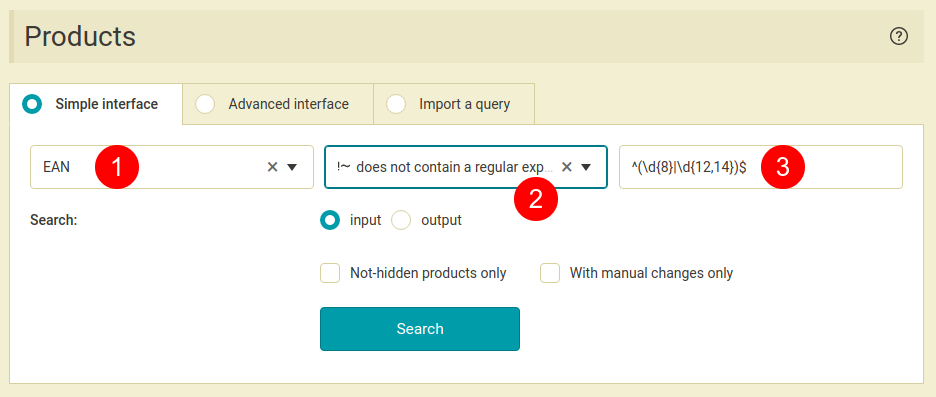
Check if the length of EAN is correct. It should have either 8 or 12 – 14 characters. To look for products with a different number of characters, go to *Products* page, choose *EAN* element, select “*does not contain regular expression*” condition and use this regular expression: **^(\\d{8}|\\d{12,14})$**
[  ](https://www.mergado.com/sites/default/files/perm/paragraph-image/searchingforproductscontaininginvalideanvalues.png)
If you find any products that meet this condition, you can save this product query and in the next step correct it. Either you can look manually at the EAN value of those products and correct it directly in your store. Or if the correct EAN value is mentioned somewhere else in the feed, you can transfer it into the EAN element using the *Find and replace* rule.
### \#2 MANUFACTURER element is empty or missing
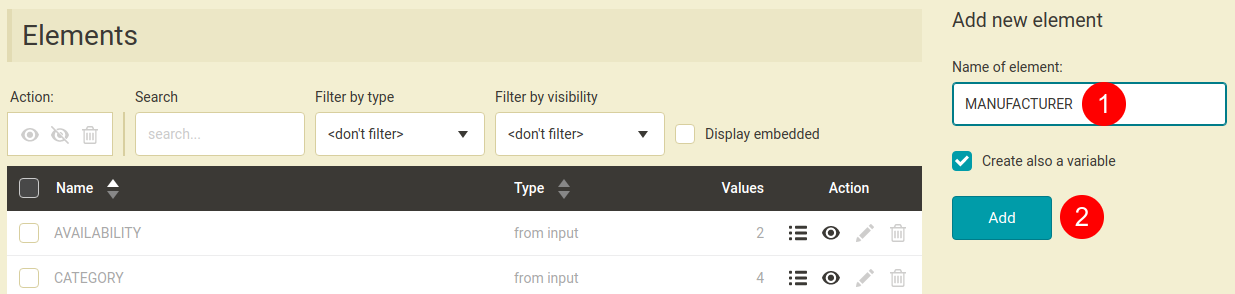
MANUFACTURER element should contain information about the product manufacturer, however it may happen that this information is mentioned somewhere else in your feed. If that’s the case you can find and copy it from a different element to MANUFACTURER element. But first make sure that your feed contains the MANUFACTURER element at all. If not, you can easily create it in Mergado. On *Elements* page on the right type MANUFACTURER and hit *Add*.
[  ](https://www.mergado.com/sites/default/files/perm/paragraph-image/howtoaddanewelementinmergado.png)
In the next step, with help of rules you can fill this element with the correct information, depending on where it is located. Here we describe several possibilities:
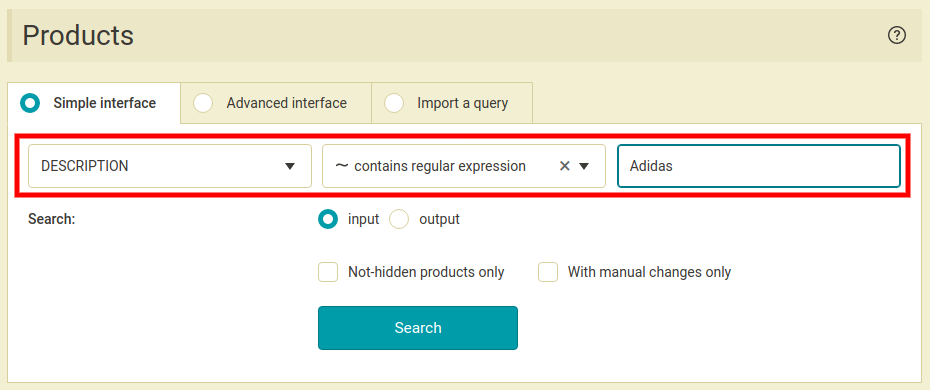
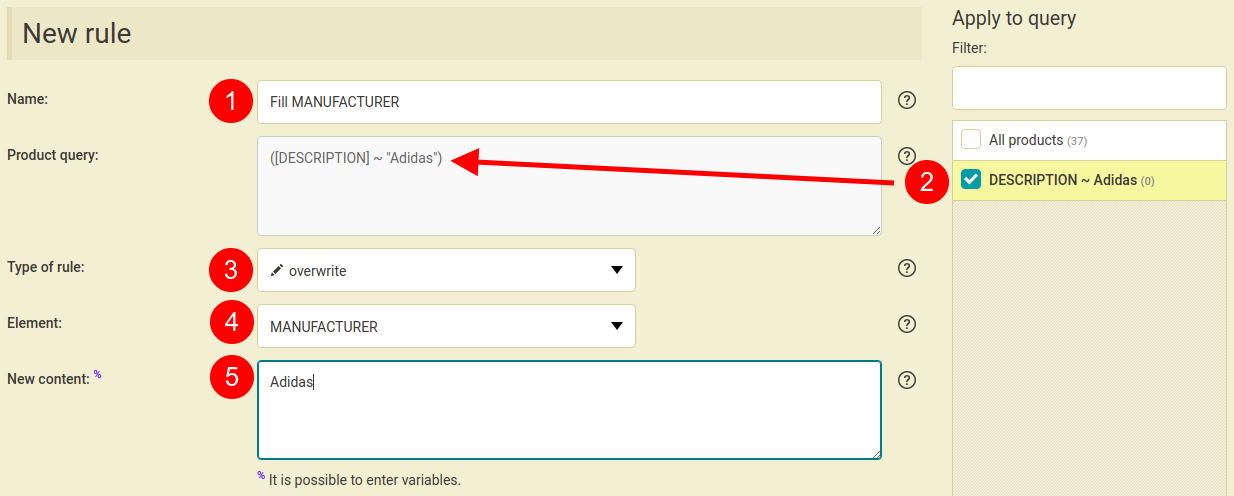
- In case you have only a few manufacturers — let’s say 20 at the most — you can use queries. First you filter each manufacturer (e.g. by searching for the manufacturer in DESCRIPTION or PRODUCTNAME element) and then for each query you create a rule (Overwrite) that will fill the MANUFACTURER element with the product manufacturer.
[  ](https://www.mergado.com/sites/default/files/perm/paragraph-image/searchingforproductscontainingaspecificwordinanelement.png)
[  ](https://www.mergado.com/sites/default/files/perm/paragraph-image/howtocreateanewrule.png)
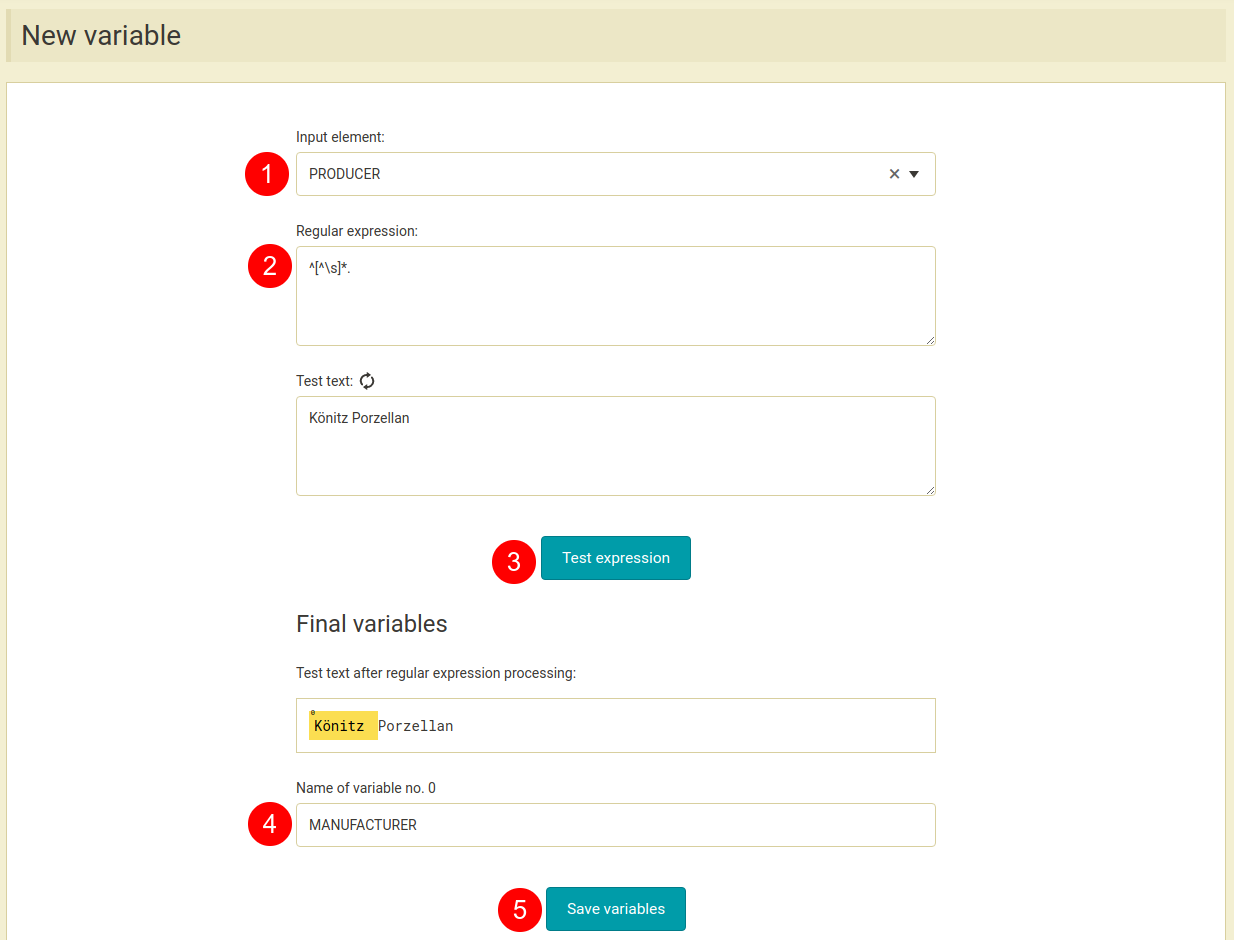
- In case of many manufacturers the previous procedure would be rather lengthy or even impossible so only automation can help. Let’s say the manufacturer name is at the beginning of the PRODUCER element. Start by creating a variable that will be filled with the first word from the PRODUCER element (to create a variable go to *Variables* page and hit *Create variable*).
As regular expression type this: **^\[^\\s\]\*** in the respective field. This regular expression searches text for any characters up to the first space. In other words it finds the first word in a text. However this expression can only be used for manufacturers with one-word names e.g. Adidas, Nike, Reebok etc.
[  ](https://www.mergado.com/sites/default/files/perm/paragraph-image/howtocreateanewvariable.png)
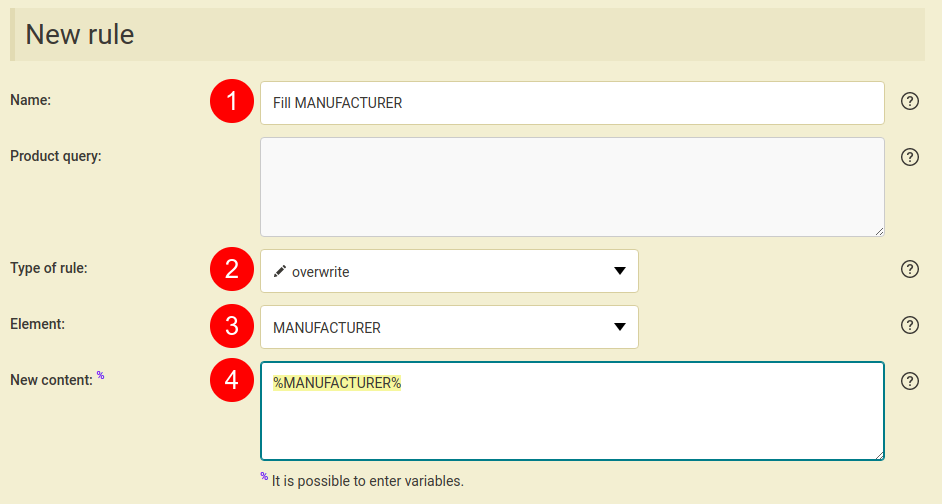
Then input this variable in the MANUFACTURER element with a rule.
[  ](https://www.mergado.com/sites/default/files/perm/paragraph-image/howtocreateanewruleusingavariable.png)
Continue to the Part 2 and 3 of the series:
- [12 most common XML feed errors and how to correct them. Part 2](https://www.mergado.com/xml-feed-errors-2)
- [12 most common XML feed errors and how to correct them. Part 3](https://www.mergado.com/xml-feed-errors-3)
- [ Regular expressions ](https://www.mergado.com/tag/regular-expressions)
- [ XML feed ](https://www.mergado.com/tag/xml-feed)
[  ](https://www.mergado.com/blog/radim-zhor)### [ Radim Zhoř ](https://www.mergado.com/blog/radim-zhor)
- He has several years of experience in e‑commerce.
- He works as a Business Development Specialist at Mergado, where he helps to market the Mergado product management tool.
## What you *might be interested in next*
[ 
### MASTER PROMPT TEMPLATE FOR ECOMMERCE
](https://www.mergado.com/blog/master-prompt-eshopy-b2c)
[ 
### How Feed Optimization Unlocked Meta Ads Performance without Increasing Ad Spend
](https://www.mergado.com/blog/feed-optimization-for-meta-ads)
[ 
### How to Sell Successfully on idealo
](https://www.mergado.com/blog/successful-sale-on-idealo)
## Don’t miss *anything*
Sign up for our newsletter
By logging in, you agree that we will process your data by the [terms of personal data protection](https://www.mergado.com/cookies).
Thank you, you have successfully joined our subscriber's list.
function ml_webform_success_5807248() {
var r = ml_jQuery || jQuery
r('.ml-subscribe-form-5807248 .row-success').show(), r('.ml-subscribe-form-5807248 .row-form').hide()
}