- [Case Studies](https://www.mergado.com/category/case-studies)
- [eCommerce tips](https://www.mergado.com/category/ecommerce-tips)
- [Online Store Solutions and Platforms](https://www.mergado.com/category/online-store-solutions-and-platforms)
- [Mergado Pack](https://www.mergado.com/category/mergado-pack)
- [Mergado tips](https://www.mergado.com/category/mergado-tips)
- [Mergado News](https://www.mergado.com/category/mergado-news)
- [eCommerce News](https://www.mergado.com/category/ecommerce-news)
- [How to use Mergado](https://www.mergado.com/category/how-to-use-mergado)
- [Interviews with e‑commerce gurus](https://www.mergado.com/category/interviews-e-commerce-gurus)
- [Extensions](https://www.mergado.com/category/apps-bidding-image-marketing-and-more)
- [Expansion with Mergado](https://www.mergado.com/category/expansion-with-mergado)
- [Mergado Lifestyle](https://www.mergado.com/category/mergado-lifestyle)
1. [ Home ](https://www.mergado.com/)
2. [ Mergado Blog ](https://www.mergado.com/blog)
3. [ How to use Mergado ](https://www.mergado.com/category/how-to-use-mergado)
4. **12 most common XML feed errors and how to correct them. Part 2**
# **12 most common XML feed errors and how to correct them. Part 2**
[  Radim Zhoř ](https://www.mergado.com/blog/radim-zhor) [How to use Mergado](https://www.mergado.com/category/how-to-use-mergado)
7. 12. 2017
3 minutes read
I think we can all agree that having an eCommerce business and running a **product campaign on comparison shopping services** while not having a flawless product feed can lead to significant losses in sales, especially before Christmas. That’s why we now present you these 12 most common XML feed errors with **simple step-by-step instructions** how to correct them.
function tableOfContents() {
return {
headings_menu: [],
heading_active: '', // Added to track the active section
shouldBeSticky: false,
generateToC() {
const headings = document.querySelectorAll('.js-article-full-headings h2, .js-article-full-headings h3');
let headingMap = {};
headings.forEach((heading) => { // Use an arrow function to maintain `this` context
// Normalize heading text to remove diacritics, then replace non-alphanumeric characters with dashes
var normalizedText = heading.textContent.normalize("NFD").replace(/[\u0300-\u036f]/g, ""); // Remove diacritics
var id = heading.id ? heading.id : normalizedText.trim().toLowerCase()
.split(' ').join('-').replace(/[^a-z0-9\-]/ig, ''); // Updated regex to replace non-alphanumeric characters
headingMap[id] = headingMap[id] !== undefined ? ++headingMap[id] : 0;
// Use the updated `id` with diacritics removed for the heading id and the TOC
const finalId = headingMap[id] ? `${id}-${headingMap[id]}` : id;
this.headings_menu.push({
id: finalId,
title: heading.textContent,
level: heading.tagName.toLowerCase(), // Track heading level
active: false, // Initially set active to false
});
heading.id = finalId;
});
},
checkStickyNeeded() {
const ul = this.$el.querySelector('ul');
if (ul) {
this.shouldBeSticky = ul.scrollHeight < window.innerHeight;
}
},
setActiveHeading() {
// disabled not working with active state on click
// add @scroll.window="setActiveHeading()" to the parent div
// const headings = document.querySelectorAll('.js-article-full-headings h2');
// let activeHeading = '';
// let closestHeadingDistance = Infinity;
// headings.forEach((heading) => {
// const rect = heading.getBoundingClientRect();
// const offset = rect.top - window.innerHeight / 2; // Consider heading in the middle of the screen as active
// if (offset < 0 && Math.abs(offset) < closestHeadingDistance) {
// activeHeading = heading.id;
// closestHeadingDistance = Math.abs(offset);
// }
// });
// // Update the active state in headings_menu
// if (activeHeading !== this.heading_active) {
// this.headings_menu = this.headings_menu.map(item => ({
// ...item,
// active: item.id === activeHeading,
// }));
// this.heading_active = activeHeading;
// }
},
setActiveItem(clickedId) {
this.headings_menu.forEach(item => {
item.active = (item.id === clickedId);
});
this.heading_active = clickedId; // Optionally update the heading_active property if used
},
};
}
1. —
[  ](https://www.mergado.com/sites/default/files/perm/paragraph-image/xmlfeederrors2.png)
I think we can all agree that having an **eCommerce business** and running a **product campaign on comparison shopping services** while not having a flawless product feed can lead to significant loss in sales, especially before Christmas. That’s why we now present you these 12 most common XML feed errors with **simple step-by-step instructions** how to correct them.
Before we start, let me remind you that you can easily check if your **XML feed contains any errors** using our [free online XML audit](https://audit.mergado.com/). All you need is a URL address of your XML file and an email where the audit results will be sent.
Last week we discussed the first two common product feed errors. Now let’s look at the next ones.
### \#3 CATEGORYTEXT element has invalid value
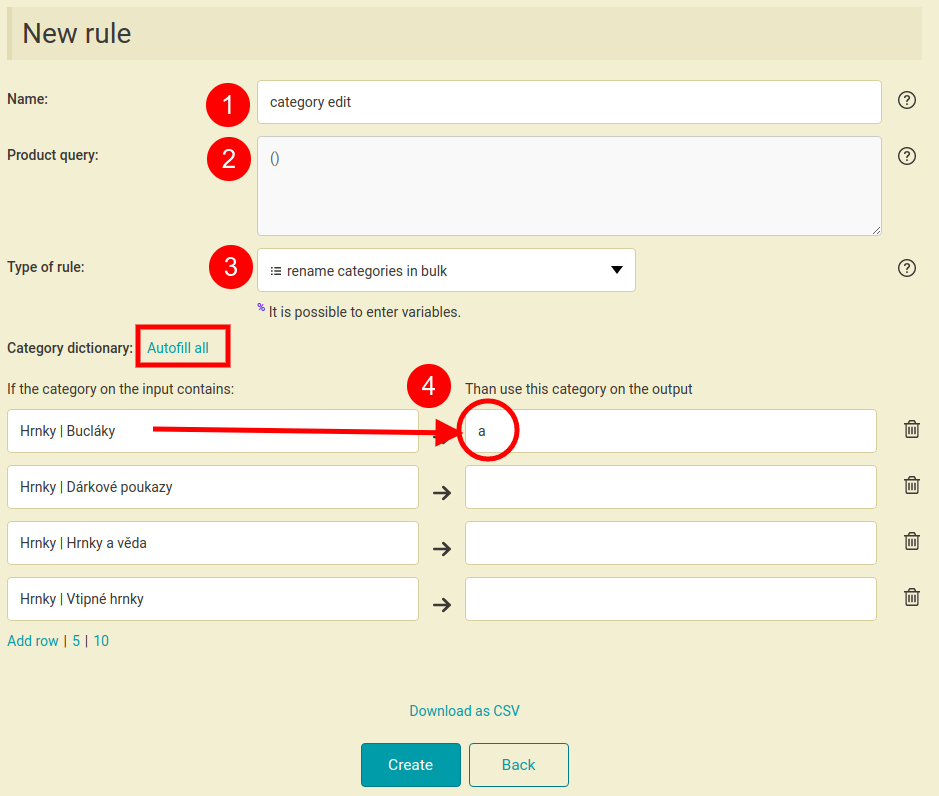
To correct this error you can use a special rule in Mergado called “*renaming categories in bulk*”. Great feature of this rule is that it will offer you suggestions of correct category names of a given comparison shopping service depending on the output XML format that you chose. Just type any character in the field on the right that you think the correct category could contain and the suggestions will automatically appear.
[  ](https://www.mergado.com/sites/default/files/perm/paragraph-image/howtorenamecategoriesinxmlfeed.png)
### \#4 DELIVERY\_DATE element is missing or empty
If this element is reported as **missing**, you need to add it and fill it with a value the same way as in the missing MANUFACTURER element example ([error #2, part 1](https://www.mergado.com/xml-feed-errors-1)).
It the element is **present** but does not contain any data, the delivery date must be set, ideally directly in your eCommerce store administration.
### \#5 PRODUCT element contains inappropriate words
Some comparison shopping services fight against extremely **long product names** or names containing **inappropriate words** by **banning some words**. It can be for example an information about a free gift, free shipping etc. It depends on the comparison shopping service policy and product feed specifications.
How to deal with such situation?
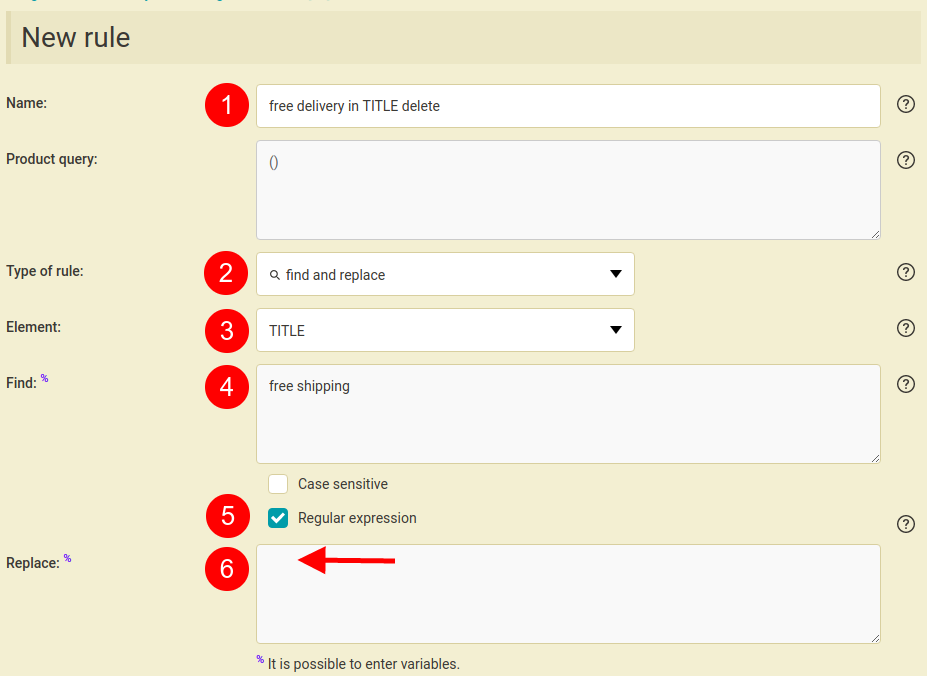
If you know which words from your product names are banned — e.g. free shipping — simply use the “*Find and replace*” rule. This rule will search all your product names and replace it with an empty character = delete it. We recommend to select the “*Regular expression*” option which will make the rule more accurate.
[  ](https://www.mergado.com/sites/default/files/perm/paragraph-image/howtodeletewordsinanelement.png)
In case you have different banned words in your product name you can try using **regular expressions**.
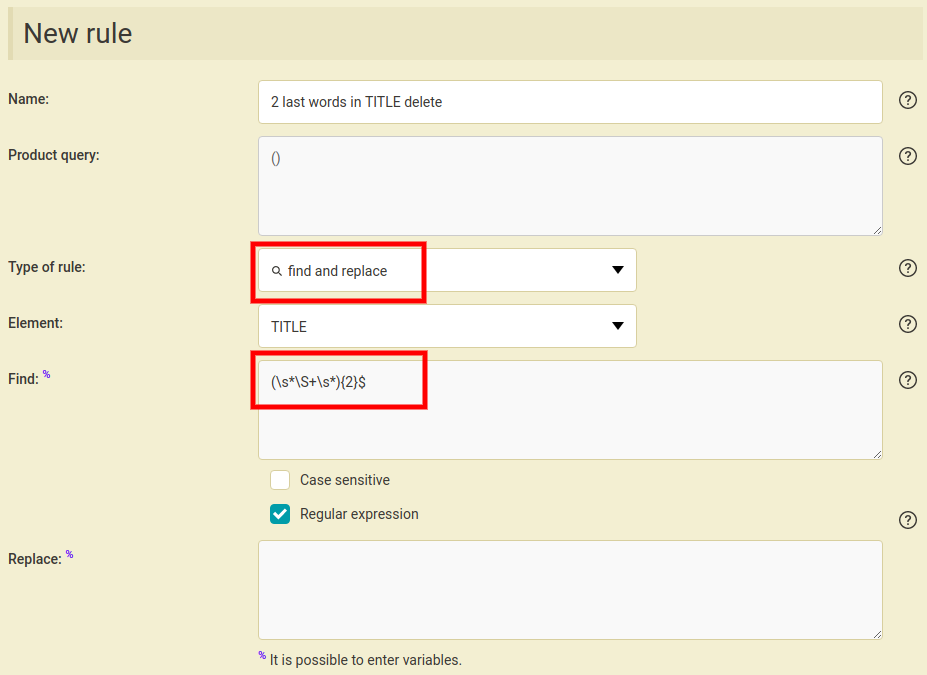
E.g. you have different two-word offers (free shipping, free gift,…) at the end of your product name. In this case you could use this regular expression in the “*Find and replace*” rule: **(\\s\*\\S+\\s\*){2}$**
This regular expression will find the two words at the end of your product name, including the space before these words. Example: product name “*Long sleeve T‑shirt free shipping*”, the reg. expression will find “ *free shipping*”.
[  ](https://www.mergado.com/sites/default/files/perm/paragraph-image/howtodeletewordsinanelementusingregularexpression.png)
Alternatively you can use this regular expression — **\\s\*-\[^-\]\*$** — that will find any long text at the end of a text up to a dash, including the dash and the space before. Example: product name “*Long sleeve T‑shirt — free shipping included*”, the reg. expression will find “ *- free shipping included*”.
To see the other articles from the “**12 most common XML feed errors and how to correct them**” series, go to [Part 1](https://www.mergado.com/xml-feed-errors-1) in our blog.
If you need any assistance with your product feed you can describe your issue in our [forum](https://forum.mergado.com/) or contact us at .
Go back to the Part 1 or continue to the Part 3 of the series:
- [12 most common XML feed errors and how to correct them. Part 1](https://www.mergado.com/xml-feed-errors-1)
- [12 most common XML feed errors and how to correct them. Part 3](https://www.mergado.com/xml-feed-errors-3)
- [ Regular expressions ](https://www.mergado.com/tag/regular-expressions)
- [ XML feed ](https://www.mergado.com/tag/xml-feed)
[  ](https://www.mergado.com/blog/radim-zhor)### [ Radim Zhoř ](https://www.mergado.com/blog/radim-zhor)
- He has several years of experience in e‑commerce.
- He works as a Business Development Specialist at Mergado, where he helps to market the Mergado product management tool.
## What you *might be interested in next*
[ 
### How We Migrated an E‑Shop from Shoptet to Shopify with Mergado: A Complete Migration Without Data Loss
](https://www.mergado.com/blog/how-we-migrated-e-shop-shoptet-shopify-mergado-complete-migration-without-data-loss)
[ 
### How to open large XML file
](https://www.mergado.com/blog/how-to-open-large-xml-file)
[ 
### Introducing smart value insertion. It will speed up the creation of bulk rules
](https://www.mergado.com/blog/smart-value-insertion)
## Don’t miss *anything*
Sign up for our newsletter
By logging in, you agree that we will process your data by the [terms of personal data protection](https://www.mergado.com/cookies).
Thank you, you have successfully joined our subscriber's list.
function ml_webform_success_5807248() {
var r = ml_jQuery || jQuery
r('.ml-subscribe-form-5807248 .row-success').show(), r('.ml-subscribe-form-5807248 .row-form').hide()
}