📌 Introduction: What This Case Study Is About
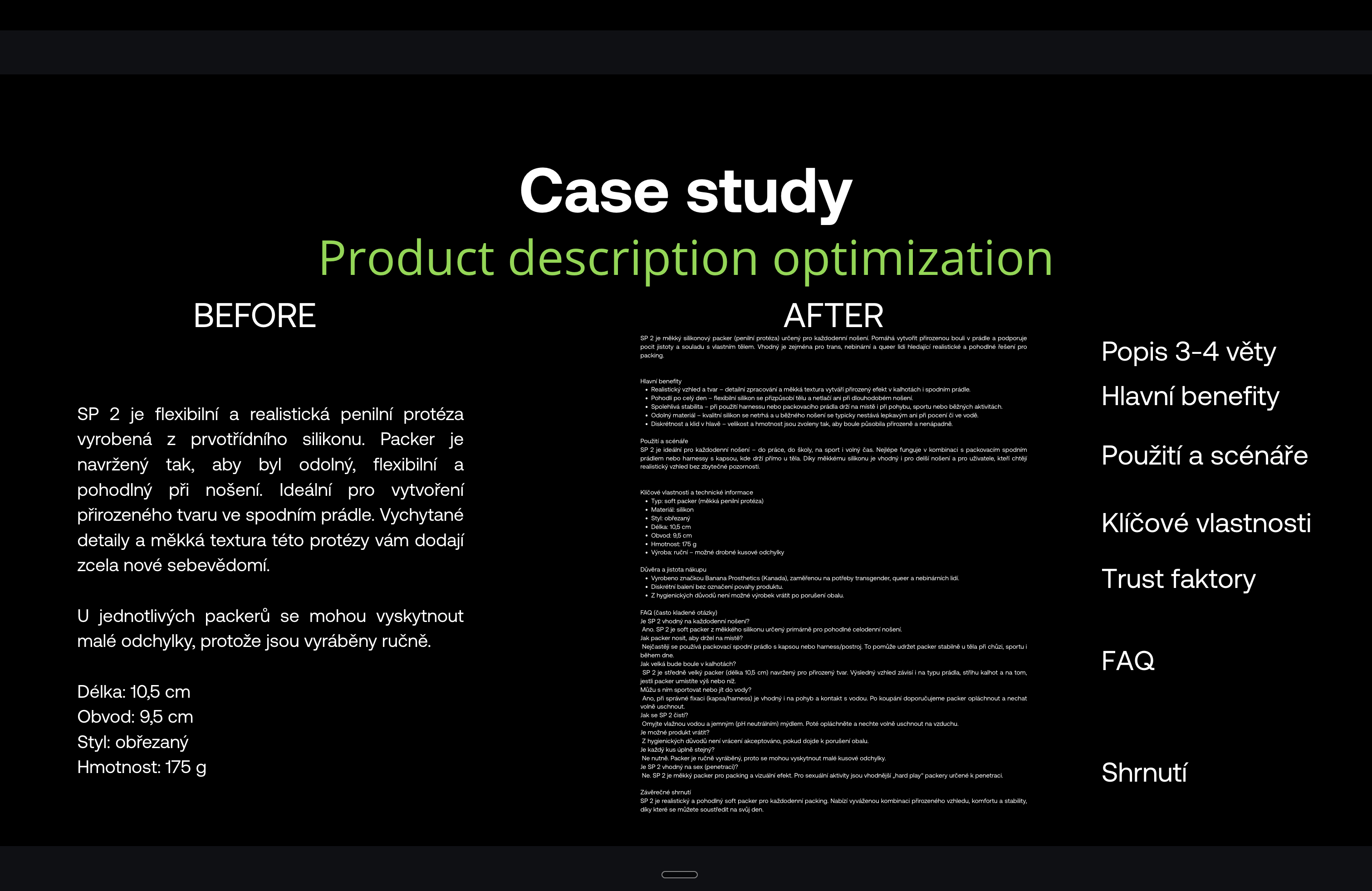
GPT Shopping places completely different demands on product data than traditional product campaigns. It is not enough to simply fill in a product description. What matters most is the context, relevance, and quality of the data the language model draws from.
In this case study, we present a practical process for optimizing product descriptions and other data for GPT Shopping. We explain how we approach content in practice, what information sources we use, and how we prepare them so they can be used efficiently.
We work with a real e‑commerce store running on Shoptet (the Dykka store) and with the Mergado tool, which serves as a central hub for data preparation and management. We do not focus only on product descriptions, but also on other content available to the store, such as articles, category descriptions, reviews, or brand information.
The core principle is simple:
👉 high-quality output for GPT Shopping does not come from a single text, but from well-prepared context.
In the following chapters, we will go through the different types of content, how to prepare them for the product feed, and how to use them when generating descriptions with a language model.
🗂️ Preparing Data for Context
A product description alone is not enough for GPT Shopping. The language model works with context created from various content sources across the e‑commerce store.
That is why we included multiple types of information in the optimization process—from articles and category descriptions to reviews and brand information. In the following chapters, we will go through them one by one and explain why they matter.
📝 Articles (Internal and External)
Articles were among the most important sources of context. They contain information that usually does not make it into product descriptions, but has high value for GPT Shopping.
Typically, this includes:
- how the product is used in practice,
- specific scenarios and situations,
- main benefits and differences,
- information about who the product is intended for (personas).
However, not every article is relevant to the entire product range. The first step was therefore filtering and segmenting the content, most often by categories or topics. The goal was not to copy articles into the feed, but to select only what makes sense for a given type of product.
In addition to the store’s own content, we also considered external articles. These are especially useful for products sold by multiple e‑shops and can provide:
- a different perspective,
- a clearer explanation of how the product is used,
- or additional information missing from the e‑shop itself.
How We Prepared the Articles
To use article content effectively when generating descriptions, it first had to be prepared in a suitable format.
We followed this process:
- we collected relevant article URLs from the e‑shop website or sitemap,
How We Used the Content in Mergado
The finished summaries were:
- uploaded to the Mergado Files extension,
- made accessible via URLs,
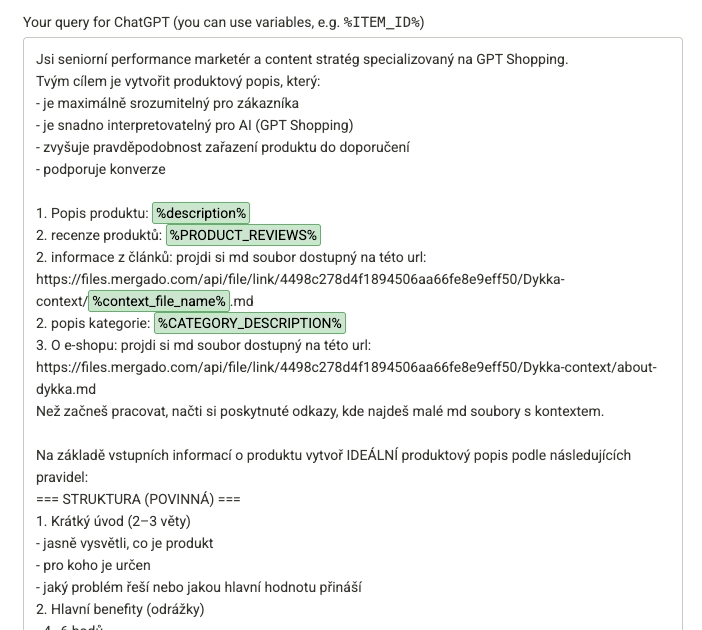
- and used directly in the prompt when generating descriptions.
This content was not exported into the final feed. It served purely as supplementary context for the language model, giving it access to the right information at the right moment.
📋 Category Descriptions
We used category descriptions as broader context beyond individual products. While a product description focuses on specific features and benefits, a category description helps the language model understand:
- what type of products belong to the category,
- what differences or alternatives exist between them,
- what problem or need the category generally solves.
This information is especially useful in situations where the product description alone is not enough or is too brief.
How We Prepared the Category Descriptions
Since the e‑commerce store runs on Shoptet, we used the Shoptet category feed as the primary data source.
The process was as follows:
- we uploaded the category feed into a supporting project in Mergado,
- within the project, we adjusted the output to obtain:
- the category name,
- the corresponding category description,
- we exported the output into a CSV file,
- using the Import Data File rule, we uploaded the CSV back into the product feed,
- we assigned the category description to each product using a matching element based on the category name.
This prepared content was stored in a helper element. It did not need to be exported into the final feed, but served as another source of context that we used directly in the prompt.
🛒 General Information About the E‑Shop
Another source of context was general information about the e‑shop. This is not data related to a specific product, but rather the overall framework in which the entire product range exists.
This information helps the language model better understand:
- what the e‑shop sells and what it specializes in,
- who the target audience is and what the main personas are,
- what values, vision, or direction the e‑shop has,
- and any specifics of the assortment (e.g. product variants or specific product types).
This context may also include general information about shipping, returns, or other policies, if relevant to the final form of the descriptions.
How We Prepared the E‑Shop Information
Preparing this data was relatively simple compared to other sources.
We followed this process:
- using a language model (e.g. ChatGPT), we generated a general description of the e‑shop,
- as input, we provided the e‑shop name and its URL,
- the resulting text was saved into a Markdown file,
- the file was then made accessible via Mergado Files.
Just like with articles, this content was not stored separately for each product. It served as global context that we added to the prompt only where it made sense.
⭐ Product Reviews
Product reviews were among the most valuable sources of information, but at the same time they posed the biggest challenge from a data preparation perspective. Unlike articles or category descriptions, they are not naturally structured for product-level work.
Their main benefits are clear:
- they contain real customer experiences,
- they describe practical use in everyday life,
- they highlight details to watch out for,
- and they often answer questions that commonly appear in Q&A.
That is exactly why reviews are such a powerful source of context for GPT Shopping.
Main Challenge: one review ≠ one product
Reviews are typically structured so that:
- each review is a separate item,
- one product appears repeatedly in the data,
- the data is prepared at the level of individual ratings rather than products.
For our needs, however, we had to attach all reviews related to one product directly to that product in the feed. This meant deduplicating reviews, merging them, and adding summary metrics.
How We Prepared the Reviews
We chose to process the data outside of Mergado and then import it back in.
The process was as follows:
- we downloaded reviews from the Shoptet administration into a CSV file,
- we opened the data in Google Sheets,
- using functions:
- UNIQUE to deduplicate reviews,
- TEXTJOIN to merge review texts for a specific product,
- at the same time, we processed numeric values as well:
- individual ratings,
- average rating,
- number of reviews,
- we published the final table as CSV,
- using the Import Data File rule, we uploaded the data back into the product feed,
- reviews and ratings were stored in helper elements (e.g. product_reviews, product_rating).
These elements then served as another input for the prompt when generating descriptions.
Alternative Approach
We also tested an alternative solution based on review feeds from Google or Heureka.
The process was more complex:
- we created two supporting projects in Mergado,
- we converted the data into the Shoptet supplier XML format,
- we used variant merging so that each product appeared only once,
- reviews remained preserved as variants,
- afterwards, we converted the data into CSV and imported it into the product feed.
This approach works, but it is more demanding in terms of setup and maintenance.
🏷️ Brand Descriptions
We used brand descriptions as an additional source of context that helps the language model better understand who stands behind the product and the environment in which it operates.
Their main value lies in the fact that they:
- add information about the manufacturer,
- indicate the brand’s specialization or focus,
- can provide context regarding product values or quality.
They are not a key source for every product, but in combination with other data they help complete the overall picture.
How We Prepared the Brand Descriptions
We took advantage of the fact that Shoptet allows brands to be exported into CSV.
The process was as follows:
- we uploaded the brand export into a simple project in Mergado,
- within the project, we adjusted the data structure to obtain:
- the brand name as the matching element,
- the brand description as the value,
- using the Import Data File rule, we uploaded the resulting CSV into the product feed,
- we assigned brand descriptions to products based on the brand name.
As with the other sources, we stored this content in helper elements. These served as additional input data for the prompt, not as content intended directly for the output feed.
🤖 Optimizing Product Descriptions with GPT
Once we had all content sources prepared — whether stored in Markdown files via Mergado Files or imported into the product feed as helper elements — it was time for the actual optimization of product descriptions using a language model.
The goal was no longer just to collect data, but to actively use it when generating content that is:
- richer in context,
- more relevant for GPT Shopping,
- and consistent across the entire product range.
For this part, we used the Mergado Sources extension, which allows you to work with GPT models directly on data inside Mergado.
The Tool Used and Its Role
Mergado Sources serves as a connection between data in Mergado and the language model. It allows you to:
- define which elements and sources the model should use,
- work with product selections,
- write outputs directly back into the feed.
This makes it possible to automate description generation and manage it using the same principles Mergado applies to other data modifications.
Step-by-Step Process
We divided the optimization process into several clear steps. This made it easy to test, refine, and gradually scale the workflow.
Our process was as follows:
-
We activated the Mergado Sources extension
We connected the extension to OpenAI using an API token obtained from an account at platform.openai.com.
-
We created a new element
On the Elements page, we created a new element where the output from the language model would be written.
-
We selected the data source
We chose OpenAI as the source and assigned the product selection for which the content should be generated.
- We selected the product selection
- We set the model parameters
- the creativity level (temperature) was kept at 0.5,
- we tested different models (e.g. GPT‑5, GPT‑5 Mini, GPT‑5 Nano).
👉 We always recommend testing the specific model — results may vary depending on the type of product range.
-
We selected the target element
The output was written either:
- to a new element,
- or directly into an existing element (e.g. the Description field in the GPT Shopping feed).
-
We tested a sample output
The extension allows you to generate a preview output for a random product, which is very useful when refining the prompt.
-
We applied the rules
It is important to keep in mind that the rules are applied twice:
- first, the data is sent to the OpenAI API,
- second, the returned output is written into the target element.
👉 It is advisable to leave a time buffer between these two steps, as processing may take tens of minutes depending on the amount of data.
Reviewing Results and Additional Options
After generating the descriptions, we:
- reviewed the resulting content for individual products,
- continued refining the prompt itself,
- verified consistency across the product range.
The same approach can also be used to optimize product titles. Since the data sources are already prepared, the process is very similar to the one used for descriptions.
🏁 Conclusion
In this case study, we showed how product descriptions and other data can be systematically optimized for GPT Shopping using Mergado. It was not just about generating text, but primarily about working with context and relevance—what data we provide to the language model and in what form.
Although the described process is based on a specific e‑commerce store and a particular technical setup, it is general enough to be applied to other projects. The key is to understand the logic:
- select relevant content sources,
- prepare them in a structured format,
- and use them purposefully when working with a language model.
If you decide to try this approach for your own e‑shop, we recommend starting gradually. Test on a smaller sample of products, fine-tune the prompt, and only then scale the solution to your entire product range.
We’d be happy if you shared your experience with us — how well the process worked for you, whether it delivered the expected results, and what improvements or simplifications you discovered along the way. Good luck. 💪