
Since February 2026, OpenAI has been testing paid ads directly within ChatGPT conversations, gradually adding tools, formats, and features that resemble established advertising platforms such as Google Ads or Meta Ads — just in a completely different environment. Since August, OpenAI Ads has also been available in 31 European countries, including the Czech Republic and Slovakia. That’s one more reason to find out right now how OpenAI Ads actually works.

In this article, we summarize what OpenAI Ads is, how it works, what testing phase it’s currently in, what campaign management looks like, and how Mergado can help you connect to it. Finally, we’ll take a look at where the whole system is likely headed.

What Is OpenAI Ads

OpenAI Ads consists of paid advertisements displayed directly within ChatGPT’s responses. The ad appears below the end of a text response, is clearly labeled as sponsored, and is visually separated from the assistant’s actual answer.

Central to the credibility of the whole system is OpenAI’s claim that ads have no influence on the content of responses. The ad system runs on infrastructure separate from the language model, and advertisers have no influence over how, when, or what ChatGPT tells the user. The ad is only “added” to the response — it doesn’t interfere with it. At the same time, users’ conversations remain private from advertisers. OpenAI neither shares nor sells that content to them.

Ads also don’t affect all users. They appear only on the Free and Go plans. The paid tiers — Plus, Pro, Business, Enterprise, and Education — remain completely ad-free. OpenAI also states that ads are not shown to accounts identified as belonging to users under 18.
How the Ad System Works

Targeting by Context, Not by Keywords

Unlike classic search PPC, OpenAI Ads doesn’t work with exact keyword matching. For standard text ads, advertisers provide so-called context hints at the ad group level — descriptions of topics, conversations, or products where their ad might be relevant. The system then decides whether to show an ad based on broader context: the intent of the current conversation, the ad’s landing page, its headline and copy, and — if the user has personalization turned on — additional signals from their ChatGPT usage. In other words, advertisers don’t specify exact keywords, but rather the context in which it makes sense for their ad to appear. The final decision on whether to display an ad always rests with OpenAI’s algorithm.

Product ads take this one step further. At the end of September 2026, OpenAI turned off context hints for this ad type, so it’s not you doing the targeting — it’s your data. You don’t set keywords, interests, or demographics, and audiences can’t yet be used for product ads in European countries. All that’s left to set is the country, budget, and campaign objective (clicks, conversions, or reach). The system then decides on its own which conversations to show a product in, based on how well it understands your products. And that’s something you influence mainly through your product feed.

Auction Model and Purchase Options

OpenAI doesn’t select ads simply based on who bids the most. Relevance to the given conversation matters too, so a lower bid with high relevance can beat a higher but less relevant one.

Two basic purchase models are supported:

  • CPM — cost per thousand impressions
  • CPC — cost per click; OpenAI recommends a starting maximum bid of $3 – 5 per click

Bids are set at the ad group level.

Content Policies

Not every advertiser, and not every product, can advertise on ChatGPT. For now, ads are intended mainly for consumer categories — lifestyle and home goods, local services, travel and experiences, digital products, and education — and the list will gradually expand. Outside the US, financial, healthcare, and legal services are generally prohibited. Also prohibited are, for example, alcohol and tobacco, gambling, adult content, and political ads. In addition, ads aren’t shown in conversations where they would seem inappropriate, such as those about violence, or in sensitive situations like conversations about mental health.

Testing Phase and Who Can Take Part

OpenAI Ads is still in beta and is gradually expanding to more countries. The pilot launched in February 2026 in the US, for users on the Free and Go plans. In March, OpenAI announced that testing had so far had no negative impact on user trust, and in May it expanded beyond the US — to the United Kingdom, Canada, Australia, Mexico, Brazil, Japan, South Korea, and New Zealand.

🚨 Since August 24, 2026, OpenAI Ads has been available in 31 European countries — including Germany, France, Spain, Italy, Sweden, Norway, Denmark, the Netherlands, and Austria. This is the platform’s largest expansion to date. Initially, advertisers only had access through the OpenAI Ads Solutions team and through agency or technology partners; since August 31, 2026, self-service access via Ads Manager has also been open. As in other countries, ads are shown only to users on the Free and Go plans, while paid tiers remain ad-free.

In Ads Manager (the interface advertisers use to set up and manage campaigns), it’s important to distinguish between two separate things:

  • Who a campaign can target (“Locations for this campaign”) — advertisers can currently choose from 40 countries, 31 of them in Europe (essentially the entire EU plus Norway, Iceland, Liechtenstein, and the United Kingdom).
  • Who can open an account (“Billing address”) — self-service Ads Manager is available to businesses from dozens of countries, including the Czech Republic and Slovakia. The requirement is that the legal entity that will advertise and pay must be based in a country listed in the official availability list.

What Campaign Management Looks Like

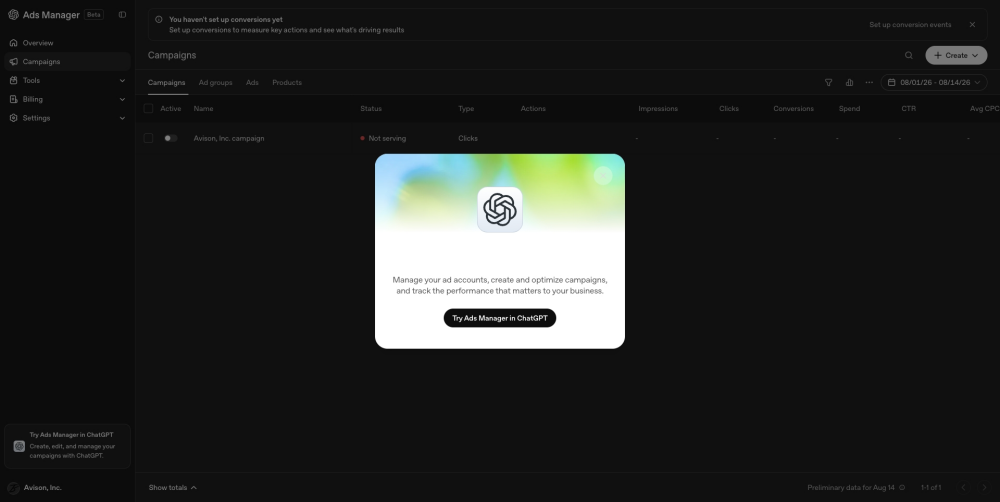
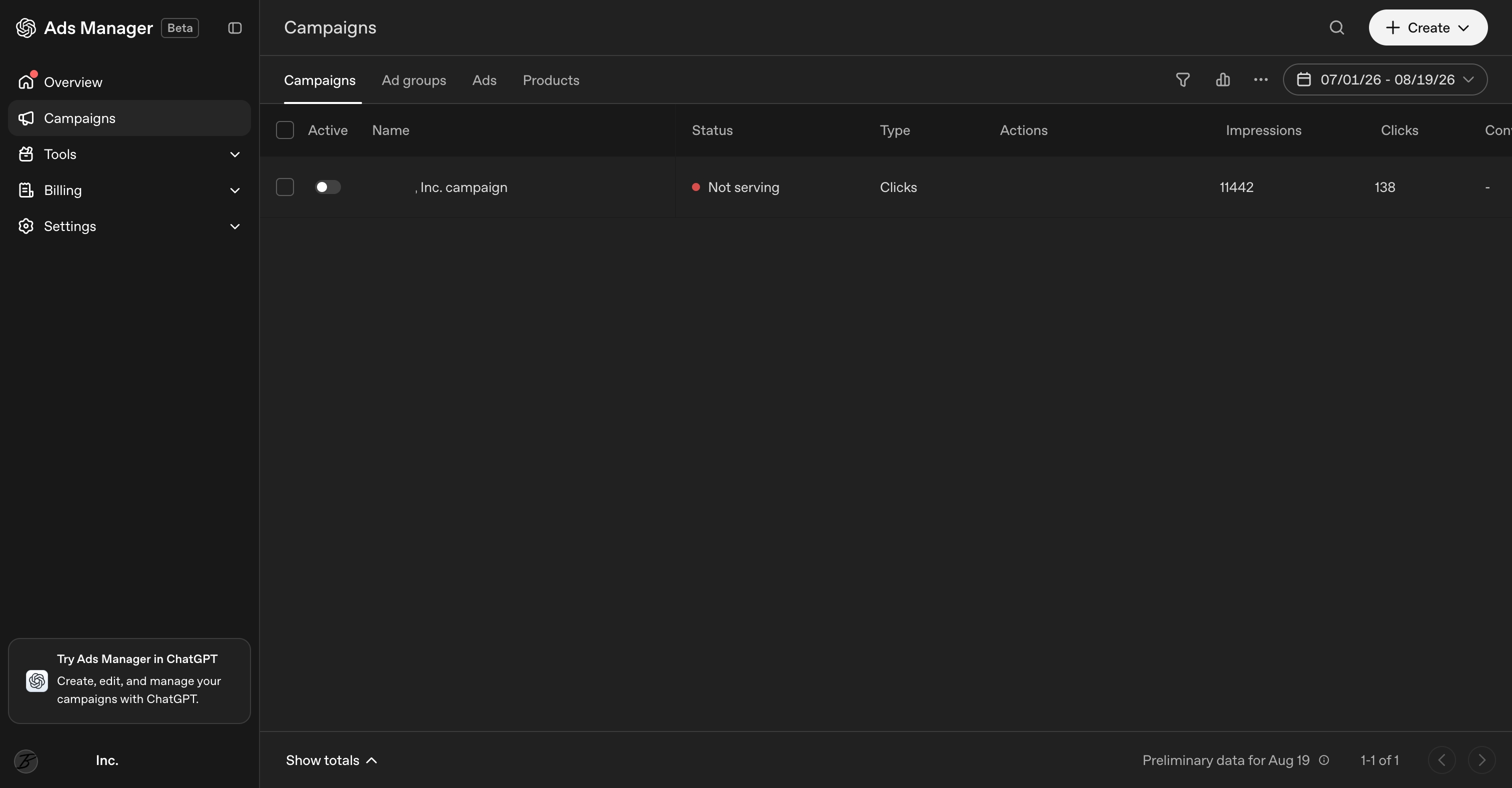
To manage ads, OpenAI offers Ads Manager — a platform for creating, launching, and managing campaigns, with performance-tracking tools all in one place. Thanks to our work with US clients and our own test account, we at Mergado also have access to Ads Manager. The interface’s layout resembles Google Ads.

Within Ads Manager, advertisers can:

  • register as advertisers and enter billing details,
  • set campaign budgets, bids, and spend pacing,
  • bulk-upload ad creatives or build them directly in the tool,
  • launch and edit campaigns,
  • track performance and report results (impressions, clicks, spend, ROAS, CTR, CPC, CPM, conversions),
  • view a change history that lets them trace back edits made to campaigns,
  • use more advanced features, such as bulk campaign management via API or excluding locations from targeting.

Ads Manager is still in beta. It keeps evolving and is a live, fast-changing product. OpenAI rolls out new features gradually, account by account, so two advertisers may not see the same set of features at the same time.

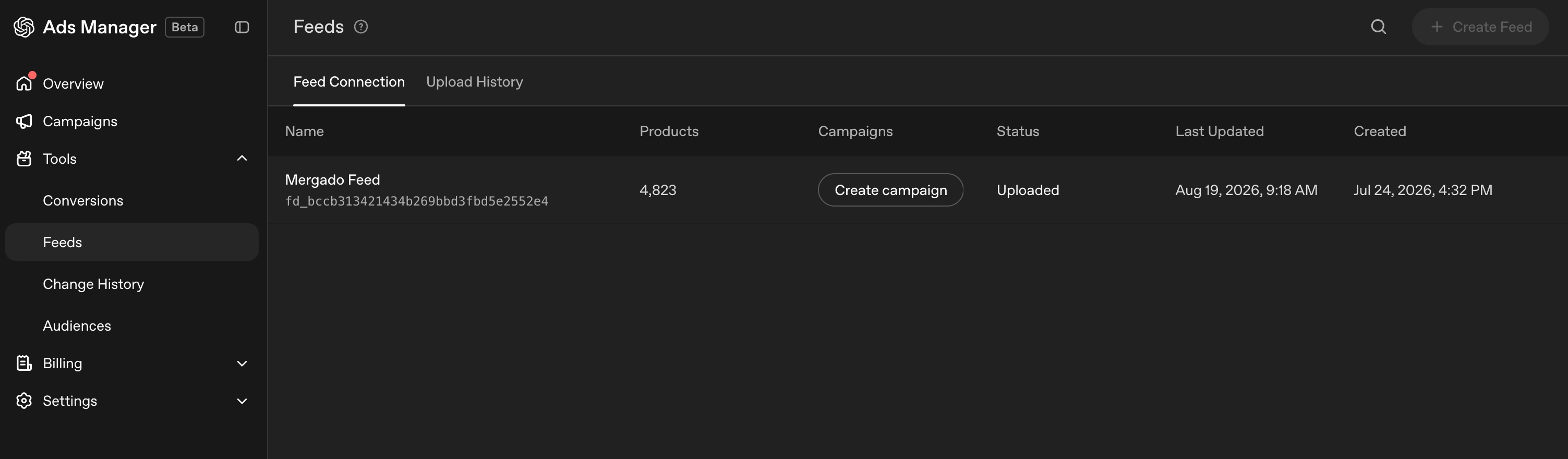
Getting Your Product Catalog into the System

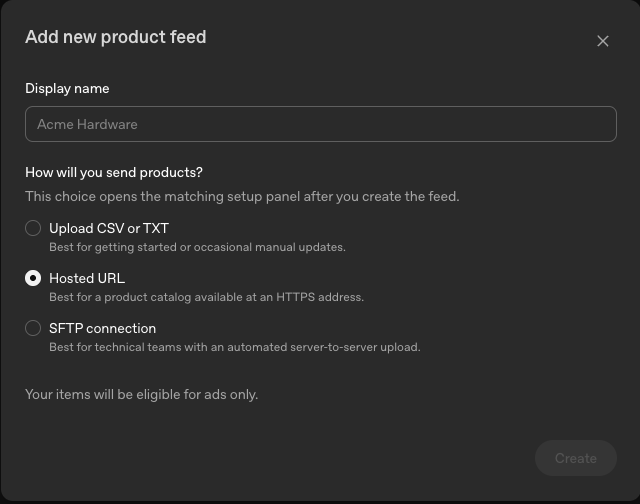
For advertisers, uploading a product catalog is a key part of setup. Ads Manager currently offers three ways to do it:

  • upload a file (CSV or TXT) directly through the web interface
  • provide a hosted URL where the catalog is available
  • connect via SFTP for automated server-to-server uploads (this option also supports TSV and JSONL formats)

In every case, the feed must comply with OpenAI’s specification.

The campaign structure is conceptually the same as in Google Ads or Meta Ads: campaign → ad group → ad. Advertisers, however, don’t select keywords manually. The system itself matches individual products from the catalog to conversations based on user intent. Whether a specific product is allowed to appear as an ad is governed by the is_​ads_​eligible element (or label).

The Description Is the Main Place for Context

The best starting point for a ChatGPT feed is your existing Google feed. It’s the most similar format and tends to be the most complete. The basic product elements carry over, and new ones are added: elements specific to ChatGPT (seller and returns information, aggregated product and store ratings) and Ads metadata, which replaces Custom Label.

When we tested converting an existing Google Shopping feed into the ChatGPT format, only 19 elements were filled in, and OpenAI approved the products without any problem. That doesn’t mean, however, that ChatGPT understands such a feed perfectly. The conversion doesn’t carry over elements such as Product Highlight and Product Detail, and at the end of September, OpenAI also removed questions and answers (Q&A) and related products from the specification. Yet with product ads, you target with your data: the system itself decides which conversation to show a product in, based on how well it understands it.

The product description, which can be up to 5,000 characters long, therefore becomes the main place to put context. It carries the largest share of the information OpenAI uses to decide when, and for which queries, products are shown. Context is worth addressing in four areas:

  • Product context — what the product is, who it’s for, what it’s used for, and in which situations. This information tends to live in blog articles but is missing from the feed.
  • Human signals — claims about the product from reviews and from questions customers send to support. The dedicated elements carry only the aggregated count and rating.
  • Brand and origin — for example, manufacturing in the Czech Republic or in Europe, the origin of materials, or verified suppliers.
  • Images — the feed image is used directly in the ad, which is often displayed as a square, so roughly square images work best. Product features visible only in the photo can also be automatically extracted and added to the feed.

The point isn’t to generate 5,000 characters of text, but to have a description that carries genuinely valuable context about the product. You can also handle description enrichment in Mergado, for example with an AI agent via Mergado MCP.

Where Products from the Feed Can Appear

For each product in the feed, you can set what ChatGPT may use it for:

  • is_​eligible_​search — determines whether the product can appear among the products ChatGPT offers for free, i.e., outside paid ads,
  • is_​eligible_​checkout — determines whether customers can buy it directly in ChatGPT (requires a separate integration),
  • is_​ads_​eligible — determines whether the product can appear in a paid ad.

Only the last option is currently used through Ads Manager. During the beta, products uploaded this way are intended for ads only and won’t appear among the products offered for free. OpenAI says, however, that it may offer this option later.

Managing Campaigns Directly in ChatGPT

Besides the web-based Ads Manager, OpenAI offers an official app (plugin) called ChatGPT Ads Manager, which lets you run the entire platform conversationally, directly inside ChatGPT. The app can create and manage ad accounts, campaigns, ad groups, and ads, evaluate performance and conversions, upload creatives, and in some cases even complete self-service account setup.

It has both read and write permissions, meaning it can genuinely change campaign settings — though you can optionally switch on an agent mode that only makes recommendations and doesn’t modify campaigns on its own. As with other new features, the app’s availability is being rolled out gradually, account by account, so not every advertiser can see it yet.

What This Means for Online Stores

For e‑commerce, OpenAI Ads is still a new, little-explored, but potentially highly relevant channel. Here’s what’s worth knowing before you dive in:

  1. ChatGPT is becoming a shopping advisor. People are increasingly asking ChatGPT not just for information, but directly what to buy, which product to choose, or which service to use. That’s exactly the moment when paid advertising makes sense — the user is in the comparison and decision-making stage, not just passively reading.
  2. It’s still an experiment, not a channel with a proven return on investment. Given the higher cost and the rules still in flux, it currently makes more sense to test OpenAI Ads with a smaller, separate budget aimed at validating the concept and building brand awareness, rather than as a replacement for established performance channels.
  3. Availability varies by country. Ads Manager is also available to Czech and Slovak online stores, and you can set up a self-service account at ads.openai.com. The requirement is that the company that will advertise and pay must be based in a country on the official availability list. Product ads only launched in the Czech Republic at the turn of September and October and are being rolled out to users gradually, so this is still a beta phase and availability will continue to expand.
  4. Technical preparation is key. A high-quality product feed is the foundation, and you can set up an SFTP connection right away.
     

How Mergado Helps With Connecting to OpenAI Ads

Mergado supports exporting product feeds directly into the format OpenAI requires, including automatic, regular uploads via SFTP to OpenAI’s server. The connection to your SFTP/FTP server only needs to be set up once, in Mergado Keychain, and you can then use it for one or several projects at the same time. That removes the need to handle the technical side of the connection manually — Mergado generates the feed in the correct specification and takes care of delivering it on a regular basis.

You can also set up the connection to OpenAI’s SFTP server right when creating a project, whether in Canvas or in the old user interface (either by using an existing connection from Keychain or by creating a new one).

Verified With Real Clients

We’ve verified the integration end-to-end with a real overseas online store that took part in the OpenAI Ads pilot. Results from our own testing:

  • The ChatGPT Shopping format and Mergado’s SFTP connection work reliably — Mergado regularly sends the current feed to OpenAI’s server, and OpenAI sees and imports the changes made.
  • Out of 4,868 products in total, 4,810 were successfully uploaded — the vast majority of the catalog.
  • The main operational challenge is the minimal feedback Ads Manager provides on data quality. The platform says almost nothing about why some products failed to upload, so at first we had to track down errors by trial and error.

💡 Check Your Feed with Mergado Audit

We’ve added a check against the ChatGPT feed specification to Mergado Audit. You can check your feed both before and after uploading it: just enter the feed URL, choose the format, and add your email, and the results will be sent to your inbox. The audit is public, and you don’t need Mergado to use it. You can then fix any errors in Mergado using rules, or via Mergado MCP, where an AI agent runs the audit on its own and suggests fixes.

Looking Ahead

Several trends suggest where OpenAI Ads is likely headed:

  • Beyond the classic “click → redirect to website” format, OpenAI is testing a fundamentally different concept: Agent-type campaigns. Instead of a click on the ad opening the advertiser’s landing page, it launches a live conversation with an automated AI agent for that company, generated automatically from the content of its website. This agent can discuss with the user what they’re looking for and steer them toward the right product or purchase — all directly within the chat, with no need to visit the website. This is a feature independent observers in the ad-tech industry have spotted; OpenAI hasn’t yet communicated details about it officially. It’s likely still in early testing, so it isn’t certain whether — or in what form — it will eventually roll out more broadly.
  • Tighter integration of advertising and purchasing. Development is heading toward product discovery, decision-making, and purchasing all happening within a single conversational flow, with no need to leave ChatGPT.
  • Gradual opening of additional markets. OpenAI has repeatedly signaled its intent to expand testing to more countries once it has enough data from the markets currently being tested.
  • Accelerating product development. The pace at which OpenAI is adding new features to Ads Manager (bulk API, measurement integrations, new formats) points to an ambition to build a full-fledged, scalable advertising platform comparable to the major players in the market.

Summary

OpenAI Ads is still only at the beginning of its journey — the beta phase, rapidly changing rules, and the still-high cost make that clear. At the same time, it’s a platform evolving unusually fast, heading toward linking advertising directly with the conversational shopping process — a concept established platforms don’t yet offer in the same form.

For online stores, that means just one thing: keep an eye on developments and, if it makes sense, set aside a small test budget to see how this new channel performs — without expecting an immediate return, but with an open mind about what it could deliver once OpenAI Ads becomes an established channel.

Want to see OpenAI Ads in action?

Michaela Vaňková

Michaela is a content specialist at Mergado. She makes life easier for Mergado Editor users by preparing guides that help them navigate the editor and feed management, and she keeps track of what’s happening in the e‑commerce world, sharing it on the blog, in the newsletter, and on social media. She sees herself as living proof that if she could figure Mergado out, anyone can.